

Quick Answer
60-second read
Make and Zapier are both solid no-code automation platforms — but they’re aimed at very different users. Make wins on price (€7.78/month vs €17.30/month) and workflow complexity, while Zapier wins on ease of use and sheer integration breadth (8,000+ apps). After analysing both platforms and 50+ user reviews, Make is the better choice for European teams, power users, and anyone processing more than 1,000 automations monthly. Zapier is the smarter pick if you’re just starting out or need a specific niche app from its enormous integration library.
Free plan available
This article was last updated May 2026 with verified current pricing, Make’s August 2025 operations-to-credits rename, and its November 2025 AI-provider update. All EUR prices are approximate — always verify current pricing at make.com and zapier.com before committing.
🔬 How This Comparison Was Done
Pricing was verified directly on official pages (make.com/en/pricing and zapier.com/pricing) in March 2026 and reviewed in May 2026. User sentiment analysis drew on 50+ reviews across G2, Capterra, and Reddit.
2
Platforms tested
50+
Reviews analysed
12
Features compared
May 2026
Pricing reviewed
Ready to start automating?
Try Make Free — No Credit Card Needed
1,000 free credits/month. Build unlimited scenarios. 3,000+ app integrations.
What Are Make and Zapier — and Who Are They For?
Make and Zapier are no-code automation platforms that connect apps and automate workflows without writing code. Make (formerly Integromat) is an EU-native tool founded in 2012 and headquartered in Prague, Czech Republic, currently serving 500,000+ users. Its Core paid plan starts at approximately €7.78/month (annual billing). Zapier is a US-based market leader founded in 2011 with 2.2 million+ users and 8,000+ app integrations, with its Professional paid plan starting at approximately €17.30/month (annual billing). Always verify current pricing at make.com and zapier.com.
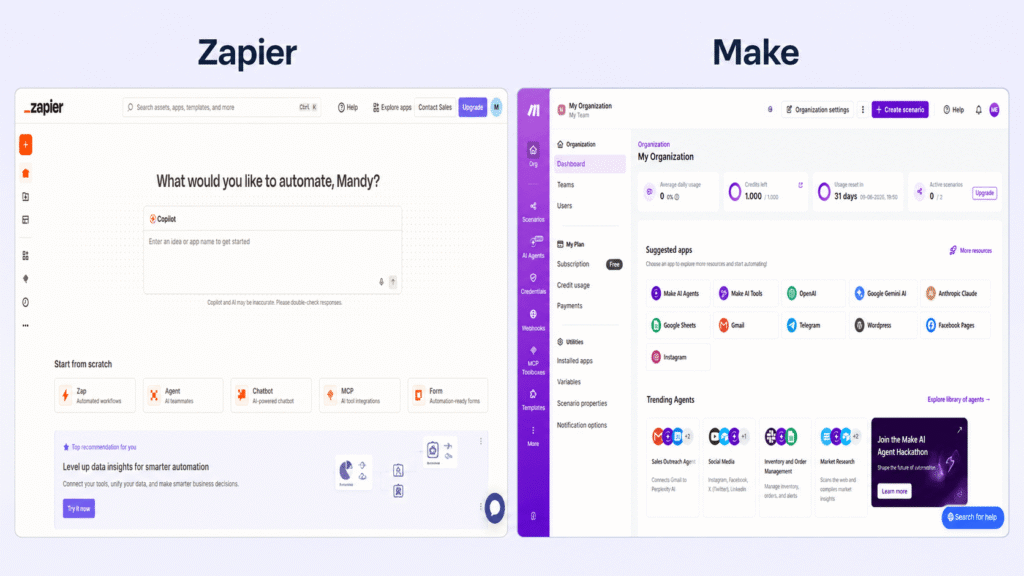
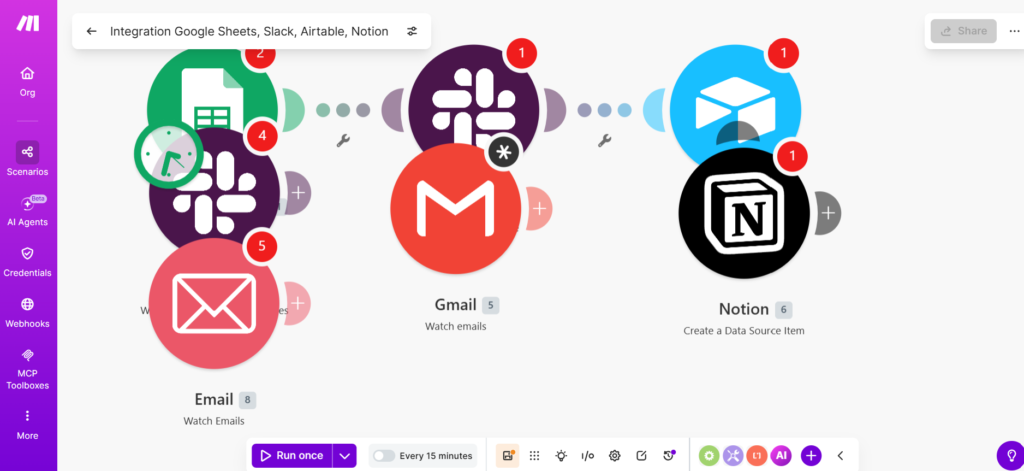
The simplest way to think about it: Make is the power tool, Zapier is the friendly tool. Make gives you a visual canvas where you can build multi-branch, multi-step workflows with no limits on complexity. Zapier gives you a linear wizard that almost anyone can master in under an hour. Both have free plans. Both connect hundreds to thousands of apps. Where they diverge is price at scale, workflow depth, and — something most comparison articles completely skip — EU data residency.
If you’re already using email marketing automation and want to connect it to your CRM or other business tools, both platforms handle that well. The question is which one fits your budget and complexity needs.
The short answer: Make is the better value for most users — dramatically cheaper at scale, more powerful for complex workflows, and the safer choice if you’re in the EU. Zapier is the better choice if you need the world’s largest integration library or want an AI assistant to build your automations for you.
How Much Does Make vs Zapier Cost in 2026? (EUR + USD Pricing)
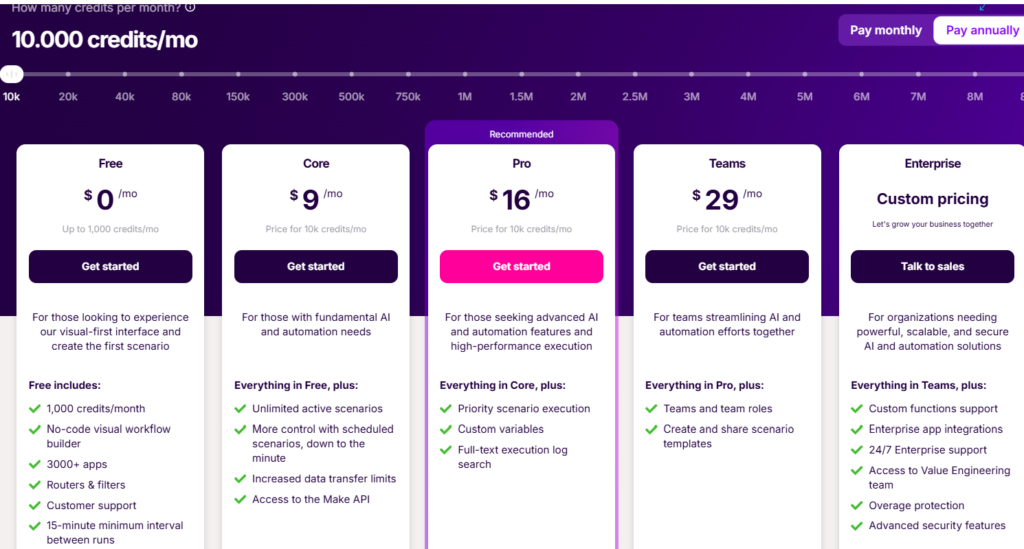
Make is cheaper than Zapier at every pricing tier. Make’s Core plan starts at approximately €7.78/month (annual billing, 10,000 credits) vs Zapier Professional at approximately €17.30/month (750 tasks). At 5,000 automations per month, Make costs ~€7.78/month while equivalent Zapier volume costs ~€77.01/month — a 10× price difference. Always verify current prices directly at make.com/en/pricing and zapier.com/pricing.
| Plan | Make (USD) | Make (EUR ~) | Zapier (USD) | Zapier (EUR ~) |
|---|---|---|---|---|
| Free | $0 — 1,000 credits | €0 | $0 — 100 tasks | €0 |
| Entry paid | $9/mo (Core) | ~€7.78/mo | $19.99/mo (Professional) | ~€17.30/mo |
| Mid tier | $16/mo (Pro) | ~€13.84/mo | $39/mo (1,500 tasks) | ~€33.74/mo |
| Team | $29/mo (Teams) | ~€25.09/mo | $69/mo (Team) | ~€59.71/mo |
EUR prices approximate based on exchange rates at time of research. Annual billing shown. Always verify at official pricing pages before purchasing.
Make Pricing Plans
Free
€0/month
- ✅ 1,000 credits/month
- ✅ 2 active scenarios
- ⚠️ 15-min polling interval
- ❌ No priority execution
Best for: testing and very light use
Core
~€7.78/month
($9/month · annual billing)
- ✅ 10,000 credits/month
- ✅ Unlimited active scenarios
- ✅ 1-min polling interval
- ✅ All app integrations + Make API
Best for: freelancers and small teams
Pro
~€13.84/month
($16/month · annual billing)
- ✅ Everything in Core
- ✅ Priority execution
- ✅ Custom variables
- ✅ Full-text log search
Best for: growing businesses needing speed
Teams
~€25.09/month
($29/month · annual billing)
- ✅ Everything in Pro
- ✅ Team roles & permissions
- ✅ Shared scenario templates
- ✅ Collaboration tools
Best for: teams with multiple automators
⚠️ Make Credits Update — August 2025
Make renamed “Operations” to “Credits” on August 27, 2025. Standard actions still cost 1 credit each — but AI-intensive modules now cost multiple credits per run. Custom AI provider connections (your own OpenAI/Anthropic API key) became available on all paid plans in a separate November 2025 update.
Hidden cost trap: Polling triggers burn credits even when no new data exists. A scenario checking every 5 minutes = ~8,640 wasted credits/month — nearly your entire Core plan. Fix: use webhooks wherever the app supports them.
Zapier Pricing Plans
Free
€0/month
- ✅ 100 tasks/month
- ⚠️ 2-step Zaps only
- ❌ No premium apps
Best for: testing only
Professional
~€17.30/month
($19.99/month · 750 tasks · annual)
- ✅ 750 tasks/month
- ✅ Unlimited multi-step Zaps
- ✅ All 8,000+ apps
- ✅ 2-min polling interval
Best for: individuals and small businesses
Professional+
~€33.74/month
($39/month · 1,500 tasks · annual)
- ✅ 1,500 tasks/month
- ✅ Everything in Professional
- ✅ Code steps (Python/JS)
Best for: higher-volume individual users
Team
~€59.71/month
($69/month · 2,000 tasks · annual)
- ✅ 2,000 tasks/month
- ✅ Up to 25 users
- ✅ Shared folders + SAML SSO
Best for: growing teams needing collaboration
💡 Zapier Task Model Update (April 2024 — Still Active)
Since April 2024, Filters, Formatters, Paths, and Looping steps no longer count as tasks. Only actions that push data to external apps do. This significantly increases the effective value of each plan. If you were avoiding Zapier because of complex workflows burning through your task count, it’s worth re-evaluating.
📊 Make vs Zapier: Real Cost at Scale
At comparable volumes, Make is typically 4–10× cheaper than Zapier. Always verify current pricing at official sites.
What Can Make and Zapier Actually Do? Feature Comparison
Make outperforms Zapier on workflow complexity and cost, while Zapier leads on integration breadth and ease of use. Make supports unlimited steps and branches per scenario — Zapier caps workflows at 100 steps and limits branching to 10 Paths with 3 nesting levels. For complex, multi-branch automations, Make wins clearly. For quick single-trigger workflows connecting mainstream apps, Zapier is faster to set up and less likely to trip you up.
| Feature | Make | Zapier | Winner |
|---|---|---|---|
| Starting price (paid) | ~€7.78/month | ~€17.30/month | 🏆 Make |
| Free tier generosity | 1,000 credits/month | 100 tasks/month | 🏆 Make |
| App integrations | 2,400–3,000+ | 8,000+ | 🏆 Zapier |
| Max steps per workflow | Unlimited | 100 steps | 🏆 Make |
| Branching logic | Unlimited routes | 10 branches, 3 nested | 🏆 Make |
| Ease of use | Moderate (2–4h) | Beginner-friendly (<1h) | 🏆 Zapier |
| AI assistant | AI modules (2024+) | Copilot (builds Zaps from text) | 🏆 Zapier |
| EU/GDPR native | ✅ EU HQ (Prague) | ⚠️ US-based, GDPR-configured | 🏆 Make |
| G2 rating | 4.7–4.8/5 | 4.5/5 | 🏆 Make |
| Value at 5,000 ops/month | ~€7.78/month | ~€77.01/month | 🏆 Make |
🇪🇺 EU/GDPR Compliance: Make Wins Clearly
Make is headquartered in Prague, Czech Republic — EU-native by design. Data processing within the EU is available on all plans, no extra configuration needed. Zapier is US-headquartered and SOC 2 Type II certified, but data is processed in the US by default. For European teams handling personal data under GDPR — think customer records, lead data, or employee information — Make removes the compliance headache before it starts.
Integrations: Does the 8,000 vs 3,000 Gap Actually Matter?
Zapier’s 8,000+ integrations is its biggest headline advantage — and it’s real. If you need a niche tool like a specific HR software, a local payment gateway, or an obscure project management app, Zapier is more likely to have it. That said, Make includes an HTTP module that connects to any public API without a native integration, which closes the gap considerably for technical users. Make also tends to go deeper within each app — its Xero integration offers around 84 actions compared to Zapier’s 25. Quantity vs depth is the real trade-off.
AI Features: Zapier Copilot vs Make’s AI Modules
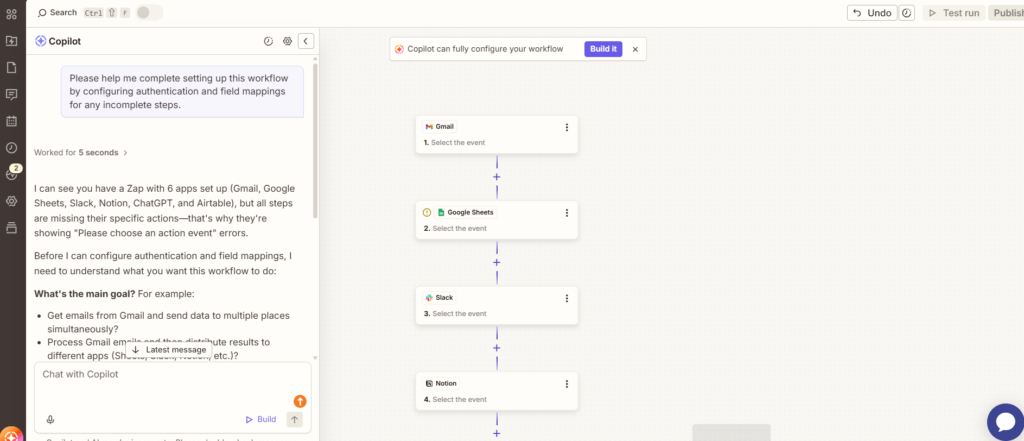
Zapier Copilot is genuinely impressive for building automations from plain English. Describe what you want and Copilot builds the Zap in under three minutes — cutting setup time by around 40% for common use cases. Make doesn’t have an equivalent AI builder, though it supports native AI modules for AI-powered data processing within scenarios. Both platforms support bringing your own AI provider key. Since November 2025, Make allows custom OpenAI/Anthropic API connections on all paid plans.
Make Pros and Cons
✅ Make Advantages
- Price: ~€7.78/month vs Zapier’s ~€17.30 — 55% cheaper at entry level
- Unlimited steps: No 100-step ceiling
- Visual canvas: See your entire automation at once
- EU-native: Prague HQ, GDPR-native, European data residency
- Free tier: 1,000 credits vs Zapier’s 100 tasks — 10× more generous
- Own AI keys: Connect OpenAI/Anthropic directly on all paid plans
❌ Make Limitations
- Learning curve: Visual canvas takes 2–4 hours to get comfortable
- Fewer integrations: 2,400–3,000 vs Zapier’s 8,000+
- Credits confusion: Polling burns credits even with no data
- Support speed: Response can take 1–2 days on lower tiers
- No AI builder: No equivalent to Zapier Copilot
Zapier Pros and Cons
✅ Zapier Advantages
- 8,000+ integrations: Largest app library available
- Ease of use: Most people can build their first Zap in under an hour
- Zapier Copilot: AI builds Zaps from natural language
- Reliability: 14+ years of production history
- Task model improvement: Filters/Formatters/Paths no longer count as tasks (since April 2024)
❌ Zapier Limitations
- Cost at scale: 5,000 tasks/month = ~€77/month vs Make’s ~€7.78
- 100-step cap: Complex workflows hit the ceiling quickly
- Branching limits: Max 10 branches, max 3 nested Paths
- US-based: Data processed in US by default — extra GDPR config required
- Free plan: 100 tasks is almost nothing for real work
What Are the Real User Complaints?
Make’s biggest complaint: The credits system is confusing, and the polling credit burn is a nasty surprise for new users. Multiple Reddit posts in r/nocode describe waking up to depleted accounts because they didn’t realise polling triggers run constantly. Make’s support has been criticised for slow ticket response times on lower tiers.
Zapier’s biggest complaint: Price shock at scale is the most common theme. A small business running a few modest automations can comfortably live on ~€17.30/month — but add a few more Zaps or a sudden marketing campaign spike and the bill can triple overnight. The 100-step workflow limit has also frustrated power users building multi-stage CRM or lead routing workflows.
⚠️ Watch Out Before You Commit
On Make: Set up all possible triggers as webhooks. Test credit consumption carefully before running scenarios at full speed. On Zapier: Monitor your task usage weekly, especially after launching new campaigns. Zapier continues running automations past your task limit and bills per additional task.
Who Should Choose Make vs Zapier?
✅ Choose Make if you…
- Run 500+ automations per month and hate Zapier’s price scaling
- Need branching logic, loops, or parallel processing
- Work in the EU and need GDPR-native data processing
- Are willing to spend 2–4 hours learning the visual canvas
✅ Choose Zapier if you…
- Are new to automation and want results today
- Need a very specific niche app from its 8,000+ library
- Want Copilot to build your workflows from plain English
- Run simple 1–3 step automations
❌ Skip both if: You need truly unlimited tasks at a flat price. Look at n8n (open-source, self-hostable via n8n) or Pabbly Connect (full review; lifetime deal available via Pabbly’s site, or see our Pabbly Connect vs Zapier comparison). For email marketing specifically, tools like GetResponse include built-in automation that removes the need for a third-party connector entirely.
Our Verdict: Is Make or Zapier Better in 2026?
Zapier vs Make — flipped around, the question comes up just as often, and the short answer stays the same either way: Make wins on price and workflow power, Zapier wins on simplicity and integration count. Which order you search it in usually says more about which tool you already use than which one is objectively “first.”
For the majority of users — especially those in Europe — Make wins. The price advantage is simply too significant to ignore, and the November 2025 update making custom AI provider connections available on all paid plans closed one of Make’s last meaningful gaps with Zapier.
Zapier remains the better tool for one specific profile: someone who wants to automate today, without any learning curve, using an app that might not be in Make’s library. If you’re running simple, low-volume workflows — Zapier’s ~€17.30/month entry plan is justifiable and genuinely easy to use. Copilot is a genuine differentiator that Make hasn’t matched yet.
| Category | Winner | Why |
|---|---|---|
| Pricing | 🏆 Make | 55% cheaper at entry; 10× cheaper at 5k ops/month |
| Ease of use | 🏆 Zapier | <1 hour to first Zap; Copilot removes most setup friction |
| Integration breadth | 🏆 Zapier | 8,000+ vs 3,000+ — meaningful for niche apps |
| Workflow complexity | 🏆 Make | Unlimited steps and branches vs Zapier’s 100-step cap |
| EU/GDPR compliance | 🏆 Make | EU HQ, EU data residency available by default |
| AI features | 🏆 Zapier | Copilot is genuinely ahead of anything Make offers |
| Free plan | 🏆 Make | 1,000 credits vs 100 tasks — 10× more useful |
| Overall Winner | 🏆 Make (for most users) | Better value, more power, EU-native |
Related Resources
- 📊 Make.com Review 2026 — Full breakdown of features, pricing, and credit system
- 🔧 Make vs n8n — Visual canvas vs developer-first automation
- 🚀 How to Use Make.com — Step-by-step setup guide
- 📧 Email Marketing Automation Guide — When email-specific tools beat general-purpose automation
- 🔗 Pabbly Connect vs Make.com
- 🔗 How to Use Pabbly Connect
- 🧩 n8n Review
- 🧩 n8n vs Zapier
- 🧩 How to Use n8n
Frequently Asked Questions: Make vs Zapier (2026)
Is Make cheaper than Zapier?
Yes — Make is significantly cheaper at every tier. Make’s Core plan costs approximately €7.78/month (10,000 credits, annual billing) while Zapier’s Professional plan starts at approximately €17.30/month for just 750 tasks. At 5,000 automations per month, Make costs approximately €7.78/month and Zapier costs approximately €77.01/month — roughly 10× the price. Even at the free tier, Make offers 1,000 credits vs Zapier’s 100 tasks. Always verify current pricing at make.com and zapier.com.
Is Make harder to use than Zapier?
Yes — Make has a steeper learning curve. Make’s visual canvas takes most users 2–4 hours to feel comfortable with. Zapier’s linear wizard lets most people build their first Zap in under an hour. Zapier also has Copilot — an AI that builds Zaps from plain English descriptions — which removes much of the remaining friction. If you’re new to automation, start with Zapier. If you’re willing to invest a few hours learning, Make’s power and cost savings more than reward the effort.
What are Make credits and how do they compare to Zapier tasks?
Make renamed its “Operations” to “Credits” on August 27, 2025. One credit equals one standard module action — roughly equivalent to one Zapier task. Key differences: Make’s AI-intensive modules cost multiple credits per run, while Zapier’s logic steps (Filters, Formatters, Paths) have not counted as tasks since April 2024. Important warning: Make polling triggers consume credits even when no new data is found. A scenario checking every 5 minutes burns approximately 8,640 credits per month. Always use webhooks where the app supports them to avoid wasted credits.
Which is better for GDPR and European teams?
Make is better for GDPR compliance. Make is headquartered in Prague, Czech Republic — EU-native by design, with European data processing available on all plans without additional configuration. Zapier is a US company that is SOC 2 Type II certified and GDPR-ready, but data is processed in the US by default. For European teams handling personal data (customer records, lead data, employee information), Make removes the compliance configuration burden before it starts.
Can I switch from Zapier to Make?
Yes — but it requires rebuilding automations manually. There is no one-click import from Zapier to Make. Make’s scenario structure is different from Zapier’s Zap structure, so direct migration tools don’t exist. Most users report that migrating 10–20 Zaps takes a weekend of work. The most common motivation for switching: teams regularly report saving 60–80% on their monthly automation budget after moving from Zapier to Make.
Does Zapier have a free plan in 2026?
Yes, Zapier has a free plan — but it’s limited: 100 tasks/month, 2-step Zaps only (one trigger, one action), and no premium apps. For any serious use beyond a single simple automation, you’ll need at least the Professional plan at approximately €17.30/month. Make’s free plan is significantly more generous: 1,000 credits and 2 active scenarios, which is enough to test real multi-step workflows before committing.
Which is better for complex automations?
Make is better for complex automations, without question. Make supports unlimited steps per scenario and unlimited branching via its Router module. Zapier caps workflows at 100 steps and limits Paths to 10 branches with 3 levels of nesting. If your automation involves multiple data sources, conditional logic, loops, parallel processing, or custom API calls via HTTP module, Make handles all of it and Zapier often doesn’t.
Is Zapier Copilot worth it?
Zapier Copilot is genuinely useful, especially for beginners. Multiple testers report it can build a functional Zap from a plain English description in under 3 minutes — roughly 40% faster than manual setup. It works best for standard scenarios (CRM → email → Slack). It struggles with complex conditional logic or highly customised workflows. Make has no equivalent AI builder as of May 2026, so if AI-assisted automation creation is important to you, Zapier has a real and meaningful advantage here.
How much does Make cost per month in euros?
Make pricing in euros (approximate, annual billing): Free — €0 (1,000 credits/month); Core — approximately €7.78/month (10,000 credits); Pro — approximately €13.84/month (10,000 credits + priority execution + log search); Teams — approximately €25.09/month (10,000 credits + collaboration tools); Enterprise — custom pricing. Monthly billing costs approximately 18% more. Always verify current pricing at make.com/en/pricing as rates may change.
Are there cheaper alternatives to Zapier for European users?
Yes — Make is the most established Zapier alternative for European users at approximately €7.78/month (Core, annual). Other alternatives: n8n (open-source, self-hostable — free if you have server costs via n8n), Pabbly Connect (lifetime deal option available), and Albato (starts at around $15/month). For email marketing automation specifically, platforms like GetResponse include built-in automation that removes the need for a third-party connector entirely.
Zapier vs Make: which should I choose in 2026?
Same comparison, reversed order — and the answer doesn’t change based on which tool you type first. If you want the lowest price and can handle unlimited-step workflows, Make wins. If you want the fastest setup, the biggest app library (8,000+), and AI-assisted building via Copilot, Zapier wins. Most teams outgrow Zapier’s task limits before they outgrow Make’s credit system, which is why long-term Make tends to work out cheaper for growing automation needs.
When do you outgrow Zapier for cross-tool automations at scale?
Three signals tell you it’s time to look past Zapier: (1) you need true two-way sync between tools (Zapier’s Zaps are one-directional triggers-to-actions, so bidirectional sync usually means building two separate Zaps and managing conflicts yourself), (2) your workflow needs more than 100 steps or more than 3 levels of nested branching — Zapier’s Paths feature caps out there, while Make’s Router module has no hard limit, and (3) you’re running enough volume that Zapier’s per-task pricing (€17.30/month for just 750 tasks) becomes the more expensive option compared to Make’s credit-based plans. Common pattern: teams start on Zapier for a handful of simple 2-step automations, then hit the wall once they try to connect 4+ tools with conditional logic — that’s usually the point to migrate to Make or, for fully custom self-hosted control, n8n.
📚 Related Guides
- 🔗 Email Marketing Automation Guide
- 🔗 GetResponse Review — built-in automation that might replace your third-party connector
- 🔗 Best Email Marketing Software 2026
- 🔗 Best Landing Page Builders
- 🔗 Best Free AI Tools 2026
