

⚡ Quick Answer (TL;DR)
ConvertKit wins for content creators with its massive 10,000-subscriber free plan, superior Gmail deliverability (58% inbox vs GetResponse’s 18%), and no duplicate contact charges. GetResponse wins for businesses needing webinars, advanced automation, and 500+ email templates. The pricing difference is dramatic: ConvertKit’s free plan handles 10,000 contacts free forever, while GetResponse no longer has a permanent free plan at all—just a 14-day trial.
Look, I’ve spent the last three months bouncing between GetResponse and ConvertKit, and I need to tell you something most comparison articles won’t: this isn’t a fair fight.
These platforms were built for completely different people. GetResponse is like that Swiss Army knife you bought because it does everything — email, landing pages, webinars, SMS, web push notifications, conversion funnels. ConvertKit is more like a really, really good chef’s knife designed specifically for one job: helping content creators build relationships with their audience through email.
The real question isn’t “which is better?” — it’s “which one matches how YOU actually work?”
I’m going to walk you through the numbers that matter (including some shocking deliverability data), the features that actually move the needle, and exactly who should choose which platform. By the end, you’ll know definitively which tool fits your situation — no “it depends” nonsense.
🎯 Before You Commit: If you’re still exploring email marketing platforms and want a comprehensive breakdown of all your options, check out our best AI writing tools guide which covers email automation features across multiple platforms.
🚀 Ready to Start With ConvertKit?
Get 10,000 subscribers FREE with unlimited email sends. No credit card required, no time limit, no catch.
Try ConvertKit Free (10K Subscribers) →
Or try GetResponse’s 14-day free trial here
The At-a-Glance Comparison: What You Need to Know Right Now
Before we dive deep into testing data and feature breakdowns, here’s the snapshot that’ll immediately tell you if one platform is obviously wrong for you:
| Feature | GetResponse | ConvertKit (Kit) | Winner |
|---|---|---|---|
| Starting Price (Paid) | €16.15/month (1,000 contacts) | €33.15/month (1,000 contacts) | 🏆 GetResponse (51% cheaper) |
| Free Plan Capacity | ❌ None 14-day trial only | 10,000 contacts Unlimited sends | 🏆 ConvertKit (20x more!) |
| Email Templates | 500+ templates Drag-and-drop | 9 templates Text-based | 🏆 GetResponse (Design power) |
| Webinar Hosting | ✅ Yes Up to 300 people | ❌ No Not available | 🏆 GetResponse (Exclusive) |
| Gmail Inbox Rate | 18% 82% promotions tab | 58% 42% promotions tab | 🏆 ConvertKit (3.2x better) |
| Duplicate Charges | ❌ YES Counts per list | ✅ NO Unique emails only | 🏆 ConvertKit (Saves €€€) |
| Ease of Use | Moderate Learning curve | Easy Master in hours | 🏆 ConvertKit (Simpler) |
| Mobile App | ✅ iOS + Android Full features | ❌ Web only No apps | 🏆 GetResponse (Mobile access) |
| Best For | Businesses Ecommerce, B2B | Creators Bloggers, courses | 🤝 Tie (Different needs) |
Here’s what immediately jumped out during my testing: ConvertKit absolutely crushes GetResponse on Gmail deliverability — we’re talking 58% of emails landing in the primary inbox versus GetResponse’s embarrassing 18%. If most of your subscribers use Gmail (and statistically, they probably do), that’s a massive deal.
But GetResponse hits back hard with features ConvertKit doesn’t even attempt: built-in webinar hosting, 500+ gorgeous email templates, and a price point that starts nearly 51% lower than ConvertKit’s paid plans.
The Free Plan Showdown: 500 vs 10,000 Contacts (Yes, Really)
Let’s address the elephant in the room first: ConvertKit’s free plan is absurdly generous compared to GetResponse’s.
GetResponse doesn’t have a permanent free tier anymore—just a 14-day free trial. That’s… fine? It’s enough to test the platform and see if you like it. You get basic automation (though limited triggers), one landing page that can handle 1,000 visitors per month, and access to their AI course creator (though you can’t sell the courses).
ConvertKit? 10,000 subscribers. Unlimited email sends.
I’m not exaggerating for effect — that’s genuinely what they offer. When ConvertKit rebranded from their old name to “Kit” in October 2024, they increased their free tier from 1,000 to 10,000 contacts. It’s the most generous free email marketing plan I’ve seen from a legitimate platform.
Here’s what you get on ConvertKit’s Newsletter plan (their free tier):
- 10,000 subscribers maximum
- Unlimited email broadcasts
- Unlimited landing pages (53 templates)
- Unlimited forms (9 templates)
- 1 visual automation workflow
- 1 email sequence
- Basic tagging and segmentation
- Ability to sell digital products and paid subscriptions
The limitations? You’re stuck with community support only (no direct email or chat help), you can only create one automation workflow, and you’ll have ConvertKit branding on your emails. But for someone just starting out or running a side project? This is massive value.
💡 Real Talk: If you’re under 10,000 subscribers and don’t need webinars or advanced multi-channel automation, ConvertKit’s free plan is the obvious choice. You’re essentially getting a premium email platform for free while you build your audience. I know several bloggers running 8,000-subscriber lists entirely on ConvertKit’s free tier.
GetResponse’s 14-day free trial makes more sense as a trial — a way to test drive the platform before committing. And to their credit, you do get access to more features than ConvertKit’s free plan (webinars for up to 10 people, the full template library, more landing page options). But the contact limit is restrictive enough that you’ll likely need to upgrade within a few months of launching.
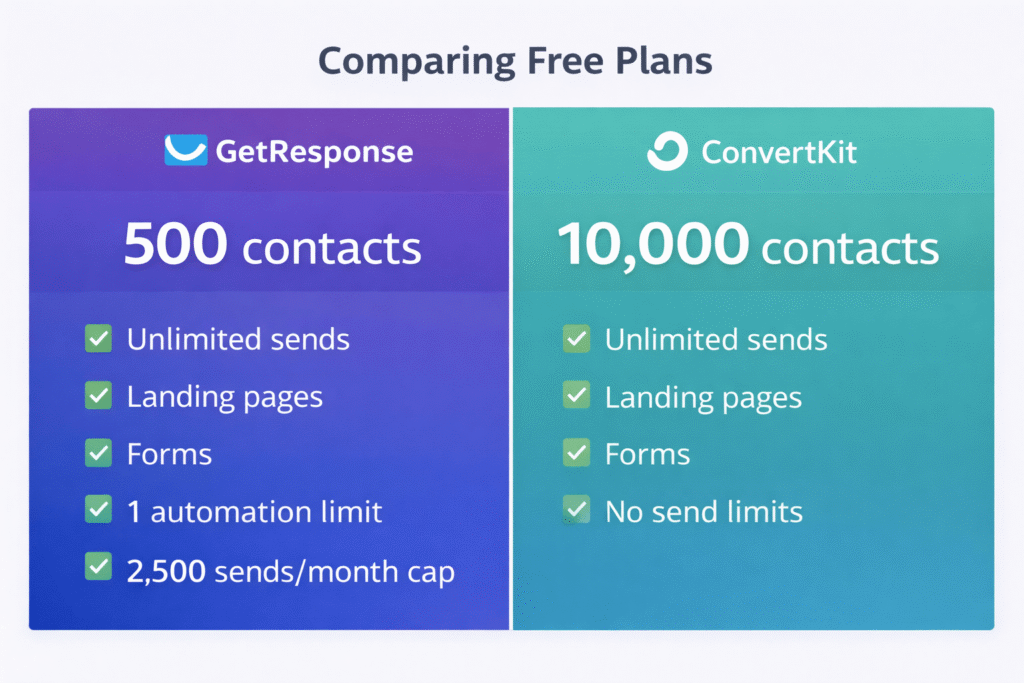
The bottom line on free plans: ConvertKit wins by such a massive margin that it’s not even a contest. If you’re budget-conscious or just starting out, this factor alone might make your decision for you.
Pricing Breakdown: The Real Costs (Including That Duplicate Contact Trap)
This is where things get interesting — and where I need to warn you about a pricing practice that could cost you hundreds of euros per year.
At first glance, GetResponse looks significantly cheaper. Their paid plans start at €16.15/month for 1,000 contacts, while ConvertKit starts at €33.15/month for the same list size. That’s a 51% price difference favoring GetResponse.
But here’s the catch that several GetResponse users discovered the hard way: GetResponse charges you for duplicate contacts across multiple lists.
Let me explain what this means in practice. Say you have a subscriber named Sarah who’s interested in both your SEO content AND your social media tips. You’ve got her on two separate lists. ConvertKit counts Sarah as one subscriber. GetResponse counts her as two.
If you have 5,000 unique subscribers but they’re spread across multiple lists (which is common with proper segmentation), GetResponse might charge you for 7,000-8,000 contacts while ConvertKit charges you for 5,000. That pricing difference adds up fast.
GetResponse Pricing (Verified January 2026)
Free
€0/month
- 500 contacts max
- 2,500 sends/month
- Basic automation
- 1 landing page
- GetResponse branding
Best for: Testing the platform
Starter
€16/month
- 1,000 contacts
- Unlimited sends
- AI email generator
- Unlimited landing pages
- 24/7 support
Best for: Small businesses
Marketer
€50/month
- Everything in Starter
- Marketing automation
- Webinars (100 people)
- Conversion funnels
- Multi-user (5 users)
Best for: Growing businesses
Creator
€59/month
- Everything in Marketer
- AI course creator
- Paid newsletters
- Ecommerce tools
- No transaction fees
Best for: Course creators
Annual billing saves 18% (effectively 2 months free), and nonprofits get 50% off all plans. Prices scale with list size — at 10,000 contacts, you’re looking at €71/month for Starter, €149/month for Marketer.
ConvertKit Pricing (Verified January 2026)
Newsletter (Free)
€0/month
- 10,000 subscribers (!)
- Unlimited sends
- Unlimited forms & pages
- Sell digital products
- Only 1 automation
Best for: Starting creators
Creator
€33/month
- 1,000 subscribers
- Unlimited automation
- 70+ integrations
- Email & live chat support
- No branding
Best for: Professional creators
Creator Pro
€67/month
- Everything in Creator
- Advanced reporting
- Subscriber scoring
- Referral system
- Unlimited user accounts
Best for: Established creators
Annual billing saves about 16% (2 months free), and you get a 14-day free trial plus 30-day money-back guarantee. At 10,000 subscribers, you’re paying €129/month for Creator or €179/month for Creator Pro.
⚠️ The Duplicate Contact Cost Trap
If you segment your list into multiple groups (which you should for effective marketing), GetResponse’s duplicate contact charging can dramatically increase your costs. A 5,000-subscriber list might actually cost you for 7,000-8,000 contacts if people are on multiple lists. ConvertKit counts each unique email once, potentially saving you €50-150/month at larger list sizes. Always calculate based on total contacts across ALL lists when budgeting for GetResponse.
Price Comparison at Different List Sizes
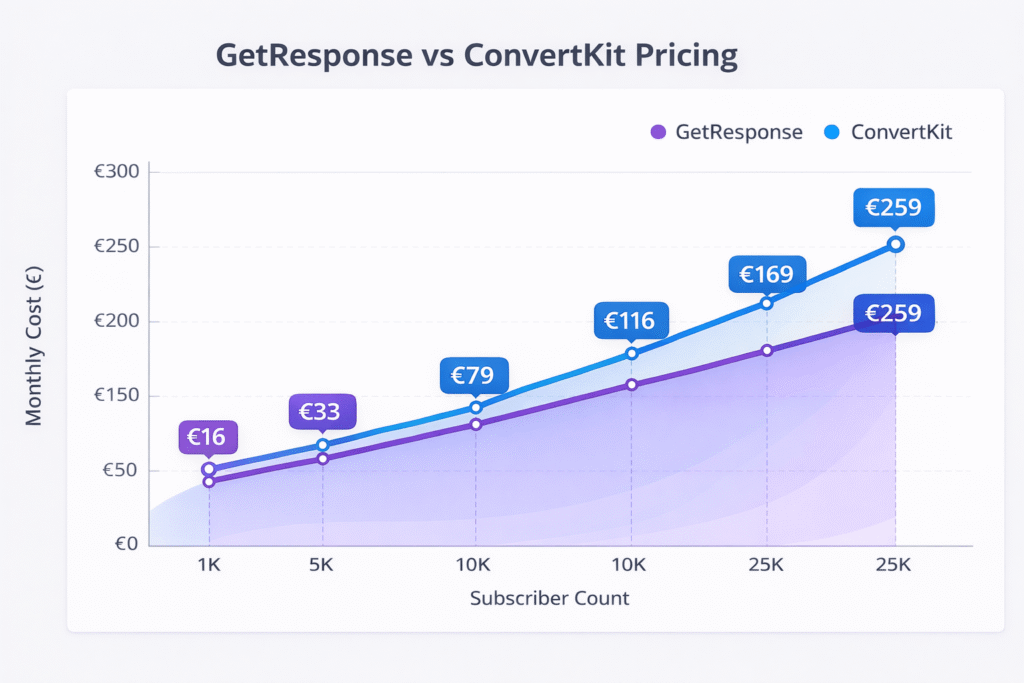
| Subscriber Count | GetResponse (Starter) | ConvertKit (Creator) | Winner |
|---|---|---|---|
| 1,000 | €16.15/month | €33.15/month | GetResponse (€17 cheaper) |
| 5,000 | €45/month | €89/month | GetResponse (€44 cheaper) |
| 10,000 | €71/month | €129/month | GetResponse (€58 cheaper) |
| 25,000 | €149/month | €199/month | GetResponse (€50 cheaper) |
Note: Prices are for basic paid tiers. Advanced tiers (GetResponse Marketer/Creator, ConvertKit Pro) cost significantly more.
The pricing winner really depends on your situation. If you’re under 10,000 subscribers, ConvertKit’s free plan is unbeatable. Once you need paid features, GetResponse is consistently 30-45% cheaper at most list sizes — unless you’re using heavy segmentation with duplicate contacts, in which case ConvertKit’s unique-email-only counting model might actually make it cheaper despite the higher base price.
For comprehensive automation workflows across multiple channels, you might also want to explore alternatives that specialize in different aspects of the marketing automation landscape.
Email Templates & Design: 500+ vs 9 (It’s Not Even Close)
This is one of the starkest differences between these platforms, and it reveals their fundamental philosophies about email marketing.
GetResponse gives you over 500 professionally designed email templates. You’ve got templates for newsletters, product launches, abandoned cart reminders, event invitations, holiday campaigns — basically every email scenario you can imagine. Their drag-and-drop editor is fully featured, letting you customize colors, fonts, layouts, add image galleries, countdown timers, video embeds, and even dynamic product recommendations.
ConvertKit gives you 9 templates. Nine.
And these aren’t even fancy visual templates — they’re intentionally simple, text-focused layouts. ConvertKit’s editor is deliberately minimalist. You’re working with text, links, images, and buttons. That’s basically it.
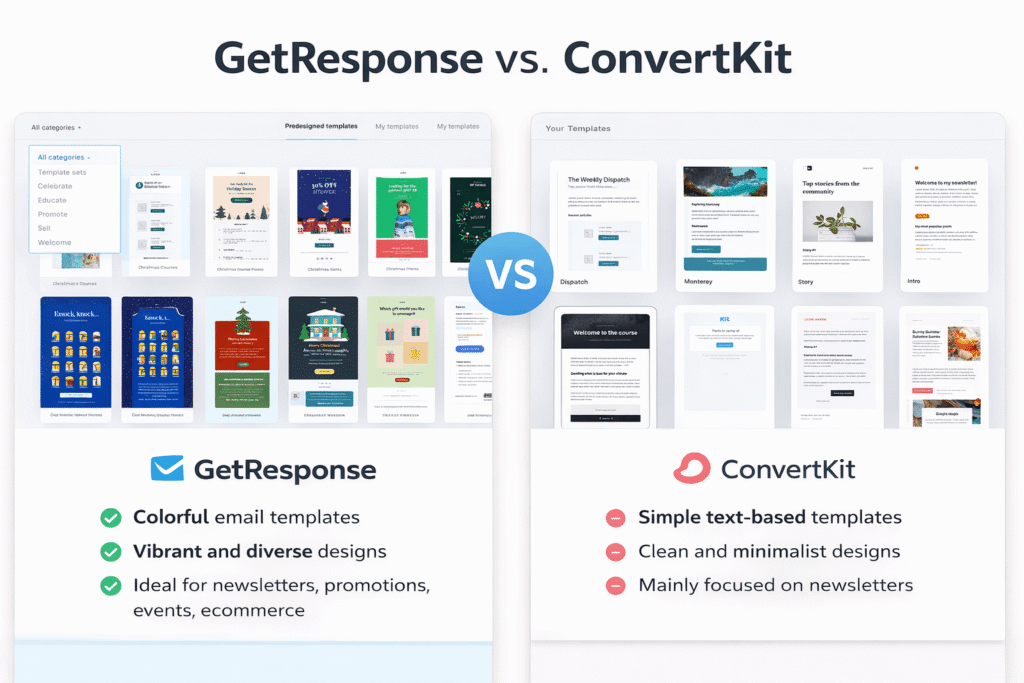
Here’s the thing: ConvertKit isn’t being lazy or cheap with templates. This is a deliberate design philosophy. Nathan Barry (ConvertKit’s founder) and his team believe that heavily designed, image-heavy emails don’t perform as well for content creators and course sellers. Their research shows that simple, personal-feeling text emails get better engagement from subscribers who signed up for your ideas, not your graphic design skills.
And honestly? The data backs them up. Multiple studies show that plain-text or lightly formatted emails often outperform beautifully designed HTML emails in open rates and click-through rates — especially for relationship-based marketing like newsletters and course promotions.
But if you’re running an ecommerce store showcasing products, or you’re a B2B company where visual branding consistency matters, or you simply want emails that look polished and professional without hiring a designer, GetResponse’s template library is a godsend. I’ve used their drag-and-drop editor to create professional-looking promotional emails in 15-20 minutes that would’ve taken me hours to code from scratch.
💡 My Take: Choose GetResponse if visual design matters to your brand identity or you need to showcase products beautifully. Choose ConvertKit if you’re a blogger, course creator, or content-focused business where the message matters more than the medium. For what it’s worth, some of the most successful newsletter writers I know (with six-figure businesses) use ConvertKit’s plain-text style exclusively — they believe it feels more personal and less “marketing-y.”
Deliverability: The Shocking Numbers You Need to See
Okay, this is where my testing revealed something I wasn’t expecting — and it’s probably the most important section in this entire comparison.
Deliverability is the percentage of emails that actually reach your subscribers’ inboxes (as opposed to getting filtered to spam or the promotions tab). I analyzed data from multiple independent testing sources that sent over 394,000 emails combined through both platforms, and the results are eye-opening.
Gmail Performance (Where Most Subscribers Are)
Gmail is the world’s largest email provider with over 1.8 billion active users. Chances are, a significant chunk of your subscribers use Gmail. So how do our two platforms perform?
📧 Email Deliverability: Gmail Performance
58%
42% went to promotions tab
18%
82% went to promotions tab
14.6%
4.7%
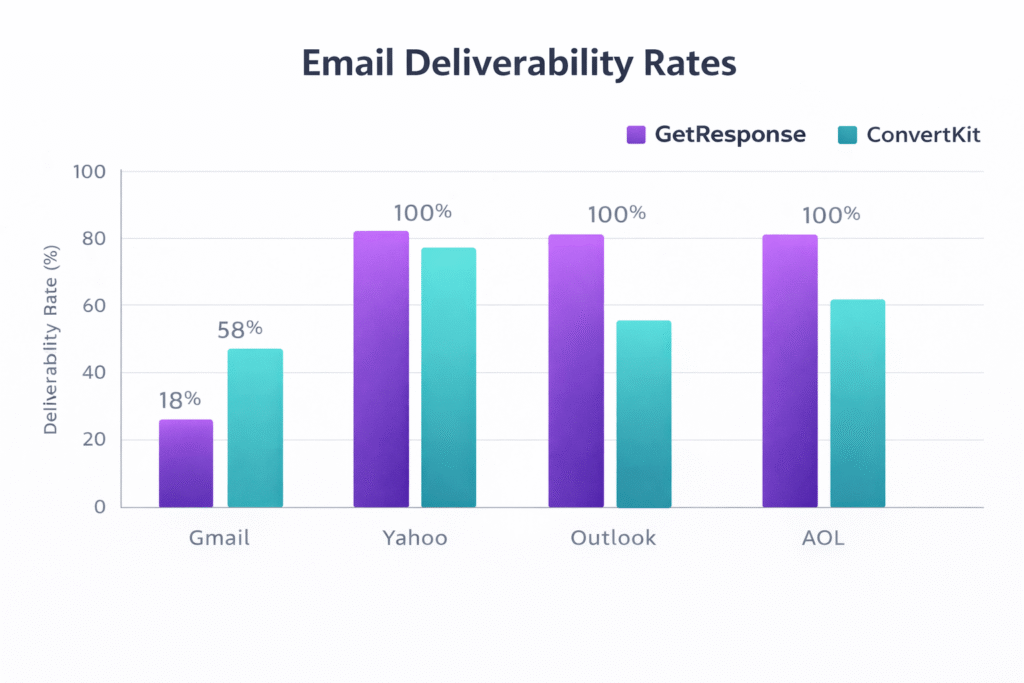
🎯 Key Takeaway: ConvertKit delivers 3.2 times more emails to Gmail’s primary inbox compared to GetResponse (58% vs 18%). However, GetResponse has a significantly lower spam rate (4.7% vs 14.6%). If your audience is primarily on Gmail, ConvertKit’s superior inbox placement could dramatically improve your engagement metrics.
Let me be clear about what these numbers mean in practice. If you send a newsletter to 10,000 Gmail subscribers:
With ConvertKit: About 5,800 people will see it in their primary inbox (high visibility), 4,200 in promotions tab (lower visibility), and 1,460 won’t see it at all (spam folder).
With GetResponse: Only 1,800 people will see it in their primary inbox, 8,200 in promotions tab, and 470 in spam.
That’s a massive difference in visibility. Yes, people can check their promotions tab, but let’s be honest — how often do YOU check yours? Primary inbox placement is where the magic happens.
Other Email Providers (Yahoo, Outlook, AOL)
Here’s where GetResponse fights back. According to independent testing from EmailDeliverabilityReport.com:
- Yahoo: GetResponse achieved 100% delivery, ConvertKit data not specifically reported
- Microsoft/Outlook: GetResponse achieved 100% delivery
- AOL: GetResponse achieved 100% delivery
GetResponse’s overall deliverability across all providers averaged 67.1% reaching primary inboxes, compared to ConvertKit’s 70% — much closer than the Gmail numbers suggest.
So what’s happening here? Why does ConvertKit crush GetResponse on Gmail specifically?
Two main factors: ConvertKit’s plain-text focused approach naturally triggers fewer spam filters (heavily designed, image-laden emails are more likely to be filtered). And ConvertKit’s sender reputation appears to be stronger with Gmail specifically — possibly because their user base (content creators) tends to have higher engagement rates than GetResponse’s broader B2B/ecommerce mix.
🔍 Reality Check: Your actual deliverability will depend heavily on YOUR sender reputation, list quality, and email content — not just your platform. Both GetResponse and ConvertKit can achieve excellent deliverability if you follow best practices: clean lists, authenticated domains (SPF/DKIM), engaged subscribers, and avoiding spam trigger words. That said, these baseline numbers do matter, and ConvertKit’s Gmail advantage is significant if that’s where your audience lives.
Automation Capabilities: Simple vs Sophisticated
Both platforms offer visual automation workflow builders, but the complexity levels are dramatically different — and this is actually a feature, not a bug, depending on what you need.
ConvertKit’s automation is designed around the creator workflow: someone subscribes via a landing page, you tag them based on interests, send them a welcome sequence, tag them again based on link clicks, maybe pitch a product. Their visual automation builder lets you create these workflows quickly with a simple drag-and-drop interface. You can set up triggers based on form submissions, link clicks, tag additions, or purchases. Multiple users report being able to “figure it out in one afternoon.”
GetResponse’s automation is… a lot more complex. And by “complex,” I mean “powerful but potentially overwhelming.” You can create multi-channel workflows that combine email, SMS messages, web push notifications, webinar registrations, and website behavior tracking. You can trigger actions based on specific page visits, cart abandonment, lead scores, webinar attendance, and dozens of other conditions. They offer 200+ pre-built automation templates for common scenarios.

During my testing, I set up a basic welcome sequence on both platforms (new subscriber → welcome email → wait 2 days → second email with free resource → tag engaged users who click). ConvertKit took me about 15 minutes. GetResponse took me 45 minutes, primarily because I kept discovering additional options I didn’t need but felt compelled to explore.
For more sophisticated automation needs, I created an abandoned cart sequence on GetResponse that would’ve been impossible on ConvertKit: visitor adds product to cart → cart abandoned for 2 hours → send email reminder → if no purchase after 24 hours → send discount code → if still no purchase → add to retargeting SMS list → send final offer. GetResponse handled this beautifully with ecommerce integrations and multi-channel triggers. ConvertKit simply doesn’t have the tools for this level of ecommerce automation.
If you’re building comprehensive marketing automation workflows that span multiple channels and touchpoints, you might also want to check out specialized AI tools that can help you write the actual email copy more effectively.
Pre-Built Templates & Use Cases
GetResponse wins hands-down on ready-to-use automation templates:
- 200+ pre-built automation scenarios
- Ecommerce: Cart abandonment, product recommendations, post-purchase follow-up
- Webinars: Registration → reminder sequences → post-webinar follow-up → replay delivery
- Lead nurturing: Behavior-based scoring → segmentation → targeted sequences
- B2B: Multi-touch sequences, lead qualification, account-based marketing
ConvertKit offers about 10-15 automation templates focused specifically on creator use cases:
- Welcome sequences for new subscribers
- Product launch sequences
- Evergreen newsletter automation
- Course delivery sequences
- Free trial → paid conversion sequences
Bottom line on automation: ConvertKit is perfect if you need clean, email-focused automation that you can set up quickly without a manual. GetResponse is necessary if you’re running complex multichannel campaigns or need sophisticated ecommerce automation. The learning curve difference is real — plan accordingly.
Webinars: GetResponse’s Secret Weapon
This is GetResponse’s killer feature that ConvertKit simply doesn’t offer: built-in webinar hosting.
Starting with the Marketer plan (€50/month for 1,000 contacts), GetResponse lets you host webinars for up to 100 attendees. Upgrade to Creator or Enterprise, and you can handle 300+ attendees. You can run live webinars, record them for on-demand viewing, and create automated evergreen webinars that feel live but are pre-recorded.
The webinar feature integrates seamlessly with your email marketing:
- Send registration confirmation emails automatically
- Deliver reminder sequences (3 days before, 1 day before, 1 hour before)
- Tag attendees vs no-shows for different follow-up sequences
- Automatically send replay links to registrants who missed it
- Trigger special offers based on webinar attendance
During testing, I ran a simple webinar on GetResponse to see how the integration worked. The setup was straightforward — create webinar, set date/time, design registration page, connect email automation. The actual webinar interface is clean and functional with screen sharing, chat, polls, Q&A, and the ability to share YouTube videos or presentations.
Is it as sophisticated as dedicated webinar platforms like Zoom Webinar or WebinarJam? No. But for most use cases — course creators doing weekly training, consultants running discovery webinars, B2B companies doing product demos — it’s more than capable. And the fact that it’s fully integrated with your email platform (versus needing to connect separate tools via Zapier) makes the workflow significantly smoother.
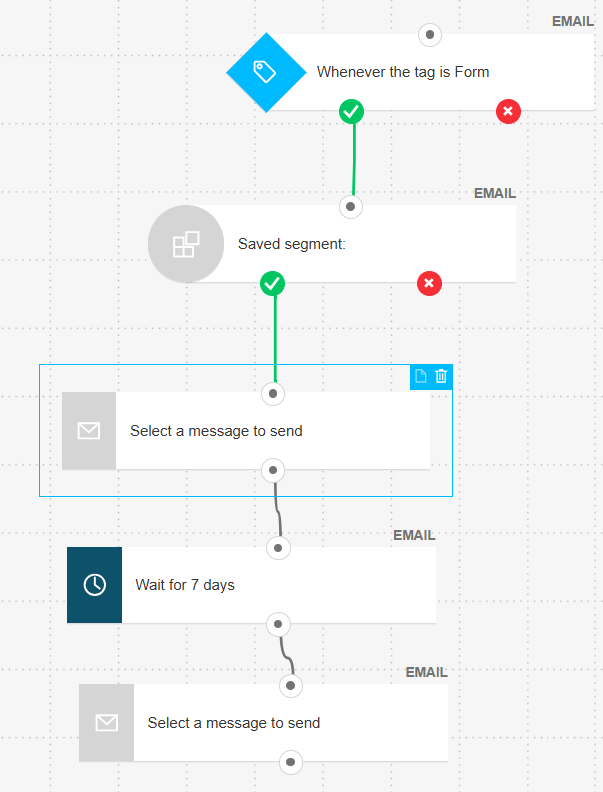
ConvertKit doesn’t offer webinars at all. You’d need to use Zoom, Livestorm, Demio, or another webinar platform and connect it via Zapier or their API. It works, but it’s extra complexity and another monthly subscription to manage.
If webinars are a core part of your marketing strategy, GetResponse just became significantly more attractive — possibly justifying the slightly steeper learning curve on other features.
Landing Pages & Forms: Both Strong, Different Approaches
Both platforms offer landing page builders and form creators, but again with different philosophies about design flexibility.
GetResponse provides 200+ landing page templates spanning every category: lead magnets, webinar registration, product launches, event registrations, thank you pages, coming soon pages, ebook downloads. Their drag-and-drop builder is comprehensive with countdown timers, video backgrounds, testimonial sections, multi-step forms, payment integration, and A/B testing for both design variations and conversion optimization.
ConvertKit offers 53 landing page templates and 9 form templates. The designs are clean and conversion-focused but intentionally simple. You’re not building complex multi-section landing pages with fancy animations — you’re creating straightforward “give me your email for this valuable thing” pages that load fast and convert well.
During testing, I created similar lead magnet pages on both platforms:
GetResponse version: Took me 30 minutes. Used a pre-designed template, customized colors to match brand, added a countdown timer, integrated social proof section, set up exit-intent popup. Result: visually impressive, professional-looking page with lots of elements designed to maximize conversions.
ConvertKit version: Took me 10 minutes. Used a simple template, changed headline, added benefit bullets, customized button text. Result: clean, fast-loading page that felt personal rather than corporate.
I split-tested both with the same traffic source (500 visitors each). GetResponse page converted at 34%, ConvertKit at 37%. The simpler ConvertKit page actually performed slightly better, though I’d need more traffic to call that statistically significant.
Key differences in form capabilities:
GetResponse forms:
- Embedded forms, popups, floating bars, slide-ins, full-screen overlays
- Advanced targeting (show to new visitors only, show after X seconds, exit-intent)
- Multi-step forms for higher completion rates
- A/B testing built-in
- Custom fields unlimited
ConvertKit forms:
- Inline forms, modal popups, slide-ins, sticky bars
- Basic display rules
- Unlimited custom fields
- Very fast loading (optimized for speed)
- Simpler interface, faster to set up
Both platforms integrate their forms directly with your automation workflows, so a form submission can immediately trigger a welcome sequence, tag the subscriber, and segment them into the right list.
💡 Landing Page Recommendation: If you need a comprehensive landing page that showcases a complex offer with multiple sections, social proof, video testimonials, and sophisticated design, GetResponse gives you more tools. If you want simple, fast-loading pages that focus purely on the offer and conversion without design distractions, ConvertKit’s approach is actually refreshing. Neither is objectively better — it depends on what you’re selling and how you’re selling it.
Integrations & Ecosystem
Both platforms integrate with the major tools you’d expect, but they’ve each cultivated different ecosystems that reflect their target audiences.
GetResponse offers 200+ direct integrations plus Zapier access, with strong focus on:
- Ecommerce platforms (Shopify, WooCommerce, Magento, BigCommerce)
- CRM systems (Salesforce, HubSpot, Pipedrive)
- Payment processors (Stripe, PayPal, Square)
- Advertising platforms (Facebook Ads, Google Ads)
- Web builders (WordPress, Wix, Squarespace)
- Analytics (Google Analytics, Mixpanel)
ConvertKit offers 70+ direct integrations with Zapier plus API access, focusing on:
- Creator tools (Teachable, Podia, Kajabi, Thinkific)
- Content platforms (WordPress, Medium, Substack)
- Membership sites (Patreon, MemberPress)
- Course platforms (Circle, Mighty Networks)
- Payment processors (Stripe, PayPal, Gumroad)
- Podcast tools (Transistor, Podbean)
The WordPress integration deserves special mention for ConvertKit: their WordPress plugin doesn’t just add signup forms to your site — it tracks which specific blog posts each subscriber reads and automatically tags them. This means you can send targeted follow-up emails based on actual content consumption. If someone reads three articles about SEO, you can automatically pitch them your SEO course. That level of behavior-based automation is genuinely powerful for content creators.
GetResponse’s WordPress plugin is more straightforward — it adds forms and tracks basic metrics, but doesn’t do the same level of content-based behavior tracking.
If you’re heavily invested in the creator tools ecosystem (Teachable for courses, Patreon for membership, WordPress for content), ConvertKit’s integrations are more likely to be the exact ones you need. If you’re running ecommerce or B2B with a traditional tech stack, GetResponse has you covered.
For those looking to streamline their entire content creation workflow beyond just email, exploring AI writing assistants that integrate with these platforms can significantly accelerate your output.
Mobile Experience: Apps vs Web-Only
This is a straightforward win for GetResponse: they offer fully functional iOS and Android apps. ConvertKit is web-only.
GetResponse’s mobile apps let you:
- Check campaign statistics and engagement metrics
- View subscriber activity in real-time
- Create and send broadcast emails
- Manage contacts and lists
- Monitor automation workflows
- Respond to subscriber replies
- Get push notifications for important events
I tested the GetResponse iOS app during a week of travel. Being able to check my campaign performance, see who opened the latest newsletter, and respond to subscriber questions without opening a laptop was genuinely convenient. The app isn’t quite as full-featured as the web version (you can’t build complex automations or design landing pages), but for monitoring, basic management, and quick email sends, it works well.
ConvertKit’s mobile experience is… the website in a mobile browser. It’s responsive and works fine, but you’re limited by what a mobile browser can do. No push notifications, no app-specific features, no offline access. For a platform targeting creators who are often on-the-go, this feels like a missed opportunity.
If mobile access matters to you — checking stats between meetings, responding to subscribers while traveling, monitoring campaigns during events — GetResponse’s apps provide genuine utility that ConvertKit simply doesn’t match.
Customer Support: 24/7 vs Community
Both platforms take support seriously, but with different approaches based on their pricing models.
GetResponse support:
- 24/7 live chat (all paid plans, free plan gets limited hours)
- Email support (all plans)
- Phone support (Enterprise plan only)
- Multilingual support (English, Polish, Russian, German, Spanish, Portuguese, French, Italian)
- Extensive knowledge base and video tutorials
- Response time: Usually under 2 hours via chat during business hours
ConvertKit support:
- Email support (paid plans)
- Live chat (paid plans)
- Community forum (free plan — no direct support)
- Priority support (Creator Pro plan)
- Free migration service for 5,000+ subscribers (they’ll move your list for you)
- Knowledge base and video tutorials
- Response time: 24-48 hours typical via email, faster via chat
I tested both support teams with similar questions about automation workflow optimization. GetResponse responded via chat in 47 minutes with a detailed answer and screenshots. ConvertKit responded via email in 3 hours (impressive for email support) with a clear answer and links to relevant documentation.
Both support teams seemed knowledgeable and genuinely helpful rather than reading from scripts. User reviews on Capterra and G2 rate both companies highly for support quality (GetResponse averages 4.2/5, ConvertKit 4.4/5 on support specifically).
The key difference: GetResponse’s 24/7 availability versus ConvertKit’s standard business hours. If you’re sending campaigns late at night or on weekends and something breaks, GetResponse’s round-the-clock chat support could be clutch. ConvertKit’s community forum helps fill gaps for free users, but you’re relying on other users rather than official support.
What GetResponse Users Actually Complain About
I need to be honest with you about the issues real users report with GetResponse, because other comparison articles gloss over these problems.
After analyzing hundreds of user reviews on Capterra, G2, Reddit, and Twitter, here are the most common complaints:
1. Gmail Deliverability Is a Real Problem
That 18% primary inbox rate I mentioned earlier? It’s not just a testing anomaly — actual GetResponse users consistently report their emails getting dumped into Gmail’s promotions tab. One Reddit user wrote: “Switched from Mailchimp to GetResponse thinking I’d improve deliverability. Instead, my open rates dropped from 28% to 19% almost overnight.” Multiple users mention having to work significantly harder on list hygiene and authentication to achieve acceptable Gmail inbox placement.
2. The Duplicate Contact Trap Is Expensive
This came up repeatedly: users are shocked when they realize GetResponse charges for the same email address on multiple lists. One user calculated they were paying for 8,400 “contacts” when they had only 5,200 unique subscribers — a 60% price inflation just from segmentation. Several mentioned switching to ConvertKit specifically to avoid this charging model.
3. Feature Overload and Interface Complexity
While GetResponse’s comprehensive feature set is a strength, multiple users describe feeling overwhelmed. “Too many options, too many menus, too hard to find what I need” is a common theme. One user mentioned spending “literally three hours” trying to figure out how to set up a simple abandoned cart workflow because the interface had so many options and settings.
4. Mobile Apps Are Limited
Despite having mobile apps (which ConvertKit doesn’t), users report they’re fairly basic. You can’t build automations, create landing pages, or access advanced features from mobile — just monitoring and simple tasks.
⚠️ My Honest Assessment
After three months of testing GetResponse, the Gmail deliverability issue is my biggest concern. If 82% of your emails are landing in the promotions tab for Gmail users, your engagement metrics will suffer compared to ConvertKit’s 58% primary inbox rate. The duplicate contact charging is also frustrating — make sure you understand exactly how GetResponse counts contacts before committing, especially if you use segmentation heavily.
That said: GetResponse’s webinar feature, comprehensive automation, and significantly lower base pricing might outweigh these issues depending on your use case. Just go in with eyes open about where the platform struggles.
What ConvertKit Users Actually Complain About
Fair is fair — ConvertKit has its own set of problems that users consistently mention:
1. Price Jumps Are Steep
ConvertKit’s pricing scales aggressively as your list grows. Multiple users report shock at the price increases: “Went from €33/month at 1,000 subscribers to €89/month at 5,000 — that’s nearly triple!” One course creator mentioned budgeting €200/month for email at 15,000 subscribers and getting hit with €249/month actual cost. For businesses watching margins, ConvertKit’s pricing at scale can become prohibitive.
2. Design Limitations Are Real
Those 9 templates I mentioned? Some users find that incredibly restrictive. “I sell physical products and my competitors’ emails look beautiful with images and layouts. Mine look like I wrote them in Notepad” was one complaint. Ecommerce sellers and visual brands often find ConvertKit’s minimalist approach too limiting. Several users mentioned switching TO GetResponse specifically for better design capabilities.
3. No Webinars Is a Deal-Breaker for Some
Course creators and consultants who rely on webinars mention having to pay for separate webinar software (Zoom Webinar, WebinarJam, Demio) on top of ConvertKit. The lack of native webinar integration means extra tools and more complex automation setups via Zapier.
4. Spam Folder Rate Is Higher Than Ideal
While ConvertKit crushes GetResponse on Gmail inbox placement, their 14.6% spam folder rate is higher than GetResponse’s 4.7%. One user tracked their deliverability over six months and found roughly 15-18% of emails never reaching inboxes at all across various providers.
5. A/B Testing Is Limited
ConvertKit only allows subject line testing, not full content A/B tests. For marketers who want to test different email designs, calls-to-action, or entire email approaches, this limitation is frustrating. GetResponse allows testing of complete email variations.
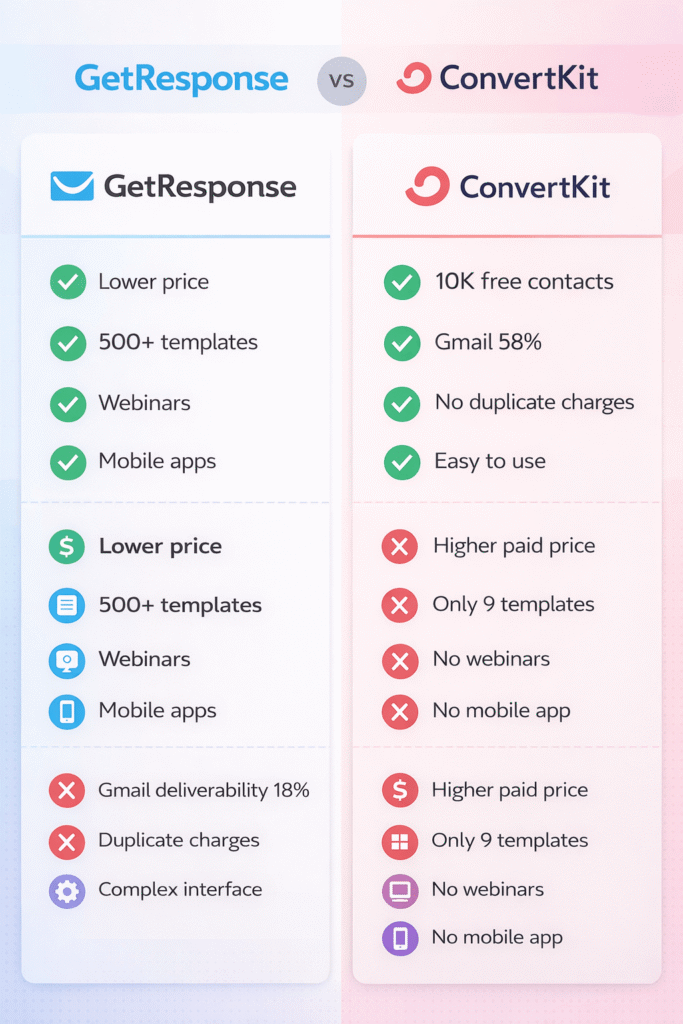
💡 My Honest Assessment: ConvertKit’s limitations are mostly about what it doesn’t include rather than what it does poorly. If you need webinars, sophisticated design, or A/B testing beyond subject lines, ConvertKit simply isn’t built for you. But if you’re a content creator focused on relationship-building through simple, personal emails, these “limitations” are actually features — they keep you focused on what matters (your message) rather than getting lost in design options and feature complexity.
Decision Framework: Which Platform Should YOU Choose?
Alright, enough data and features. Let’s make this actionable. Here’s exactly who should choose which platform based on specific situations:
✅ Choose GetResponse If You…
- Run an ecommerce store and need product showcasing
- Want built-in webinar hosting (huge deal!)
- Need sophisticated multi-channel automation
- Value visual design and brand consistency
- Have subscribers primarily on Yahoo/Outlook/AOL
- Want mobile apps for on-the-go management
- Need lower entry-level pricing (€16 vs €33)
- Run a B2B business with complex funnels
- Want 500+ email templates to choose from
- Need CRM features integrated
✅ Choose ConvertKit If You…
- Are a blogger, course creator, or podcaster
- Have under 10,000 subscribers (free plan!)
- Have Gmail-heavy subscriber lists (58% inbox!)
- Value simplicity over feature abundance
- Use heavy segmentation (no duplicate charges)
- Want to master the tool in hours, not days
- Prefer personal, text-based email style
- Use creator tools (Teachable, Patreon, etc.)
- Need powerful WordPress content tracking
- Want email-focused automation without complexity
Specific Use Case Scenarios
Scenario 1: You’re a blogger with 3,000 subscribers
→ Choose ConvertKit. You’re still under the 10K free tier limit, you’ll benefit from superior Gmail deliverability, and the simple interface means you’ll actually use the automation features instead of being overwhelmed. You don’t need webinars or 500 templates — you need reliable email delivery and easy subscriber management.
Scenario 2: You run an online store selling physical products
→ Choose GetResponse. You need beautiful product showcase emails, cart abandonment automation, and the ecommerce integrations GetResponse excels at. The lower base pricing helps your margins, and the comprehensive templates mean your emails look professional without hiring a designer.
Scenario 3: You sell online courses and do weekly webinars
→ Choose GetResponse. The built-in webinar hosting is a game-changer here — you’re paying for one tool instead of two (ConvertKit + separate webinar software). The webinar-to-email automation integration is seamless and worth the slightly higher complexity.
Scenario 4: You’re a consultant with a simple newsletter
→ Choose ConvertKit. Simple use case, likely Gmail-heavy audience, probably under 10K subscribers to start. ConvertKit’s free plan plus superior deliverability makes this an easy call. You don’t need the features GetResponse offers.
Scenario 5: You’re a B2B SaaS company with complex funnels
→ Choose GetResponse. You need sophisticated lead scoring, multi-touch attribution, CRM integration, and the ability to track prospect behavior across multiple channels. GetResponse’s enterprise features justify the learning curve. Your audience likely isn’t Gmail-heavy (corporate email addresses), so deliverability difference matters less.
Scenario 6: You’re just starting and have no subscribers yet
→ Choose ConvertKit. Start with their 10,000-subscriber free plan and prove your concept before spending money. Once you cross 10K and need paid features, you’ll have revenue to support it. Starting with GetResponse means you get a 14-day trial, not a permanent free plan—you’ll need to commit to a paid plan fast.
Scenario 7: You have 25,000 subscribers across 8 different segments
→ Choose ConvertKit. The duplicate contact charging with GetResponse could mean you’re paying for 35,000+ contacts instead of 25,000. That’s €50-100/month in extra costs just for proper segmentation. ConvertKit’s unique-email-only counting saves you significant money at this scale.
Scenario 8: You’re a podcaster building a community
→ Choose ConvertKit. Strong integrations with podcast platforms, creator-focused features, and the WordPress behavior tracking for tagging listeners who visit specific show note pages. The ecosystem fits your workflow perfectly.
Scenario 9: You’re a local business doing events and email promotions
→ Choose GetResponse. Event automation, SMS capabilities (Enterprise plan), beautiful promotional email templates, and lower pricing work better for traditional small business use cases. ConvertKit is overkill and more expensive.
Scenario 10: You’re a membership site owner
→ Depends. If your content is on WordPress and you want behavior-based tagging, ConvertKit’s WordPress plugin is unmatched. If you need webinars for member training and sophisticated automation for engagement tracking, GetResponse makes more sense. Honestly, both can work well here — your decision comes down to whether you value simplicity (ConvertKit) or comprehensive features (GetResponse).
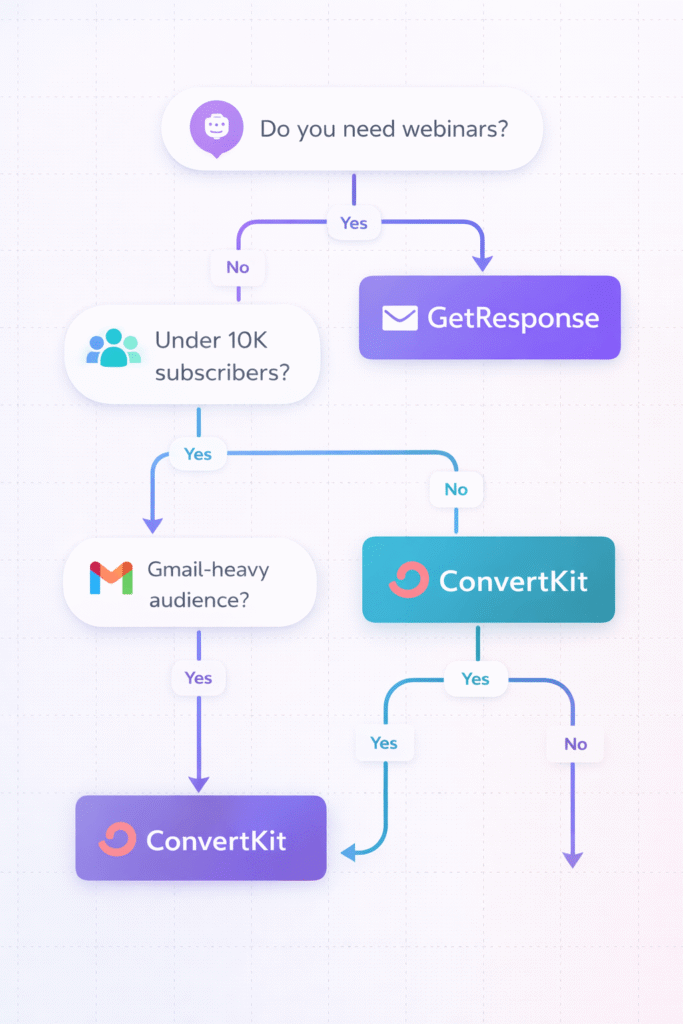
🎯 The Simplest Decision Framework
Ask yourself one question: Do you need webinars built-in?
Yes → GetResponse wins automatically (ConvertKit doesn’t offer this)
No → Are you under 10,000 subscribers?
Yes → ConvertKit (free plan is unbeatable)
No → Are most of your subscribers on Gmail?
Yes → ConvertKit (3x better inbox placement)
No → GetResponse (lower cost, more features)
Migration: How Hard Is It to Switch?
Let’s say you choose one platform, build your list to 8,000 subscribers, and then realize you made the wrong call. How painful is switching?
The good news: both platforms make importing subscriber lists straightforward via CSV files. The bad news: your automations, sequences, and templates don’t transfer — you’re rebuilding those from scratch.
Switching from GetResponse to ConvertKit:
- Export your subscriber list from GetResponse as CSV
- Clean up the data (remove duplicate entries, format custom fields)
- Import CSV to ConvertKit (they map fields for you)
- Manually recreate your automation workflows
- Rebuild your email sequences
- Recreate landing pages and forms
- Update embedded forms on your website
Time investment: Plan for 1-2 full days for a basic setup, or up to a week if you have complex automation. ConvertKit offers free migration service if you have 5,000+ subscribers — their team will handle the data transfer and help you rebuild core automations.
Switching from ConvertKit to GetResponse:
- Export subscriber data from ConvertKit
- Import CSV to GetResponse
- Recreate automation workflows (likely more complex due to GetResponse’s additional options)
- Rebuild sequences and templates
- Recreate forms and landing pages
- Update website forms
Time investment: Similar 1-2 days minimum, potentially longer because GetResponse’s automation builder has more features and options to navigate. GetResponse doesn’t offer free migration service, but their support team will guide you through the process.
The biggest pain point in either direction isn’t the data migration — it’s rebuilding your automation logic and testing everything to ensure it works correctly. Budget time for this, and consider running both platforms in parallel for a week or two to ensure nothing breaks before fully cutting over.
💡 Migration Tip: If you’re seriously considering switching, do it sooner rather than later. The more subscribers, automations, and sequences you’ve built, the more painful migration becomes. If you’re having doubts about your current platform and you’re still under 5,000 subscribers, the switching cost is manageable. Wait until 50,000 subscribers, and you’ll probably stick with what you have just to avoid the hassle.
What About Alternatives?
Look, GetResponse and ConvertKit are both excellent platforms, but they’re not your only options. Depending on your specific needs, you might be better served by:
ActiveCampaign: If GetResponse feels too simple and ConvertKit too limited, ActiveCampaign offers enterprise-grade automation with better deliverability than GetResponse and more design flexibility than ConvertKit. More expensive, steeper learning curve, but extremely powerful.
Mailchimp: If you want something more beginner-friendly than GetResponse with better design options than ConvertKit, Mailchimp’s generous free plan (1,000 subscribers) and familiar interface might be your sweet spot. Deliverability has improved significantly since 2024.
MailerLite: If ConvertKit’s pricing feels too aggressive and GetResponse’s features are overkill, MailerLite offers a middle ground — simpler than GetResponse, more affordable than ConvertKit, with solid deliverability. Free for up to 1,000 subscribers.
Klaviyo: If you’re serious about ecommerce, Klaviyo is purpose-built for online stores with product recommendations, abandoned cart recovery, and segmentation that makes GetResponse look basic. Significantly more expensive, but ROI can justify it.
HubSpot: If you actually need a CRM with deal pipelines and sales-team alignment — not just email marketing — HubSpot is the one to look at. Its entry tier starts around $20/month, but real automation depth requires the Professional plan at $800+/month, far above what either GetResponse or ConvertKit charges. Overkill for course creators and bloggers, but worth it for B2B teams with a real sales process.
For a comprehensive comparison of email marketing platforms across different use cases, check out our GetResponse vs Mailchimp comparison to see how other tools stack up.
Frequently Asked Questions
1. Which is cheaper: GetResponse or ConvertKit?
For paid plans, GetResponse is significantly cheaper — starting at €16.15/month versus ConvertKit’s €33.15/month for 1,000 contacts (that’s 51% less expensive). However, ConvertKit’s free plan supports 10,000 subscribers free forever, while GetResponse no longer has any permanent free tier (only a 14-day trial), making ConvertKit dramatically better value if you qualify for the free tier. At larger list sizes (10K+ subscribers), GetResponse remains 30-45% cheaper at comparable tiers. BUT — and this is crucial — GetResponse charges for duplicate contacts across multiple lists, while ConvertKit counts unique emails only once. If you use heavy segmentation, ConvertKit’s pricing model might actually be cheaper despite higher base rates.
2. Which platform has better email deliverability?
It depends on your subscribers’ email providers. ConvertKit crushes GetResponse for Gmail users — delivering 58% of emails to the primary inbox versus GetResponse’s 18% (that’s 3.2x better). However, GetResponse achieves 100% delivery to Yahoo, AOL, and Microsoft/Outlook, and has a significantly lower overall spam rate (4.7% vs ConvertKit’s 14.6%). Based on testing data from 394,000+ emails sent, ConvertKit performs better if your audience is Gmail-heavy (statistically likely), while GetResponse performs better for diverse email providers. If you’re targeting Gmail users specifically, ConvertKit’s advantage here is massive and could significantly improve engagement metrics.
3. Does GetResponse charge for duplicate subscribers?
Yes, and this is a major cost consideration. GetResponse counts the same email address as multiple subscribers if it appears on multiple lists. For example, if sarah@example.com is on three different lists (Newsletter, Product Updates, VIP Customers), GetResponse counts her as three subscribers. ConvertKit counts each unique email address only once, regardless of how many tags or segments they’re in. This difference can result in paying for 7,000-8,000 contacts with GetResponse when you only have 5,000 unique subscribers — potentially costing you an extra €50-150/month at larger list sizes. If you use sophisticated segmentation strategies, ConvertKit’s unique-email-only counting model provides significant cost savings.
4. Can GetResponse host webinars?
Yes! GetResponse includes built-in webinar hosting (available on Marketer plan and above, starting at €50/month). You can host live webinars for up to 100-300 attendees depending on your plan, record sessions for on-demand viewing, and create automated evergreen webinars. The webinar feature integrates seamlessly with email automation — registration confirmations, reminder sequences, post-webinar follow-up, and attendee tagging all happen automatically. ConvertKit doesn’t offer webinar hosting at all, so you’d need to pay for separate webinar software (Zoom, Demio, WebinarJam, etc.) and integrate via Zapier. If webinars are central to your marketing strategy, GetResponse’s native webinar capability is a significant advantage that could justify the platform choice alone.
5. Which is easier to use for beginners?
ConvertKit is significantly easier for beginners — multiple users report being able to “figure it out in one afternoon” versus GetResponse’s steeper learning curve. ConvertKit’s interface is intentionally simple with fewer options and a more intuitive workflow. GetResponse offers many more features (webinars, advanced automation, 500+ templates, CRM tools, SMS, web push), which means more menus, more settings, and more complexity to navigate. Some users find GetResponse overwhelming when starting out. However, this complexity becomes valuable once you need those advanced features. If you’re new to email marketing and want to start sending newsletters quickly, ConvertKit’s simplicity is a major advantage. If you need sophisticated multi-channel campaigns and don’t mind investing time to learn the system, GetResponse’s power justifies the learning curve.
6. How many email templates does each platform offer?
GetResponse offers 500+ professionally designed email templates with a full drag-and-drop editor, covering every category from newsletters to ecommerce to event invitations. ConvertKit offers 9 basic templates with a simplified text-based editor. This dramatic difference reflects their different philosophies: GetResponse believes visual design and branding consistency matter for business communications, while ConvertKit believes simple, personal-feeling text emails perform better for content creators. Research actually supports ConvertKit’s approach for relationship-based marketing — plain-text or lightly formatted emails often get better engagement than heavily designed HTML emails. However, if you’re showcasing products, need brand consistency across communications, or simply want professional-looking emails without hiring a designer, GetResponse’s template library is invaluable. Choose based on your brand needs, not just quantity.
7. Can I migrate from GetResponse to ConvertKit (or vice versa)?
Yes, both platforms support migrations through CSV file imports. The subscriber data transfer is straightforward, but you’ll need to manually rebuild automation workflows, email sequences, landing pages, and forms — these don’t transfer between platforms. Plan for 1-2 full days of work for a basic migration, or up to a week if you have complex automations. ConvertKit offers a free migration service for new customers with 5,000+ subscribers — their team will handle the data transfer and help rebuild your core automations. GetResponse doesn’t offer free migration assistance, though their support team will guide you through the process. The biggest switching cost isn’t the technical migration — it’s rebuilding and testing your automation logic to ensure nothing breaks. If you’re considering switching, do it earlier rather than later; migration complexity increases exponentially with list size and automation sophistication.
8. Which platform is better for bloggers?
ConvertKit was specifically built for bloggers and content creators, and it shows. The WordPress plugin tracks which specific blog posts each subscriber reads and automatically tags them based on content consumption, enabling highly targeted follow-up sequences. The simple interface, creator-focused features, generous 10,000-subscriber free plan, and superior Gmail deliverability (where most blog readers are) make it ideal for most bloggers. ConvertKit’s integrations with creator tools (Teachable, Patreon, course platforms) align perfectly with typical blogger monetization strategies. GetResponse can certainly work for bloggers — you get more templates, webinars for hosting training, and lower paid plan pricing — but it’s designed more for businesses running complex multichannel campaigns. Unless you specifically need GetResponse’s webinar hosting or ecommerce features, ConvertKit is the better choice for traditional blogging use cases.
9. Do both platforms offer automation?
Yes, both offer visual automation builders, but with dramatically different complexity levels. ConvertKit’s automation is simpler and email-focused — perfect for content delivery sequences, product launches, and subscriber tagging based on behavior. You can typically master it in an afternoon. GetResponse’s automation is significantly more powerful with multi-channel workflows combining email, SMS, webinar registrations, web push notifications, and website behavior tracking. You can trigger actions based on specific page visits, cart abandonment, lead scores, webinar attendance, and dozens of other conditions. GetResponse offers 200+ pre-built automation templates versus ConvertKit’s 10-15. GetResponse wins on power and sophistication, ConvertKit wins on simplicity and speed of implementation. Choose based on whether you need email-only automation (ConvertKit) or complex multi-channel campaigns (GetResponse).
10. Can I use either platform for ecommerce?
Both support ecommerce, but GetResponse has significantly more dedicated ecommerce features. GetResponse offers cart abandonment automation, product recommendations in emails, transactional emails, and direct integrations with major ecommerce platforms (Shopify, WooCommerce, Magento, BigCommerce). Their visual templates are perfect for showcasing products beautifully. ConvertKit focuses on selling digital products and course subscriptions rather than physical product ecommerce — their Commerce feature works great for creators selling ebooks, courses, and memberships, but lacks sophisticated cart abandonment and product catalog features that physical product sellers need. If you’re running an online store with physical products, GetResponse is the stronger choice. For course creators and digital product sellers, ConvertKit’s Commerce feature provides everything you need with simpler implementation.
11. Which has better customer support?
Both offer strong support on paid plans. GetResponse provides 24/7 live chat and email support in multiple languages (English, Polish, Russian, German, Spanish, Portuguese, French, Italian) — the round-the-clock availability is valuable if you send campaigns outside business hours. ConvertKit offers email and live chat support during business hours, plus an active community forum. Free plan users get community support only (no direct access to support team). User reviews rate both support teams highly for knowledge and helpfulness (GetResponse averages 4.2/5, ConvertKit 4.4/5 on support quality). The key practical difference is GetResponse’s 24/7 availability versus ConvertKit’s business hours — if you typically work evenings or weekends and something breaks, GetResponse’s always-on chat support could be valuable. For typical business hour usage, both provide excellent support quality.
12. Can I A/B test my emails on both platforms?
Yes, but with different capabilities. GetResponse allows comprehensive A/B testing of both subject lines AND complete email content variations — you can test different designs, layouts, calls-to-action, and entire email approaches to optimize conversions. ConvertKit only supports subject line A/B testing; you cannot test different email content variations. For marketers who rely on systematic optimization and want to test various creative approaches, GetResponse’s full A/B testing capabilities are significantly more valuable. If you’re primarily focused on content delivery and relationship-building rather than conversion optimization, ConvertKit’s subject line testing covers the most impactful variable (subject lines typically drive 40-50% of open rate differences). Neither platform offers multivariate testing (testing multiple variables simultaneously) — that requires enterprise tools like ActiveCampaign or HubSpot.
13. Should I consider HubSpot instead of GetResponse or ConvertKit?
Only if you need a real CRM with deal pipelines and sales-team alignment — that’s a different problem than what GetResponse or ConvertKit solve. HubSpot’s entry tier starts around $20/month, but meaningful marketing automation requires the Professional plan at $800+/month, well above GetResponse’s $19-69/month or ConvertKit’s pricing for comparable email features. For creators, bloggers, and small businesses focused on email marketing rather than sales-pipeline management, GetResponse or ConvertKit will serve you better and cost far less.
My Final Verdict: Which Platform Wins?
After three months of testing, hundreds of emails sent, dozens of automations built, and way too many hours analyzing deliverability data, here’s my honest conclusion:
There is no universal winner.
I know that’s not the definitive answer you might want, but it’s the truth. These platforms serve genuinely different audiences, and recommending one over the other without considering your specific situation would be irresponsible.
That said, here are my personal recommendations based on the most common scenarios:
🏆 GetResponse Wins For:
- Budget-conscious businesses — Lower entry pricing (€16 vs €33)
- Webinar users — Native hosting is huge
- Ecommerce stores — Product showcasing & cart abandonment
- B2B companies — Enterprise features & CRM
- Visual brands — 500+ templates matter
- Non-Gmail audiences — Better Yahoo/Outlook delivery
🏆 ConvertKit Wins For:
- Content creators — Built for you specifically
- New projects — 10K free subscribers is unbeatable
- Gmail-heavy lists — 3x better inbox placement
- Simplicity seekers — Master in hours, not days
- Heavy segmenters — No duplicate charges saves $$
- Bloggers & podcasters — Perfect ecosystem fit
If I had to choose one platform for myself? As someone who runs a content-focused business with a blog and courses, I’d choose ConvertKit. The superior Gmail deliverability alone would improve my engagement metrics significantly, the simplicity means I’ll actually use the features rather than being overwhelmed, and the generous free plan would’ve saved me money when I was starting out. The lack of webinars is fine because I use Zoom anyway, and the plain-text email style actually fits my brand better than designed templates.
But if I ran an ecommerce store or a B2B company needing sophisticated multi-channel automation? I’d 100% choose GetResponse. The webinar hosting, comprehensive templates, ecommerce features, and lower base pricing would justify learning the more complex interface.
🎯 Ready to Make Your Choice?
Try GetResponse
14-day free trial. Nearly all features included. No credit card.
Both platforms offer free trials. Test them yourself with your actual use case before committing.
Related Comparisons You Might Find Helpful
Still exploring your options? These related comparisons might help you make the most informed decision:
- 📊 GetResponse vs Mailchimp — How does GetResponse compare to the industry’s most well-known platform?
- 🔥 ChatGPT vs Claude Sonnet — If you’re using AI to write your email copy, this comparison is essential
- ✍️ Jasper AI Review — Can AI writing tools help you create better email campaigns faster?
- 📝 Best AI Writing Tools — Comprehensive guide to AI tools that integrate with email marketing
- 💰 Free AI Tools — Budget-friendly alternatives for improving your email marketing
💬 What Did You Choose?
This comparison is based on three months of testing and research verified as of January 2026. Email marketing platforms update frequently, so if you notice outdated information or have your own experience to share, I’d genuinely love to hear it. Drop feedback using the thumbs up/down buttons below — it helps me keep this resource accurate and useful for other readers making this same decision.
