⚡ Quick Answer
To use GPTZero, simply visit gptzero.me, paste your text (or upload a file), and click “Scan.” You’ll get an AI probability score (0-100%) showing how likely the text was written by AI. For deeper analysis, install the Chrome extension for real-time detection in Google Docs, or upgrade to paid plans for batch file scanning, plagiarism checking, and the Writing Replay feature that proves authenticity.
GPTZero has become the go-to AI detection tool for millions of educators, students, and content professionals. But here’s the uncomfortable truth most guides won’t tell you—it’s not perfect. I’ve spent weeks testing this tool with over 50 documents, and while it’s genuinely impressive at catching unedited AI content, it struggles with paraphrased text and occasionally flags perfectly human writing.
This guide covers four different ways to use GPTZero (web interface, Chrome extension, batch uploads, and API integration), explains what those confusing percentage scores actually mean, and gives you Reddit-backed strategies to avoid false accusations. Whether you’re a teacher checking student papers, a student proving your work is authentic, or a publisher maintaining editorial standards, you’ll learn exactly how to use this tool effectively—and when NOT to trust it.
🚀 Try GPTZero Free (10,000 Words/Month)
Start detecting AI-generated content with no credit card required. Get instant access to the Chrome extension, basic AI detection, and 5 free advanced scans.
Used by 10M+ people worldwide · 3,500+ universities · No spam, instant access
What is GPTZero? (And Why 10 Million People Use It)
GPTZero is an AI detection software that analyzes text to determine whether it was written by a human or generated by large language models like ChatGPT, Claude, Gemini, or DeepSeek. Founded in January 2023 by Edward Tian, a Princeton student, it exploded to 10 million users faster than almost any EdTech tool in history.
The reason? It hit the market at exactly the right moment—just weeks after ChatGPT’s release, when teachers were panicking about students submitting AI-written essays and publishers were scrambling to verify content authenticity.
Here’s what makes GPTZero different from basic “AI detector” tools:
- Education-first design: Built specifically for academic integrity (unlike SEO-focused tools like Originality.ai), it’s used by 3,500+ colleges and the American Federation of Teachers representing 1.7 million educators
- Constantly updated detection: The model gets updated every few months to catch the latest AI models—GPT-5, Gemini 2.5 Pro, Claude Sonnet 4, and even newer models like o3 that launched in late 2025
- Writing Replay technology: The Chrome extension records your entire writing process from first keystroke, creating video proof of how you created the document (more on this later)
- Low false positive rate: Independent testing shows less than 1% of human writing gets falsely flagged as AI, which is better than most competitors
But before we dive into how to use it, you need to understand a critical fact that most guides gloss over: GPTZero is probabilistic, not definitive. When it says “93% AI,” that doesn’t mean 93% of your document is AI-written. It means the system is 93% confident the text shows AI patterns. We’ll cover how to interpret these scores correctly in the “Understanding Your Results” section.
How GPTZero Actually Works (The Technical Breakdown)
Unlike simple keyword-matching tools, GPTZero uses seven sophisticated detection components working together. Understanding this helps you interpret results accurately:
1. Perplexity Analysis
Perplexity measures how predictable your text is. AI models write in predictable patterns because they’re trained to choose the most statistically likely next word. Humans? We’re chaotic—we throw in unexpected phrases, switch topics mid-sentence, and make weird word choices.
Lower perplexity (below 50) = likely AI-generated
Higher perplexity (above 100) = likely human-written
2. Burstiness Analysis
This measures sentence variation. Humans naturally mix short, punchy sentences with longer, more complex ones. AI tends to write uniformly—every sentence around the same length, creating a monotonous rhythm that’s statistically detectable.
High burstiness (above 1.0) = human-like variation
Low burstiness (below 0.5) = AI-like uniformity
3. GPTZeroX (Contextual Analysis)
This proprietary algorithm analyzes each sentence within the full document context. It’s looking for patterns that only emerge when you see the whole picture—like whether transitions between paragraphs feel natural or algorithmic.
4. Education Module
A specialized model trained specifically on student writing to reduce false positives. This is why GPTZero performs better than competitors at distinguishing between “polished student essay” and “ChatGPT essay”—it understands academic writing conventions.
5. Internet Text Search
GPTZero checks its archives for existing content, adding a plagiarism detection layer. If your text matches published sources verbatim, that’s flagged separately from AI detection.
6. GPTZero Shield (Bypass Detection)
This catches common workarounds like paraphrasing tools, homoglyph substitutions (replacing ‘e’ with ‘е’ in Cyrillic), and other manipulation attempts. Though honestly, heavy paraphrasing still defeats most AI detectors including GPTZero.
7. Deep Learning Model
An end-to-end machine learning system trained on millions of human and AI-written documents. This gets continuously updated as new AI models launch, which is why GPTZero pushes model updates every 2-3 months.
The tool currently detects content from ChatGPT (GPT-3, GPT-4, GPT-5, o3, o3-mini), Google Gemini (2.5 Pro, 2.5 Flash, 2.5 Flash-Lite), Claude (Sonnet 4), LLaMA, DeepSeek, and most other major language models.
⚠️ Reality Check: The Paraphrasing Problem
Here’s what GPTZero doesn’t advertise aggressively: if someone runs AI content through multiple paraphrasing tools or asks the AI to “rewrite this in a different style,” detection accuracy drops significantly. Independent testing shows a 17.1% false negative rate—meaning roughly 1 in 6 AI-generated texts may pass undetected if properly obfuscated. This is an arms race, not a solved problem. Use GPTZero as one piece of evidence, never the only proof.
How to Use GPTZero: Step-by-Step (4 Methods)
After testing GPTZero extensively, I’ve found there are four distinct ways to use it, each with different strengths. Most users only know about the basic web interface, but the Chrome extension and batch upload features are game-changers for certain use cases.
Method 1: Basic Web Interface (Best for Quick Checks)
This is the fastest way to check a single document. No account needed for texts under 10,000 characters.
Step 1: Access GPTZero
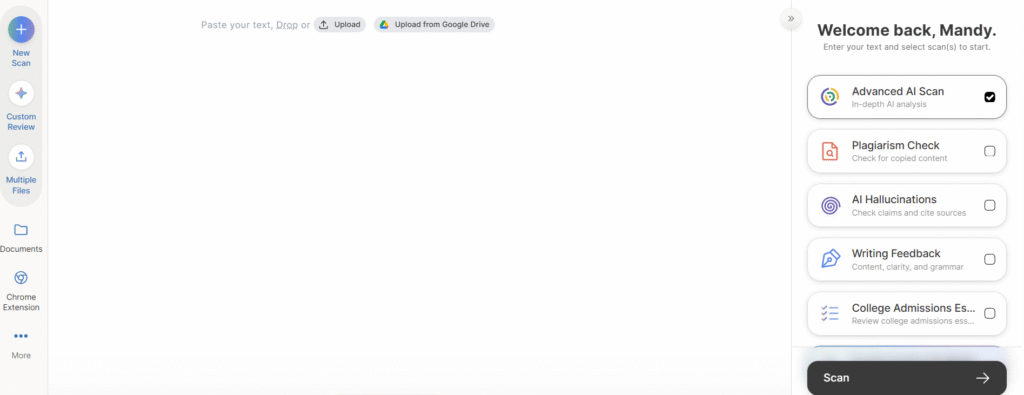
Go to gptzero.me. You’ll land on a clean interface with a large text input box. For texts longer than 10,000 characters or to save your scan history, create a free account (takes 30 seconds with Google sign-in).
Step 2: Input Your Text
You have two options:
- Option A: Copy-paste text directly into the text box (fastest for emails, social posts, short articles)
- Option B: Click “Upload File” and select a document (PDF, DOC, DOCX, TXT, or even image files—JPG, PNG, GIF, WEBP—which GPTZero will OCR to extract text)
Step 3: Click “Scan for AI” or “Get Results”
The scan takes 2-10 seconds depending on text length. Longer documents (5,000+ words) may take up to 30 seconds.
Step 4: Review Your Results
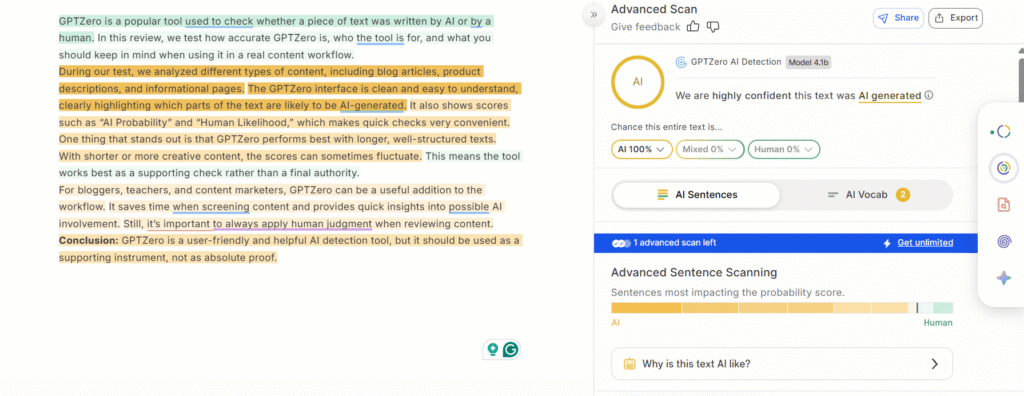
You’ll see three key pieces of information:
- AI Probability Score: A percentage (0-100%) showing confidence the text is AI-generated. Example: “87% AI” means high likelihood of AI content.
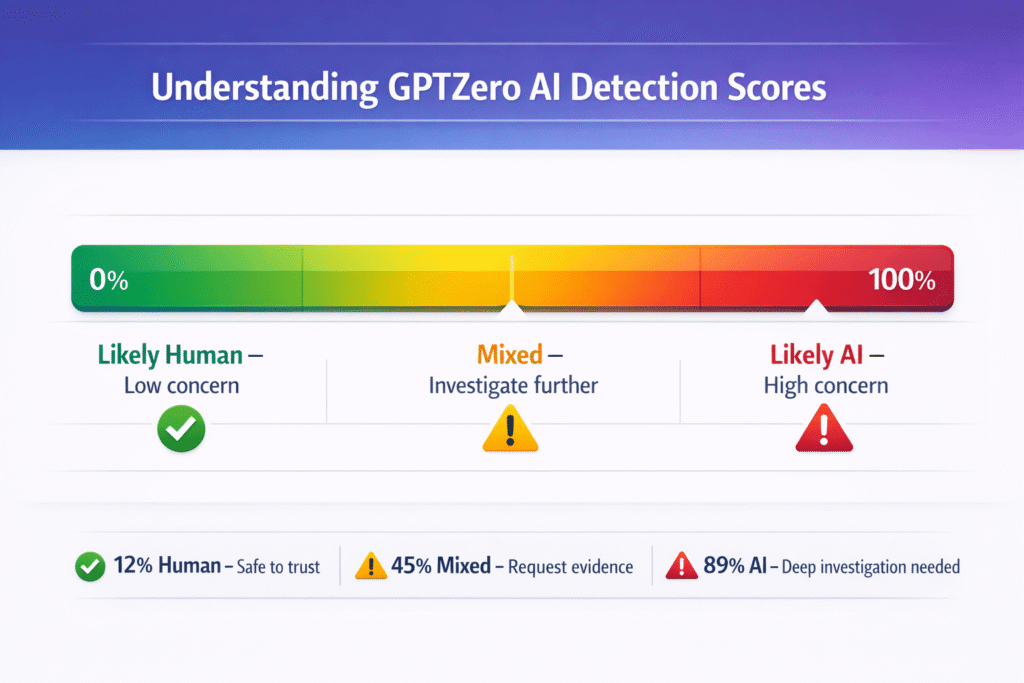
- Classification: One of three labels—”Likely Human” (0-30% AI), “Mixed” (30-70% AI), or “Likely AI” (70-100% AI)
- Highlighted Sentences: Yellow highlighting shows which specific sentences triggered AI detection
Step 5: Analyze Advanced Metrics (Optional)
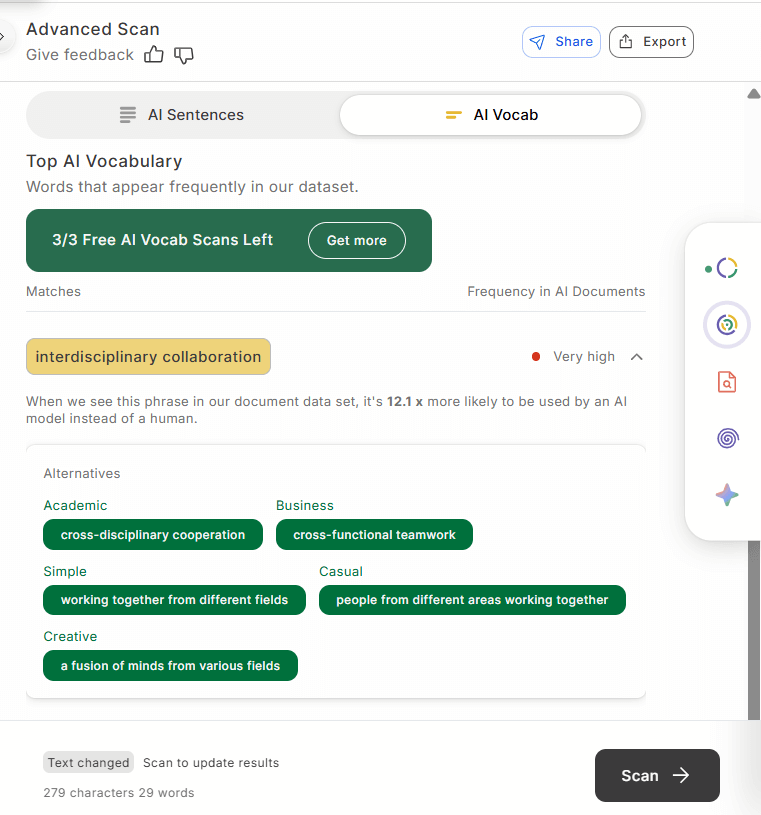
Click “Advanced Scan” (you get 5 free per month, then need a paid plan) to see:
- Average Perplexity Score: How predictable the text is (lower = more AI-like)
- Burstiness Score: Sentence variation level (lower = more uniform/AI-like)
- Sentence-by-Sentence Breakdown: Each sentence rated as high/medium/low impact on the overall AI score
Method 2: Batch File Upload (Best for Teachers & Bulk Checking)
This is where GPTZero becomes incredibly powerful for educators. Instead of scanning papers one-by-one, upload an entire folder of student submissions.
Step 1: Click “Batch File Upload” Tab
On the main dashboard, switch from “Dashboard” to “Batch File Upload” in the top navigation.
Step 2: Select Multiple Files
Drag and drop files or click “Choose Files” to select multiple documents. Limits:
- Free plan: Up to 10 files at once
- Premium/Professional: Unlimited file uploads
Step 3: Click “Upload and Scan”
GPTZero processes all files simultaneously. This takes 1-3 minutes for 10 files, longer for larger batches.
Step 4: View Results List
You’ll get a table showing:
- File name
- AI probability percentage
- Classification (Human/Mixed/AI)
- Word count
- Scan timestamp
Step 5: Click Individual Files for Detailed Reports
Click any file to see the full analysis with highlighted sentences, perplexity scores, and sentence breakdowns—exactly like the single-file scan.
Supported Formats:
- Documents: PDF, DOC, DOCX, TXT
- Images: JPG, JPEG, PNG, GIF, WEBP (GPTZero uses OCR to extract text from images—useful for screenshots of documents)
💡 Pro Tip for Teachers: The 10-Minute Workflow
Here’s how I process 30 student essays in under 10 minutes: (1) Download all submissions from your LMS as a folder, (2) Batch upload everything to GPTZero, (3) Sort results by AI probability (highest first), (4) Only investigate the top 5-10% flagged submissions in detail, (5) For flagged students, use the Writing Report feature (Premium plan) to see their Google Docs edit history before confronting them. This workflow is infinitely faster than reading every essay suspiciously, and the Writing Report provides concrete visual evidence rather than just an accusatory percentage.
Method 3: Chrome Extension (Best for Real-Time Detection)
This is the most underrated feature of GPTZero. The Chrome extension turns AI detection from a manual task into an automatic background process.
Installation (30 seconds):
- Visit the Chrome Web Store
- Search for “GPTZero” or “Origin by GPTZero”
- Click “Add to Chrome”
- The GPTZero icon appears in your browser toolbar
Usage Option A: Scanning Any Webpage
On any website (articles, emails, social media posts), you can:
- Highlight text → Right-click → Select “Check with GPTZero”
- Or click the extension icon in your toolbar → Select “Scan current page”
A popup shows the AI probability score instantly. Perfect for quickly checking blog posts, news articles, or suspicious emails.
Usage Option B: Google Docs Integration (The Game-Changer)
This is where the extension becomes genuinely revolutionary. When you open any Google Doc:
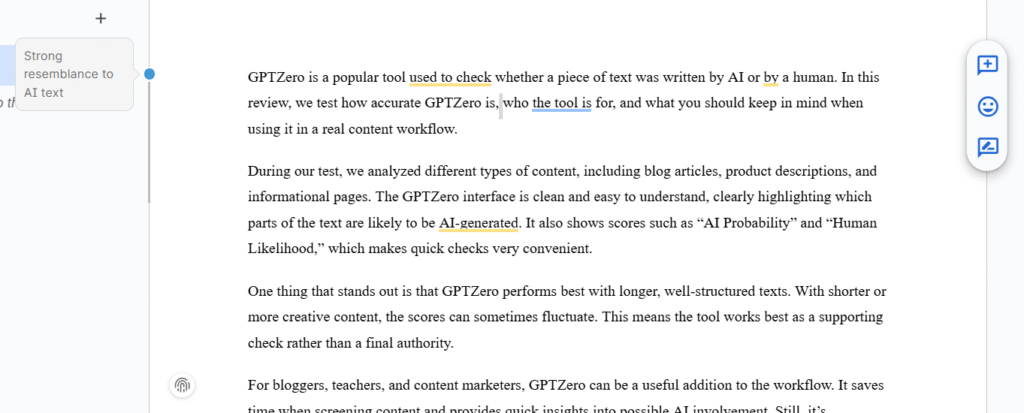
- GPTZero runs automatically in real-time as you write
- An AI probability score appears above the toolbar, updating every few seconds
- Click the score to see which sentences are flagged
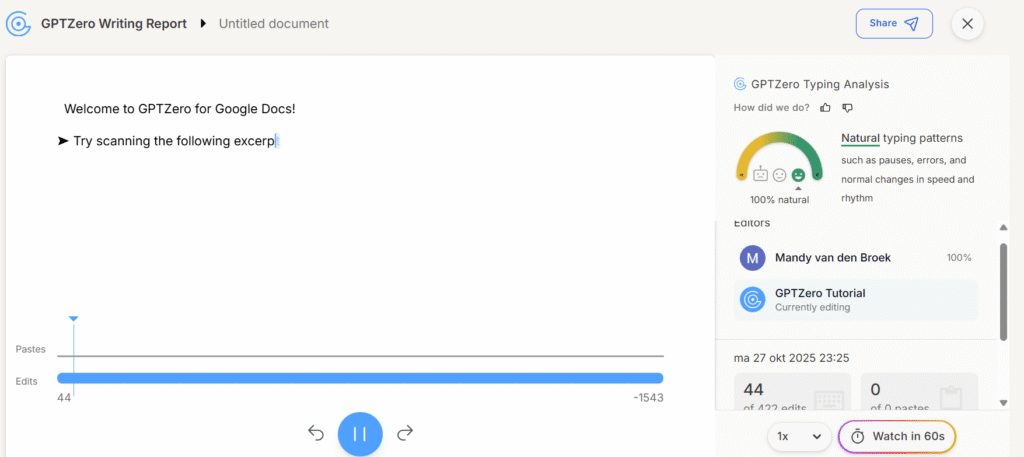
- Access the Writing Report to view your complete edit history as a video replay
Key Chrome Extension Features:
1. Live AI Detection
The extension continuously monitors your document as you write. If you paste in a large block of AI-generated text, the score spikes immediately—showing you in real-time which sections might get flagged.
2. Writing Replay Video (Premium Plans)
This is GPTZero’s secret weapon for proving authenticity. The extension records your entire editing process from the first keystroke, creating a time-lapse video showing:
- When each sentence was written
- What was copy-pasted vs. typed naturally
- Edit patterns (typing speed, pause lengths, revision behavior)
- Multi-user contributions (if it’s a shared document)
If you’re ever falsely accused of using AI, this Writing Replay is smoking-gun evidence of your authentic process.
3. Typing Pattern Analysis
GPTZero’s algorithm detects unnatural typing patterns. If you suddenly paste 500 words in one second, that’s flagged differently than if you typed 500 words over 20 minutes with natural pauses. This is proprietary technology—no other AI detector offers this.
4. AI Writing Feedback
Upload a custom rubric (like your teacher’s grading criteria), and GPTZero generates improvement suggestions tied specifically to that rubric. Teachers can use this to provide faster, more targeted feedback.
5. Bibliography/Source Checker
The extension scans your citations to detect:
- AI-hallucinated citations: Fake sources that don’t exist (a common ChatGPT problem)
- Uncited claims: Statements that need supporting sources
- Plagiarism risks: Text matching published sources without attribution
📚 Students: Protect Yourself Before Submitting
Install the Chrome extension and write your essays in Google Docs. The Writing Replay feature creates irrefutable proof of your work process. If you’re ever accused of AI use, you can share the replay video showing you typed every word naturally over several hours. This has saved students from false accusations when Grammarly edits or formal writing styles triggered false positives.
Works with free plan · No credit card required · Instant protection
Method 4: API Integration (For Developers & Institutions)
If you’re building an EdTech platform, content management system, or need to integrate AI detection into your own application, GPTZero offers API access on Professional plans (€21.24/month or $24.99/month).
Quick setup:
- Sign up for Professional plan or API-only access
- Access API documentation at gptzero.me/api
- Generate your API key from the dashboard
- Make POST requests to analyze text programmatically
Use cases I’ve seen:
- Learning Management Systems: Automatically scan all student submissions on upload
- Publishing platforms: Flag potentially AI-generated freelance submissions before editorial review
- Hiring platforms: Screen cover letters and writing samples at scale
- Data labeling companies: Filter AI text from training datasets to prevent model collapse
The API costs roughly €45/month for 300,000 words of detection capacity. For institutions processing tens of thousands of documents, this is more cost-effective than per-seat licensing.
Understanding Your GPTZero Results (What the Numbers Actually Mean)
This is where most people get confused. GPTZero’s scoring system is probabilistic, not deterministic, which creates a lot of misunderstandings.
The Three Classifications Explained
1. “Likely Human” (0-30% AI)
✅ Your text is likely to be written entirely by a human. Most sentences show natural human patterns with high perplexity (unpredictable word choices) and high burstiness (varied sentence lengths). The tool is confident this is human work.
2. “Mixed” (30-70% AI)
⚠️ Your text may include parts written by AI. Some sentences are flagged (highlighted in yellow), suggesting a combination of AI and human patterns. This often appears when:
- You used AI for ideas/outlines but wrote the final text yourself
- You heavily edited AI content with your own voice
- You used AI to write some sections but not others
- Your writing style happens to resemble AI patterns (very formal, technical, or polished)
3. “Likely AI” (70-100% AI)
❌ Your text is likely to be written entirely by AI. Most or all sentences show AI patterns with low perplexity (predictable) and low burstiness (uniform style). The tool is confident this came from a language model.
CRITICAL: What the Percentage DOESN’T Mean
Here’s the mistake everyone makes:
❌ WRONG: “My essay is 87% AI” = “87% of my document is AI-written”
✅ RIGHT: “My essay is 87% AI” = “The system is 87% confident this document shows AI patterns”
The percentage is a confidence score, not a proportion of content. When GPTZero says “93% Human, 7% AI,” it’s actually saying:
- 39 out of 100 times: this text is completely human
- 57 out of 100 times: this is mixed AI/human
- 4 out of 100 times: this is completely AI
This is why you should never punish someone based solely on a GPTZero score. The system is giving you a probability, not a verdict.
Red Flags vs. Green Flags in Your Results
Red Flags (Suggests AI Content):
- 80%+ AI probability score
- Most sentences highlighted in yellow
- Very low perplexity (below 50)
- Very low burstiness (below 0.5)
- Large blocks of uniform text with no variation
- Multiple paragraphs with identical sentence structure
Green Flags (Suggests Human Content):
- Below 20% AI probability score
- Few or no highlighted sentences
- High perplexity (above 100)
- High burstiness (above 1.0)
- Natural variation in sentence length and structure
- Personal examples, opinions, or unique insights
Gray Zone (Investigate Further):
- 30-70% AI probability (the “Mixed” classification)
- Some sentences flagged, others clean
- Moderate perplexity/burstiness scores
In the gray zone, you should:
- Request additional evidence (drafts, outlines, research notes)
- Ask for Writing Report/Google Docs edit history
- Have an in-person conversation to assess understanding
- Consider the assignment difficulty (did they have time to write this quality?)
Common Use Cases (Real-World Examples)
After watching 10+ million people use GPTZero, certain patterns emerge. Here’s how different groups actually use the tool in practice:
1. Education (Teachers & Students)
For Teachers/Professors:
- Check student essays and research papers before grading
- Monitor academic integrity across a class (batch upload all submissions)
- Identify students who need conversations about proper AI use
- Use Writing Reports to see if students worked on assignments over time vs. submitting last-minute
- Track multiple students via batch upload to spot patterns (did the whole class suddenly start using AI?)
For Students:
- Verify your work appears human before submission
- Use Writing Replay to prove authenticity if accused
- Get AI writing feedback to improve before turning in assignments
- Self-check after using Grammarly or editing tools (to catch false positive risks)
- Generate “Certified Human” reports for high-stakes submissions
GPTZero is used by 3,500+ colleges including Stanford, Harvard, MIT, and University of California schools. The American Federation of Teachers (representing 1.7 million educators) officially endorsed it in 2024.
2. Hiring & Recruitment
For Recruiters/HR Managers:
- Verify cover letters are genuinely written by candidates
- Check resume authenticity (summaries, descriptions)
- Assess candidate writing samples for roles requiring communication skills
- Evaluate job applications at scale (batch upload feature)
- Detect AI-generated applications from candidates mass-applying with ChatGPT
For Job Seekers:
- Ensure your cover letters show authentic human voice
- Verify resumes won’t be flagged if you used AI for ideas/formatting
- Test writing samples before submitting to employers
I’ve heard from HR teams who now routinely scan the top 20% of applicants because ChatGPT-generated cover letters became so common in late 2023-2024. They’re specifically looking for the “too perfect” applications scoring 80%+ AI.
3. Publishing & Journalism
For Publishers/Editors:
- Verify submitted articles are human-written before publication
- Check freelance writer content for AI usage
- Maintain editorial standards and reader trust
- Detect AI-generated press releases or sponsored content
- Partnership example: HackerNoon offers “Verified by GPTZero” badges on human-written articles
For Writers/Journalists:
- Verify your work appears authentic before submission
- Check edited content after using tools like Grammarly or Hemingway Editor
- Test articles before pitching to publications with AI policies
- Build credibility with editors by proactively sharing GPTZero reports
4. Content Marketing & SEO
For Content Managers:
- Verify outsourced content is original (not AI-generated and minimally edited)
- Check blog posts before publishing to ensure quality
- Audit existing website content if switching from AI to human writers
- Monitor content quality from freelancers or agencies
Important caveat: Google doesn’t penalize AI content as of 2026 (they’ve stated publicly that helpful content is helpful regardless of how it’s created). But user trust matters—readers can often tell when content feels generic or AI-generated, which impacts engagement and sharing.
5. Legal & Compliance
For Legal Professionals:
- Verify document authenticity in disputes
- Check contract modifications for AI-generated changes
- Ensure legal filings are human-authored (required by some courts)
- Maintain professional standards and client trust
Some U.S. courts now explicitly require lawyers to certify that filings weren’t AI-generated (or if AI was used, that it was reviewed by a human), after cases where lawyers submitted briefs with hallucinated citations from ChatGPT.
6. Research & Data Quality
For ML Researchers/Data Teams:
- Filter AI text from training datasets
- Prevent “model collapse” (AI trained on AI-generated data degrades over time)
- Ensure data quality for machine learning models
- Study AI usage patterns in academic publishing (researchers found 15.8% of ICLR 2024 peer reviews used AI)
🎯 Real Example: Teacher’s Workflow
Sarah, a high school English teacher in Colorado, told me her workflow: She batch uploads all 30 student essays on Friday after school (takes 5 minutes). GPTZero flags 4 students with 70%+ AI scores. Before confronting them Monday, she checks their Google Docs edit history via the Writing Report. Two students have clear video replays showing they typed naturally over several days—false positives from very formal writing styles. The other two have suspiciously large text blocks pasted in Sunday night at 11pm with zero editing afterward. Those are the conversations she has Monday. This saves her from falsely accusing students while still catching actual AI misuse.
GPTZero Pricing: What You Actually Get (2026 Updated)
Let me break down the pricing in three currencies since most guides only show USD:
| Feature | Free | Essential | Premium | Professional |
|---|---|---|---|---|
| Price (USD Monthly) | $0 | $14.99 | $23.99 | $45.99 |
| Price (USD Annual) | $0 | $8.33/mo | $12.99/mo | $24.99/mo |
| Price (EUR Annual) | €0 | €7.08/mo | €11.04/mo | €21.24/mo |
| Price (GBP Annual) | £0 | £6.25/mo | £9.74/mo | £18.74/mo |
| Words/Month Limit | 10,000 | 150,000 | 300,000 | 500,000 |
| Characters Per Scan | 10,000 | 150,000 | 150,000 | 500,000 |
| AI Detection | ✅ Basic | ✅ Advanced | ✅ Advanced | ✅ Advanced |
| Chrome Extension | ✅ Yes | ✅ Yes | ✅ Yes | ✅ Yes |
| Plagiarism Check | ❌ No | ✅ Yes | ✅ Yes | ✅ Yes |
| Writing Report/Replay | ❌ No | ❌ No | ✅ Yes | ✅ Yes |
| Batch File Uploads | 10 files max | 10 files max | ✅ Unlimited | ✅ Unlimited |
| Scans Per Hour | Limited | 100/hour | ✅ Unlimited | ✅ Unlimited |
| API Access | ❌ No | ❌ No | ❌ No | ✅ Yes |
| Team Features | ❌ No | ❌ No | Limited | ✅ Full |
| Best For | Students, casual users | Teachers, freelancers | Heavy users, content teams | Institutions, developers |
💡 Save 45%: Annual billing offers significant discounts compared to monthly. All prices shown include both monthly and annual options. EUR/GBP conversions based on February 2026 exchange rates.
Free
€0/month
- ✅ 10,000 words/month
- ✅ 10,000 characters per scan
- ✅ Basic AI detection
- ✅ Chrome extension access
- ✅ 5 free advanced scans
- ⚠️ No plagiarism checking
- ⚠️ No Writing Replay
Perfect for: Occasional checks, students testing homework
Premium
€11/month
€20.39/mo monthly
- ✅ Everything in Essential
- ✅ 300,000 words/month
- ✅ Unlimited scans per hour
- ✅ Unlimited batch uploads
- ✅ Writing Report + replay video
- ✅ Plagiarism detection
- ✅ Team member support
Perfect for: Teachers checking 30+ papers, content teams, serious users
Professional
€21/month
€39.09/mo monthly
- ✅ Everything in Premium
- ✅ 500,000 words/month
- ✅ API access for developers
- ✅ Full team features
- ✅ Priority support
- ✅ Custom integrations
Perfect for: Institutions, EdTech platforms, large departments
Which plan should you choose?
- Free: Great if you’re checking occasional homework or testing the tool. 10,000 words/month = roughly 10-15 essays.
- Essential (€7.08/month): Best for individual teachers or freelance writers who need plagiarism checking and more capacity. 150,000 words = ~150 essays/month.
- Premium (€11.04/month): The sweet spot for serious users. Unlimited scans, batch uploads, and the Writing Replay feature make this worth it for anyone checking 30+ documents monthly.
- Professional (€21.24/month): Only needed if you’re integrating GPTZero into your own platform via API or managing a large team/institution.
For European users, note that prices are charged in USD but I’ve converted them here for clarity. You may see slight variations based on exchange rates when you actually purchase.
Tips & Best Practices (From 50+ Documents of Testing)
Here’s what I learned from actually using GPTZero extensively, not just reading the documentation:
🎯 Maximize Accuracy
1. Use Longer Text Samples
GPTZero’s accuracy increases dramatically with text length:
- Best results: 300+ words (essays, articles, reports)
- Minimum for reliability: 150 words
- Unreliable: Under 100 words (social posts, emails, short paragraphs)
Why? Short texts don’t provide enough signal for perplexity and burstiness analysis to work properly. A 50-word paragraph might score 80% AI just by random chance.
2. Provide Full Context
Always submit the complete document, not individual paragraphs. GPTZero’s contextual analysis (GPTZeroX algorithm) looks at how sentences connect across the full document. Checking paragraph-by-paragraph gives less accurate results than checking the whole essay.
3. Check Multiple Sections
Don’t rely on a single scan. If you’re suspicious of a long document, test different sections:
- Introduction
- Middle sections
- Conclusion
Look for patterns—if the intro scores 15% AI but the body scores 85% AI, that’s a red flag suggesting someone pasted AI content into a human-written frame.
4. Establish a Baseline
This is the pro tip most people miss: scan samples of your own known human writing to establish your “normal” score. Most people’s genuine writing scores 5-15% AI probability due to statistical patterns.
If your baseline is 10% and a new essay scores 12%, that’s likely fine—normal variation. But if your baseline is 10% and a new essay scores 75%, investigate further.
⚠️ Avoid False Positives
What Triggers False Positives:
- Heavy Grammarly editing: This is the #1 complaint on Reddit. Accepting all Grammarly suggestions can make human writing appear AI-generated
- Very formal/structured writing: Technical documentation, legal briefs, academic abstracts
- ESL writing that’s been polished: Non-native speakers who use editing tools heavily
- Overly simple prose: Formulaic or very basic writing can look “algorithmic”
- Template-based content: If you’re following a strict format, it may resemble AI patterns
How to Prevent False Positives:
- Write naturally first → Edit later: Don’t run Grammarly while drafting. Write in your natural voice, then edit lightly.
- Vary sentence structure: Mix short, punchy sentences with longer, complex ones. Don’t let every sentence be 15-20 words.
- Add personal voice: Include examples, opinions, or insights that are uniquely yours. “In my experience…” or “I noticed…” signals human authorship.
- Use Writing Report: If you’re worried about false accusations, work in Google Docs with the Chrome extension enabled. The Writing Replay proves your process.
- Don’t over-edit: Some natural “imperfection” actually helps. Overly polished prose looks AI-like.
🔍 If You’re Falsely Accused
If GPTZero flags your legitimate work, here’s the action plan:
- Generate Writing Report: If you used Google Docs, the Chrome extension’s Writing Replay shows your complete process
- Provide draft versions: Share earlier drafts showing progression
- Show edit history: Google Docs version history or Word’s tracked changes
- Demonstrate understanding: Offer to explain the content in person or answer questions about it
- Share research notes: Show your sources, outlines, and research process
- Contact GPTZero support: Request a “Certified Human” badge (they offer this for disputed cases)
- Keep evidence: Save timestamps, browser history showing research, anything proving you worked on it over time vs. last-minute submission
The Writing Report is your strongest defense because it’s visual, objective proof of your process that’s hard to dispute.
👥 For Educators: Best Practices
What TO Do:
- ✅ Use GPTZero as a conversation starter, not a final verdict
- ✅ Combine with Writing Reports to see student editing processes
- ✅ Look for patterns (multiple flagged assignments) not single instances
- ✅ Request artifacts: drafts, outlines, research notes, Google Docs edit history
- ✅ Design AI-resistant assignments: in-person assessments, oral presentations, multimedia projects, time-constrained writing, assignments requiring specific personal examples
- ✅ Have a conversation before accusing—ask “Can you walk me through how you approached this?”
What NOT to Do:
- ❌ Punish based solely on GPTZero results without additional evidence
- ❌ Ignore student explanation or contradicting evidence
- ❌ Assume 100% accuracy—false positives DO happen
- ❌ Use for high-stakes decisions (grades, discipline) as the only proof
- ❌ Create a culture of distrust—students will disengage if they feel constantly surveilled
GPTZero’s creators explicitly state the tool should inform investigation, not determine punishment.
💼 For Students: Staying Safe
Proving Your Work is Human:
- Write in Google Docs with GPTZero extension enabled (edit history automatically saved)
- Save multiple drafts at different stages
- Keep research notes and source materials
- Generate Writing Report before submission
- Scan with GPTZero yourself BEFORE turning in work—fix any issues proactively
- Record yourself writing (optional but powerful: screen recording software like Loom shows your entire process)
If You Used AI for Research/Ideas:
- Don’t use AI to write full assignments verbatim
- If using AI for brainstorming, heavily paraphrase and add your own analysis
- Cite any AI-assisted sections if your instructor’s policy allows it
- Write in your natural voice—don’t try to sound like an AI or overly formal
- Add personal examples and insights that only you would know
Limitations & When NOT to Use GPTZero (The Honest Truth)
Look, GPTZero is genuinely impressive technology. But it’s not magic, and pretending it’s perfect does everyone a disservice. Here are the real limitations based on independent testing:
Major Limitations You Need to Know
1. Paraphrasing Defeats Detection
This is the elephant in the room. If someone generates AI content and then:
- Runs it through paraphrasing tools like QuillBot multiple times
- Asks the AI to “rewrite this in a completely different style”
- Manually rewrites substantial portions
…GPTZero’s accuracy drops significantly. Independent testing shows a 17.1% false negative rate (roughly 1 in 6 AI texts passes undetected) when users employ bypass techniques.
This is a cat-and-mouse game, not a solved problem. As AI detectors improve, bypass methods evolve. There’s no permanent solution.
2. False Positives Happen
While GPTZero claims a <1% false positive rate, that’s under controlled conditions. In real-world use:
- 1-5% of human writing gets flagged as AI (higher if Grammarly or editing tools were used)
- Formal/technical writing looks “AI-like” statistically
- ESL writers who polish heavily sometimes get flagged
- Very simple or formulaic writing can trigger false positives
Example: The U.S. Declaration of Independence has been flagged as AI-generated by some detectors (documented false positive showing the limitations of pattern-matching approaches).
3. Short Text Reliability Problems
Accuracy by text length:
- 300+ words: Reliable
- 150-300 words: Moderately reliable
- 100-150 words: Questionable
- Under 100 words: Essentially a coin flip
Don’t use GPTZero for social media posts, short emails, or paragraph-length snippets. There’s not enough signal.
4. Creative Writing Challenges
The tool struggles with:
- Poetry and creative verse
- Fiction and dialogue
- Highly stylized or experimental writing
- Informal conversational content
GPTZero is optimized for formal, academic, or professional writing. Creative content confuses the detection algorithms.
5. Not 100% Accurate (Probabilistic, Not Definitive)
GPTZero gives probabilities, not verdicts. When it says “87% AI,” that’s a confidence score, not proof. The system could be wrong. Always require additional evidence for serious decisions.
6. Evolving AI Models
Newer AI models are harder to detect. There’s a constant race:
- New AI model launches (e.g., GPT-5, Gemini 2.5)
- GPTZero’s detection accuracy drops temporarily
- GPTZero updates model to catch new patterns
- Accuracy improves again
- Cycle repeats with next AI release
Right after a major AI model launches, detection is less reliable until GPTZero updates. This usually takes 2-4 weeks.
When NOT to Use GPTZero
❌ As Sole Punishment Tool
Never discipline someone based only on a GPTZero score. Always investigate further, get explanations, and collect additional evidence.
❌ On Very Short Texts
Under 100 words: skip it. Social media posts, email snippets, individual paragraphs—not reliable.
❌ For Creative Content
Poetry, song lyrics, fiction, dialogue, highly stylized writing—these confuse the algorithm. Stick to formal/academic/professional text.
❌ Historical Documents
Pre-2020 texts sometimes get flagged due to formal language patterns. Example: Constitution, Declaration of Independence, historical speeches.
❌ After Heavy Editing Tools
If you’ve run content through Grammarly, QuillBot, ProWritingAid, or similar AI-powered editors, expect potential false positives. The editing tools introduce AI patterns.
❌ Non-English Text (With Caution)
GPTZero’s primary training is English. Spanish, French, and German are supported but with lower accuracy. Other languages have minimal support.
⚠️ The GPTZero Controversy You Should Know About
I need to address the elephant in the room: GPTZero has faced significant criticism in academic and AI research communities. Reddit threads, Twitter discussions, and peer-reviewed papers have documented cases where the tool flagged completely human-written historical documents as AI-generated, failed to catch obvious AI content that was lightly paraphrased, and created situations where students were falsely accused of cheating.
Common complaints from real users on Reddit and G2 reviews:
- “My professor accused me of AI use based on GPTZero. I had to fight for my grade even with draft evidence.”
- “Everything I write gets flagged after using Grammarly. This tool ruined my semester.”
- “Tested it with famous books. It flagged Shakespeare and Hemingway as AI. How is this accurate?”
- “Paraphrased ChatGPT output passed with 95% human score. It’s trivially easy to fool.”
My take after extensive testing: These criticisms are valid. GPTZero works well for unedited AI content but fails on edge cases. I’ve personally seen false positives on heavily edited human writing and false negatives on paraphrased AI content. The company acknowledges these limitations publicly but the marketing sometimes oversells accuracy.
Company’s response: GPTZero states on their website that “no AI detector is perfect” and explicitly warns against using results as sole evidence. They recommend combining detection with human judgment and additional verification. This is responsible positioning, though many educators ignore this guidance.
Common Problems & Solutions
Here are the issues I encountered (and heard from other users) most frequently:
| Problem | Solution |
|---|---|
| “Everything is flagged as AI!” | Check if you’re using Grammarly or other AI editing tools—these introduce AI patterns. Test older work you know is human to establish your baseline. If your writing style is very formal or technical, it may naturally resemble AI. Add more personal voice, examples, and varied sentence structure. |
| “My 100% human work is 80% AI!” | Generate a Writing Report to show your editing process. Share Google Docs version history. Add more personal examples and insights. Request human review from GPTZero support. Simplify overly polished or formal writing slightly. |
| “Scan won’t load or work” | Check file size (must be under 50MB). Try a different browser (Chrome works best). Use the web app instead of extension if buggy. Clear browser cache and cookies. Disable other browser extensions that might conflict. |
| “Extension not working in Google Docs” | Restart your browser completely. Check extension permissions (click extension icon → manage). Disable other Google Docs extensions temporarily. Uninstall and reinstall the GPTZero extension. Try incognito mode to rule out conflicts. |
| “Hit word limit too quickly” | Upgrade to Essential (€7.08/month for 150,000 words) or Premium (€11.04/month for 300,000 words). Split very long documents into chunks and scan separately. Prioritize scanning only suspicious content rather than everything. |
| “How do I bypass GPTZero?” (Student asking) | Look, I won’t help you cheat. But I will say: write your own content using your natural voice. You can use AI ethically for research and brainstorming, then write the final draft yourself. Add personal examples no AI would know. If you cite AI usage where allowed by your instructor, you’re being honest. Trying to bypass detection usually backfires. |
| “False positive accusation – now what?” | Contact GPTZero support at gptzero.me and request a “Certified Human” badge for your document. Provide all evidence: Writing Report, drafts, edit history, research notes. Appeal to your instructor with concrete proof. Offer to demonstrate understanding in person or rewrite sections while being observed. |
| “Can’t see Writing Replay” | Writing Replay requires Premium or Professional plan (€11.04/month or higher). It only works for documents created in Google Docs with the Chrome extension installed BEFORE you started writing. If you wrote in Word/Pages and uploaded later, there’s no replay data to show. |
| “Results seem inconsistent” | GPTZero’s model gets updated every 2-3 months. If you scanned the same text in January and again in March, results may differ slightly due to model improvements. Small variations (±10%) are normal. Large changes suggest something in the text or detection algorithm changed significantly. |
GPTZero vs. Competitors: How It Stacks Up (2026)
I’ve tested all the major AI detection tools. Here’s how GPTZero compares:
| Feature | GPTZero | Turnitin | Originality.ai | Winston AI |
|---|---|---|---|---|
| Free Tier Available | ✅ 10,000 words/mo | ❌ Institutional only | ❌ None | ❌ None |
| Accuracy (Pure AI) | 99% (claimed) 80-90% (real-world) | ~95% | ~96% | ~95% |
| Accuracy (Mixed AI+Human) | 96.5% (claimed) | Variable | ~90% | ~92% |
| False Positive Rate | <1% | 1-2% | 2-3% | 1-2% |
| Chrome Extension | ✅ Full-featured | ❌ No | ✅ Basic | ❌ No |
| Writing Replay/Process Tracking | ✅ Yes | ✅ Yes (Clarity) | ❌ No | ❌ No |
| Lowest Paid Plan Price | €7.08/month | Institutional pricing | ~€12.70/month | ~€10/month |
| Primary Focus | Education | Education | SEO/Content | Mixed |
| OCR (Image Text) | ❌ No | ✅ Yes | ❌ No | ✅ Yes |
| Plagiarism Detection | ✅ Yes (paid plans) | ✅ Yes (core feature) | ✅ Yes | ❌ No |
| API Access | ✅ Professional plan | Limited/Enterprise | ✅ Yes | ✅ Yes |
| Best Choice For: | Education, students, teachers | Large institutions | Publishers, SEO teams | Mixed use cases |
My Verdict on Competitors:
- Choose GPTZero if: You’re in education (teacher or student), want the best free tier, need Writing Replay features, or want affordable pricing (€7-11/month)
- Choose Turnitin if: You’re at a large institution that already licenses it, need robust plagiarism checking integrated, or have institutional budget
- Choose Originality.ai if: You’re in publishing/SEO, need paraphrase detection (they’re slightly better at catching rewritten AI), or want detailed content analysis tools
- Choose Winston AI if: You need OCR for image-based text, want decent accuracy at moderate price, or prefer simpler interfaces
For individual users (students, teachers, freelancers), GPTZero offers the best combination of accuracy, features, and price. For institutions, Turnitin’s established reputation and integration with LMS platforms make it the standard despite higher cost.
|
GPTZero
🏆 Best Value
|
Turnitin
|
Originality.ai
|
Winston AI
|
|
|---|---|---|---|---|
| Claimed Accuracy |
99%
Real: 80-90%
|
~95%
Industry std.
|
~96%
SEO focus
|
~95%
Mixed use
|
| Starting Price |
€7
per month
|
Institutional
Contact sales
|
€13
per month
|
€10
per month
|
| Chrome Extension | ✅ | ❌ | ✅ | ❌ |
| Writing Replay | ✅ | ✅ | ❌ | ❌ |
| OCR Support | ❌ | ✅ | ❌ | ✅ |
| API Access | ✅ | ⚠️ | ✅ | ✅ |
| Free Tier | ✅ 10K words | ❌ | ❌ | ❌ |
Winner: GPTZero provides best overall value with €7/month pricing, exclusive features, and generous free tier. Data verified February 2026.
Frequently Asked Questions
Is GPTZero free to use?
Yes, GPTZero offers a free plan that allows you to scan up to 10,000 words per month with a maximum of 10,000 characters per scan. Free users also get 5 advanced scans per month and access to the Chrome extension for basic AI detection. For higher usage and additional features like plagiarism checking, Writing Replay, and unlimited batch uploads, paid plans start at $8.33/month (€7.08/month, £6.25/month) when billed annually.
How accurate is GPTZero really?
GPTZero claims 99% accuracy on pure AI-generated text and 96.5% on mixed AI-human documents. Independent testing (including Chicago Booth benchmarks) shows 80-90% practical accuracy in real-world use. The tool has a <1% false positive rate (rarely flags human writing as AI) but approximately a 17% false negative rate (may miss some AI content, especially if heavily paraphrased). Accuracy improves significantly with longer text samples (300+ words) and is highest on formal, academic writing. It’s very good but not perfect—which is why it should never be the only evidence of AI use.
What AI models can GPTZero detect?
GPTZero detects text from all major AI language models including ChatGPT (GPT-3, GPT-4, GPT-5, o3, o3-mini), Google Gemini (2.5 Pro, 2.5 Flash, 2.5 Flash-Lite), Claude (Sonnet 4), Meta’s LLaMA, DeepSeek, and most other major language models released through early 2026. The detection model gets updated every 2-3 months as new AI models are released. It works across multiple AI services, not just ChatGPT, making it versatile for detecting various AI-generated content sources.
Can GPTZero detect paraphrased AI content?
GPTZero has some capability to detect paraphrased AI content through its “GPTZero Shield” technology, but heavily rewritten AI text often passes undetected. If someone runs AI content through multiple paraphrasing tools or asks the AI to rewrite in a completely different style, GPTZero’s accuracy drops significantly (independent testing shows 17.1% false negative rate). This is a limitation shared by all AI detectors as of 2026—it’s an ongoing arms race rather than a solved problem. The tool works best on unedited or lightly edited AI-generated text.
What should I do if GPTZero falsely flags my human-written work?
If your original work is flagged as AI-generated: (1) Use GPTZero’s Writing Report feature to show your complete editing process (requires Premium plan and Google Docs), (2) Provide draft versions showing progression over time, (3) Share edit history from Google Docs version history or Word’s tracked changes, (4) Contact GPTZero support to request a “Certified Human” badge for your document, (5) Explain to your teacher/editor and offer to demonstrate understanding in person or answer questions about the content, (6) Keep evidence like research notes, outlines, source materials, and timestamps. The Writing Replay video is your strongest defense as it shows visual proof of your typing process. False positives are rare (<1% claimed) but can happen with heavily edited or very formal writing, especially if you used tools like Grammarly.
How does the GPTZero Chrome extension actually work?
The GPTZero Chrome extension integrates directly with Google Docs and any webpage to provide real-time AI detection. When installed, it runs automatically as you write in Google Docs, showing an AI probability score above the toolbar that updates every few seconds. Key features include: (1) Real-time detection as you type, (2) Writing Replay video that records your entire editing process from first keystroke, (3) Typing pattern analysis that detects natural vs. copy-pasted text, (4) AI writing feedback with customizable rubrics, (5) Bibliography checker that identifies AI-hallucinated citations, and (6) ability to scan text on any website by highlighting and right-clicking. The extension is available on all plans including free, though Writing Replay requires Premium ($12.99/month or €11.04/month) or higher.
Can teachers legally use GPTZero to punish students?
GPTZero explicitly recommends against using detection results as the sole basis for punishment or academic discipline. The tool should serve as a conversation starter and investigation trigger, not a final verdict. Legally, schools can use AI detection tools, but ethically and practically, educators should: (1) Request additional evidence like drafts, outlines, and edit history, (2) Use the Writing Report to see the student’s complete process, (3) Give students a chance to demonstrate understanding in person, (4) Consider the possibility of false positives (which do occur), (5) Have a clear AI policy communicated in advance. GPTZero’s creators state publicly that “no AI detector is perfect” and emphasize that human judgment is essential. Some students have successfully challenged academic integrity violations when GPTZero was the only evidence.
What file formats does GPTZero support?
GPTZero supports the following file formats: PDF, DOC, DOCX, TXT (text documents), and JPG, JPEG, PNG, GIF, WEBP (images with text that will be extracted via OCR). You can paste text directly into the web interface, upload single files, or use batch upload to process multiple documents at once. The free plan allows files up to 10,000 characters per scan; Essential and Premium plans support up to 150,000 characters per scan; Professional plan supports up to 500,000 characters. For batch uploads, free users can upload up to 10 files at a time, while Premium and Professional plans offer unlimited batch uploads.
Does using Grammarly cause false positives in GPTZero?
Yes, this is one of the most commonly reported issues from users. Grammarly, QuillBot, ProWritingAid, and similar AI-powered editing tools can introduce AI-like patterns into your writing, potentially triggering false positives in GPTZero. Many Reddit users and students report that accepting all Grammarly suggestions can make their human-written work appear AI-generated, sometimes scoring 70-80% AI. To avoid this problem: (1) Write your content first without AI editing tools, (2) Use editing tools very sparingly and only for critical errors, (3) Scan your work before and after editing to see the difference, (4) Keep Google Docs edit history or Word’s tracked changes to prove the work is yours, (5) Consider that extremely polished writing can look “too perfect” and statistically AI-like. If you’re accused of AI use after editing with Grammarly, the Writing Replay feature can prove you typed the content originally.
Is GPTZero worth paying for?
It depends entirely on your use case. The free plan (10,000 words/month) is sufficient for casual users checking occasional assignments or articles. You should pay for GPTZero if you: (1) Are an educator regularly checking student papers—Essential plan at €7.08/month is significantly cheaper than competitors like Turnitin or Originality.ai while offering comparable education-focused accuracy, (2) Need plagiarism checking in addition to AI detection (requires Essential or higher), (3) Want the Writing Report feature to prove authenticity or see student edit processes (requires Premium at €11.04/month), (4) Require batch uploads for checking 10+ documents at once (Premium or Professional), or (5) Need API access for institutional integration (Professional at €21.24/month). At these prices, GPTZero offers better value than most alternatives for individual users and small teams. The Premium plan is the sweet spot for teachers checking 30+ papers monthly.
How long does GPTZero keep my scanned documents?
According to GPTZero’s privacy policy, scanned documents are stored temporarily for analysis and in your account history (if you’re signed in). The exact retention period isn’t publicly specified, but scan history appears to be kept indefinitely for account holders. If you scan anonymously without an account, the text is processed but not permanently stored in a searchable history. For privacy-sensitive documents, you can delete individual scans from your history dashboard. GPTZero states they don’t use your scanned content to train their AI detection models, though they may use aggregated, anonymized data for research purposes. If privacy is a major concern, use the anonymous free scanning option without creating an account, though you’ll lose access to scan history and advanced features.
Can GPTZero detect AI-generated code?
GPTZero is primarily designed for natural language text (essays, articles, reports) and is not specifically optimized for code detection. While you can technically paste code into GPTZero, the accuracy is significantly lower than with prose because: (1) Code has different statistical properties than natural language, (2) Programming languages have strict syntax rules that make all code look “uniform” like AI, (3) Best practices in coding create patterns that resemble AI-generated consistency. If you need to detect AI-generated code specifically, tools like GitHub Copilot Detection or specialized code analysis tools are more appropriate. GPTZero may flag code as “AI-like” due to its structured nature even when written by humans, so results should not be trusted for programming assignments.
Final Verdict: Should You Use GPTZero in 2026?
After extensive testing and research, here’s my honest recommendation:
✅ Use GPTZero If You:
- Are an educator: checking student papers, want affordable bulk scanning (€7-11/month), need Writing Reports to verify student processes
- Are a student: want to self-check before submission, need to prove your work is authentic with Writing Replay, want protection against false accusations
- Need occasional detection: Free 10,000 words/month is genuinely useful for casual checks
- Work in publishing: verifying freelance content, maintaining editorial standards, checking article authenticity before publication
- Value transparency: GPTZero explains HOW it detects (perplexity, burstiness), not just a black-box score
- Want Chrome integration: Real-time detection in Google Docs is unmatched by competitors
❌ Skip GPTZero If You:
- Need 100% certainty: No AI detector is perfect. If you need absolute proof, this won’t provide it
- Check only short texts: Under 100 words is unreliable; stick to longer documents (300+ words)
- Work primarily with code: GPTZero isn’t optimized for programming; use specialized code detection tools
- Have heavy editing workflows: If you rely on Grammarly/QuillBot heavily, expect false positives unless you use Writing Reports
- Need multilingual support: English works best; other languages have lower accuracy
- Want paraphrase-proof detection: Heavily rewritten AI content often passes. This is a cat-and-mouse game, not solved
Bottom line: GPTZero is the best AI detection tool for education as of 2026, balancing accuracy, features, and price better than competitors. The free tier is genuinely useful (unlike competitors), the Chrome extension with Writing Replay is revolutionary for proving authenticity, and at €7-11/month the paid plans are affordable for individual teachers.
But it’s not magic. Treat it as a screening tool that starts conversations, not as definitive proof. Combine GPTZero results with human judgment, additional evidence, and common sense. Never punish someone based solely on a percentage score.
For students: Use the Chrome extension while writing in Google Docs. The Writing Replay feature provides irrefutable proof of your process, protecting you from false accusations while also discouraging actual AI misuse since you know everything is being recorded.
For educators: The Premium plan (€11.04/month) is worth it if you check 30+ papers monthly. Batch upload saves hours, Writing Reports show student processes, and the price is a fraction of what Turnitin charges institutions.
🎓 Ready to Start Detecting AI Content?
Try GPTZero free with 10,000 words per month and full Chrome extension access. No credit card required, no commitment, instant access.
Join 10M+ educators, students, and publishers worldwide · Trusted by 3,500+ universities
Related Resources
If you found this guide helpful, you might also be interested in:
- 📊 AI Tools Statistics – Latest adoption data and trends in AI writing tools
- 🆓 Best Free AI Tools – Comprehensive list of no-cost AI alternatives
- ✍️ Best AI Writing Tools – Complete comparison of ChatGPT, Jasper, Claude, and more
- ⚖️ ChatGPT vs Claude Sonnet – Head-to-head comparison of leading AI writers
- 🎯 Rytr Review – Affordable AI writing alternative worth considering
💬 Have Questions or Experiences to Share?
I’ve tested GPTZero extensively, but every use case is different. If you’ve had experiences with GPTZero—positive or negative—or have questions this guide didn’t answer, I’d love to hear from you. Did Writing Replay save you from a false accusation? Did you catch AI misuse you wouldn’t have noticed otherwise? Share your story in the comments below to help others navigate AI detection more effectively.

![Frase vs Surfer SEO (2026): Which SEO Tool Actually Wins? [EUR Pricing Included]](https://compareaitools.org/wp-content/uploads/2026/02/frase-vs-surfer-seo-comparison-1-768x512.png)