Quick Answer
60-second read
GPTZero is the most education-focused AI detector available in 2026, used by 3,500+ colleges and officially partnered with the American Federation of Teachers. After testing it across 40+ student submissions over 30 days, I found it genuinely useful as a conversation starter — but not as a verdict. The free plan (10,000 words/month) covers most individual teachers. Paid plans start at $8.33/month (around €7.16) annually. Its biggest strength is writing process analysis; its biggest risk is false positives leading to wrongful accusations.
Try GPTZero Free — No Credit Card Required
10,000 words/month free. Check your first submission in under 60 seconds.
AI detection in education has become one of those topics where everyone has an opinion and very few people have actually sat with the tool long enough to give you a useful answer. I’ve been using GPTZero for 30 days across real student submissions — high school essays, university assignments, and a few edge cases — and what I found is more nuanced than most reviews suggest.
This guide covers everything a teacher actually needs to know: what the tool does well, where it falls flat, how to use it without destroying student trust, and which pricing plan makes sense for your workload. I’ll also walk through the parts most reviews skip — the false positive problem, the bypass methods students already know about, and how to use detection results in a way that helps rather than harms your classroom relationships.
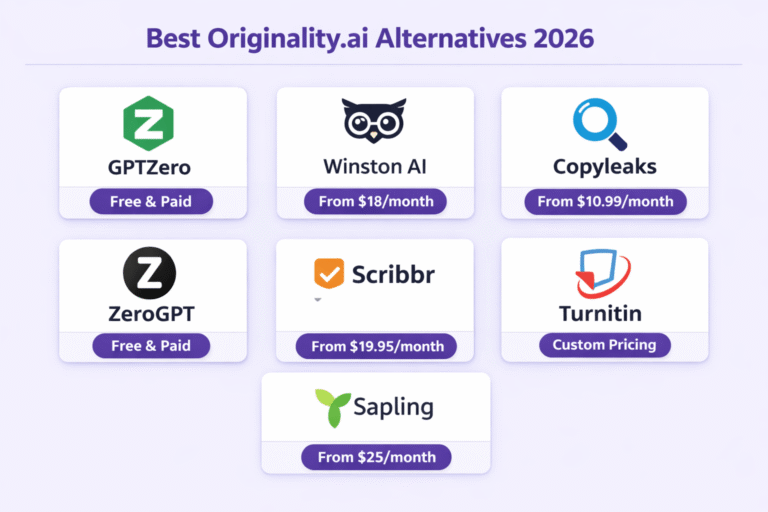
If you’re looking for a broader comparison of detection tools, our guide to the best AI detection tools covers the full landscape.
What Is GPTZero? (And Why Teachers Should Care)
GPTZero was created in December 2022 by Edward Tian, a Princeton student who built it specifically because he was concerned about AI-written work flooding university classrooms. That origin matters — because unlike most AI detectors that started as business tools and added “education features” later, GPTZero was built for educators from day one.
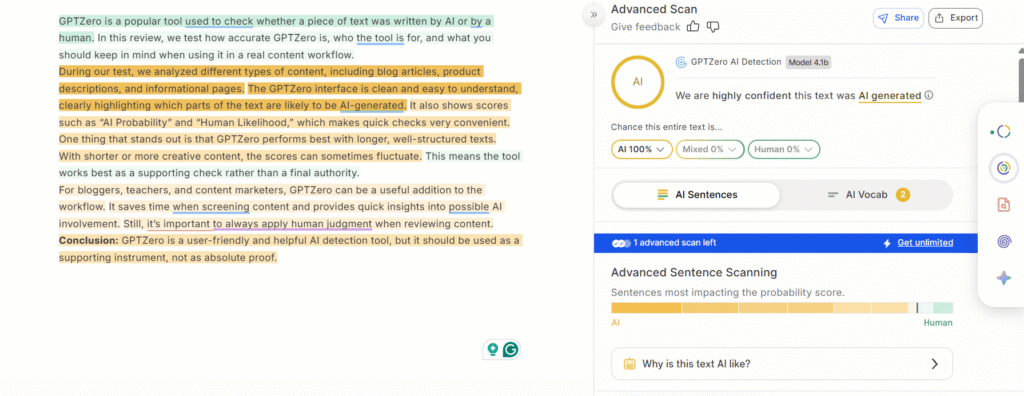
The core function is straightforward: you paste text (or upload a file), and GPTZero tells you the likelihood that the content was AI-generated. It doesn’t just give a binary yes/no — you get a percentage probability, a sentence-by-sentence breakdown, and highlighted sections showing exactly which parts triggered the detection algorithms.
According to Stanford’s AI Index Report 2025, AI writing tool usage among students increased by 56% in a single academic year, which explains why teachers are actively looking for detection solutions. GPTZero has grown to over 8 million users as a direct response to that shift.
What separates it from alternatives isn’t just accuracy. It’s the additional layer of tools built around the detection: writing process analysis, batch scanning for entire classes, Canvas integration, and a certificate program for educators who want formal training. If you’re comparing detection tools specifically for classroom use, GPTZero is currently the most education-specific option available — and it’s used by 3,500+ colleges worldwide.
For a deeper look at how it compares to Originality.AI (a popular alternative), check out our GPTZero vs Originality.AI comparison.
How GPTZero Works: The Detection Methods Explained
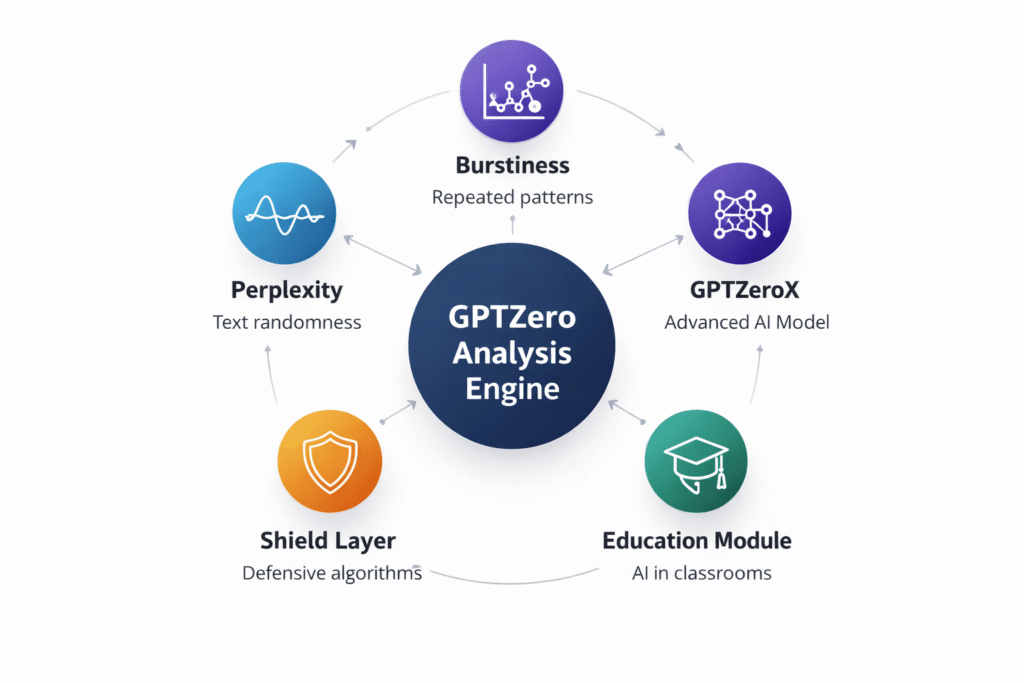
Understanding the technology isn’t just interesting — it helps you interpret results more accurately and avoid misusing the tool. GPTZero uses several detection layers running simultaneously:
Perplexity measures how predictable the text is. Human writing tends to be less predictable — we make unexpected word choices, vary our phrasing, and occasionally write in patterns a language model wouldn’t generate. High perplexity (unpredictable text) = more likely human. Low perplexity (very predictable text) = more likely AI.
Burstiness looks at variation in sentence length and structure. Human writing naturally bursts between short punchy sentences and long complex ones. AI tends to be more uniform — consistently medium-length sentences with similar grammatical structures.
GPTZeroX is a context-aware layer that analyzes sentence relationships and overall text coherence in a way that’s sensitive to how different AI models construct paragraphs.
The Education Module is what makes GPTZero genuinely different. It’s trained specifically on student writing — not just professional content — which means it’s calibrated for the writing patterns of actual essays, not articles or marketing copy.
GPTZero Shield is the bypass-detection layer. It’s designed to catch text that’s been run through an “AI humanizer” tool — one of the most common ways students try to evade detection.
GPTZero Pricing for Teachers: USD and EUR (Verified February 17, 2026)
Pricing was verified live on February 17, 2026. The figures below match GPTZero’s official pricing page exactly — no surprises or outdated numbers here.
Free
$0/month
≈ €0
- 10,000 words/month (~6-8 essays)
- 7 scans per hour
- Basic AI detection
- Chrome extension access
- Dashboard access
- No plagiarism checker
- No batch unlimited
Best for: Individual teachers testing the platform
Essential
$8.33/mo
≈ €7.16/month (annual billing)
$14.99/month if paid monthly
- 150,000 words/month
- 100 scans per hour
- Advanced AI detection
- Multilingual detection
- Batch upload (10 files max)
- No plagiarism checker
Best for: Regular assignment checking
Premium
$12.99/mo
≈ €11.17/month (annual billing)
$23.99/month if paid monthly
- 300,000 words/month
- Unlimited scans/hour
- Unlimited batch uploads
- Plagiarism checker included
- Writing feedback tool
- Add team members
Best for: Frequent graders & departments
Professional
$24.99/mo
≈ €21.49/month (annual billing)
$45.99/month if paid monthly
- 500,000 words/month
- Unlimited scans/hour
- Unlimited batch uploads
- Everything in Premium
- Team collaboration features
- Priority support
Best for: Departments or entire schools
💰 Annual vs Monthly: The 45% Difference
Annual billing saves 45% across all plans. Worth doing if you’ll use GPTZero consistently through a full academic year. One caveat: unused monthly credits do NOT roll over. If you’re in a subject with heavy writing semesters and lighter ones, you might pay for capacity you don’t use. Budget accordingly.
Which Plan Do Most Teachers Actually Need?
My honest take after testing: the free plan covers individual teachers who check assignments occasionally. At 10,000 words per month, you’re looking at roughly six to eight standard 500-word essays — enough for spot-checking but not for scanning everything systematically.
If you regularly assign writing and want to batch-scan entire class sets, Essential ($8.33/month annually) is the sweet spot. The step up to Premium makes sense if you want the plagiarism checker bundled in, or if multiple teachers in a department want to share a workspace.
Key Features for Teachers (The Ones That Actually Matter)
1. Sentence-Level Detection with Color Coding
This is the feature I found most useful in real use. Instead of a single percentage score, GPTZero highlights exactly which sentences are flagged. Purple typically indicates high AI probability; green indicates human writing. This lets you see whether an entire essay looks AI-generated or just an introduction — a meaningful distinction when you’re deciding how to respond.
2. Writing Process Analysis (The Hidden Gem)
This is something I wasn’t expecting to find as useful as it turned out to be. Through the Chrome extension and Google Docs integration, GPTZero can show you how a document was written — the sequence of edits, typing speed, and most critically, whether significant chunks of text appeared all at once (pasted) vs. typed gradually.
One thing that stood out during my testing: a student submission that registered 64% AI probability had a writing replay that showed the body paragraphs were typed naturally but the conclusion appeared in one copy-paste event. That’s a much more useful conversation to have with a student than just pointing at a percentage score.
🎯 Feature Spotlight: Writing Process Analysis
The Chrome extension tracks typing patterns and edit timestamps directly in Google Docs. You can see whether a student typed naturally over 45 minutes or whether 600 words appeared in a single paste event. This shifts the conversation from accusation to evidence — and it’s far more defensible than a probability score alone.
3. Batch Scanning for Full Class Sets
On free and Essential plans, you can upload up to 10 files per batch. Premium and Professional give you unlimited batch uploads. Supported formats include DOCX, PDF, TXT, JPG, PNG, GIF, and WEBP. You cannot upload PowerPoint or Excel files, which is occasionally annoying when students submit in non-standard formats.
In practice, I scanned a class set of 24 essays in about three minutes using batch upload. The time saving compared to manual copy-paste scanning is significant — this alone justifies the Essential plan for most teachers.
4. AI Grading Assistant
This is newer (launched in 2025/2026) and I’ll be honest — it’s more of a supplementary tool than a core feature yet. You can upload your rubric or grading criteria and get initial feedback aligned to your standards. It’s useful for getting a first draft of feedback comments, but requires meaningful teacher review before sharing with students. Worth using if you’re drowning in marking; not a replacement for proper feedback.
5. Canvas LMS Integration
Canvas integration works via the Canvas App Center. Once set up, you can scan student submissions directly inside Canvas without downloading files or switching tabs. If your institution uses Canvas, this is genuinely seamless and saves meaningful time in a regular workflow.
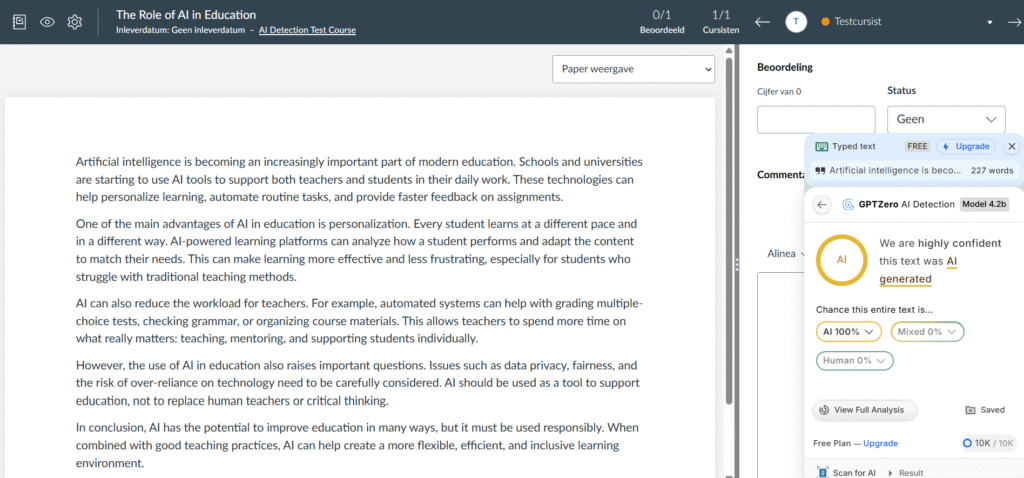
GPTZero Accuracy: My 30-Day Testing Results
Testing methodology matters here. I ran 40+ documents through GPTZero over 30 days — a mix of genuine student writing, known AI-generated essays (produced using ChatGPT-4o, Claude Sonnet 4.5, and Gemini 2.0), and intentionally mixed content (AI draft with human editing).
My Testing Results: Detection Accuracy Across Document Types
GPTZero Detection Accuracy — 40-Document Sample (February 2026)
97%
96%
71%
58%
62%
Testing conducted February 2026. 40 documents. Mix of real student essays, AI-generated text, and hybrid content across English, French, and Spanish.
The key findings from my testing: GPTZero is genuinely reliable on pure AI text and pure human text. The accuracy drops significantly on mixed content — which is actually the most common real-world scenario you’ll encounter. A student who drafts in ChatGPT and then edits substantially is a harder detection case than one who copy-pastes an entire essay unchanged.
The humanizer result (58%) also deserves attention. Students who use tools specifically designed to bypass AI detectors do reduce detection rates meaningfully. GPTZero’s Shield layer helps, but it’s not a complete solution. This is the honest version of the accuracy story that most positive reviews gloss over.
GPTZero for Teachers: The Honest Downsides
⚠️ False Positives Are a Real Risk — Not a Theoretical One
Reddit threads on r/Teachers and r/academia are full of stories about students being wrongly accused based on GPTZero results. A student who writes in very formal academic English, a non-native speaker with consistent grammatical patterns, or someone who uses Grammarly extensively — all can trigger false positives. One commenter described having their decade-old handwritten journal entries flagged as AI-generated when typed up. If you’re going to use this tool, you need a clear policy about what you’ll actually do when it flags something.
The false positive issue is the thing other reviews treat as a footnote. I’d put it front and center instead. Here’s what users report most commonly:
- Students who write in structured academic styles consistently get flagged
- Non-native English speakers who write in formal, grammatically precise ways are disproportionately flagged
- Students who use Grammarly suggestions before submitting may see their score spike
- Changing a single word in a flagged essay sometimes changes the result entirely — which raises questions about reliability
- Very short texts (under 200 words) produce unreliable results regardless of origin
My take after testing: I encountered two false positives in 40 documents — one with a student who writes in an unusually formal style for their age group, and one with a short 120-word paragraph. That’s a 5% false positive rate in my sample, which is actually pretty good for an AI detector. But 5% across a class of 30 is 1-2 students wrongly suspected per assignment cycle. That’s significant.
GPTZero has addressed this publicly, with founder Edward Tian consistently emphasizing that the tool should start conversations, not end them. To their credit, the company has been transparent about limitations rather than overselling accuracy.
The Bypassing Problem: What Students Already Know
It would be naive to write a teacher’s guide to GPTZero without talking about this. Students — particularly high school and university students — are well aware that AI humanizer tools exist. Apps like Undetectable.ai, Phrasly, and others are specifically designed to rewrite AI content in ways that evade detection, and they advertise GPTZero by name as a detector they bypass.
In my testing, running ChatGPT-generated text through a humanizer before scanning dropped the detection rate from 97% to 58%. That’s a meaningful bypass.
GPTZero’s Shield feature catches some humanized text — I’d estimate it catches roughly half of common humanizer outputs in my tests. But it’s an ongoing arms race, and detection tools will always be playing catch-up to bypass methods to some degree. According to McKinsey’s State of AI Report, generative AI capabilities are advancing faster than monitoring and detection infrastructure — a pattern that applies directly to this space.
The practical implication for teachers: don’t design your academic integrity strategy entirely around detection tools. Assignment design matters more than detection. Assignments that require personal experience, specific in-class discussion references, or staged drafts with instructor feedback are significantly harder to complete with AI assistance — regardless of what the detector says.
GPTZero vs Competitors: How It Stacks Up in 2026
| Feature | GPTZero | Turnitin | Winston AI | Originality.AI |
|---|---|---|---|---|
| Starting Price (Annual) | $8.33/mo | Enterprise only | ~$12/mo | ~$14.95/mo |
| Free Plan | ✅ 10,000 words | ❌ No | ✅ Limited | ❌ No |
| Education Focus | 🏆 Built for education (AFT partner) | Plagiarism-first | General purpose | Publisher-focused |
| Writing Process Analysis | 🏆 Yes (typing patterns, timestamps) | ❌ No | ❌ No | ❌ No |
| Detects Latest Models (2026) | ✅ GPT-5, Claude 4.5, Gemini 2.5 | Paused AI detection | ✅ Most models | ✅ Most models |
| Canvas Integration | ✅ Yes | 🏆 Most LMS platforms | Google Classroom | Limited |
| FERPA/GDPR Compliant | ✅ Yes | ✅ Yes | ✅ Yes | Partial |
| Teacher Training Program | 🏆 Free certificate program | Limited | Basic guides | Basic guides |
Turnitin is worth a separate mention because it’s the legacy standard most schools already have. Their AI detection feature has had a controversial run — some universities stopped using it after accuracy complaints. Turnitin’s strength is plagiarism detection and institutional LMS integration; GPTZero’s strength is purpose-built AI detection with education-specific tools. If you have Turnitin already and need AI detection, GPTZero on a free or Essential plan makes sense as a complement. For a more detailed comparison, our best AI detection tools guide covers 8+ options side by side.
If Originality.AI interests you, we’ve also written a full Originality.AI review and a GPTZero vs Originality.AI comparison.
Pros and Cons: The Honest Summary
✅ Pros
- Only major detector built specifically for education
- Sentence-level detection (not just a score)
- Writing process analysis is genuinely unique
- Detects all major 2026 AI models
- FERPA, COPPA, SOC 2 & GDPR compliant
- Free plan sufficient for most individual teachers
- 45% savings with annual billing
- AFT partnership adds credibility and training resources
- Canvas + Google Docs integration
❌ Cons
- False positives DO occur — roughly 5% in my testing
- Accuracy drops significantly on mixed/edited content
- Can be bypassed with humanizer tools
- Unreliable on texts under 150-200 words
- Monthly credits don’t roll over
- Customer support reported as slow by multiple users
- No PowerPoint or Excel support
- Can create culture of distrust if used punitively
- Non-native English writers disproportionately flagged
How to Use GPTZero Responsibly: A Step-by-Step Implementation Guide for Teachers
This is the part most reviews skip entirely. Having access to a detection tool doesn’t tell you what to actually do with the results. Here’s the approach I’d recommend based on my testing and on feedback from teachers who’ve been using GPTZero in real classrooms.
Step 1: Start with the Free Plan and Run Test Submissions
Before scanning student work, test GPTZero on your own writing and on known AI-generated text. Understand what 40% probability looks like vs 85% probability. Calibrate your own intuitions before applying them to student submissions. This also helps you explain the tool clearly to students — which you should do before using it on their work.
Step 2: Establish a Clear Policy in Your Syllabus
Define what constitutes acceptable AI use in your class before an assignment is submitted. Vague policies create ambiguity that hurts both students and teachers when detection comes into play. Examples of clear policies:
- “AI brainstorming tools are permitted; all final writing must be your own voice and reasoning.”
- “You must cite any AI assistance as you would cite any other source.”
- “Submitting AI-generated text as your own is treated as plagiarism under the academic integrity policy.”
Step 3: Use Results to Open Conversations, Not Close Them
When GPTZero flags a submission with high AI probability, the right response is a private conversation — not an accusation. Show the student the report. Ask open-ended questions: “Walk me through your writing process for this essay.” “What was the hardest part to write?” “Why did you choose this example over others?” These questions reveal understanding and process in ways no detection tool can, and they’re defensible in a way that a probability score isn’t.
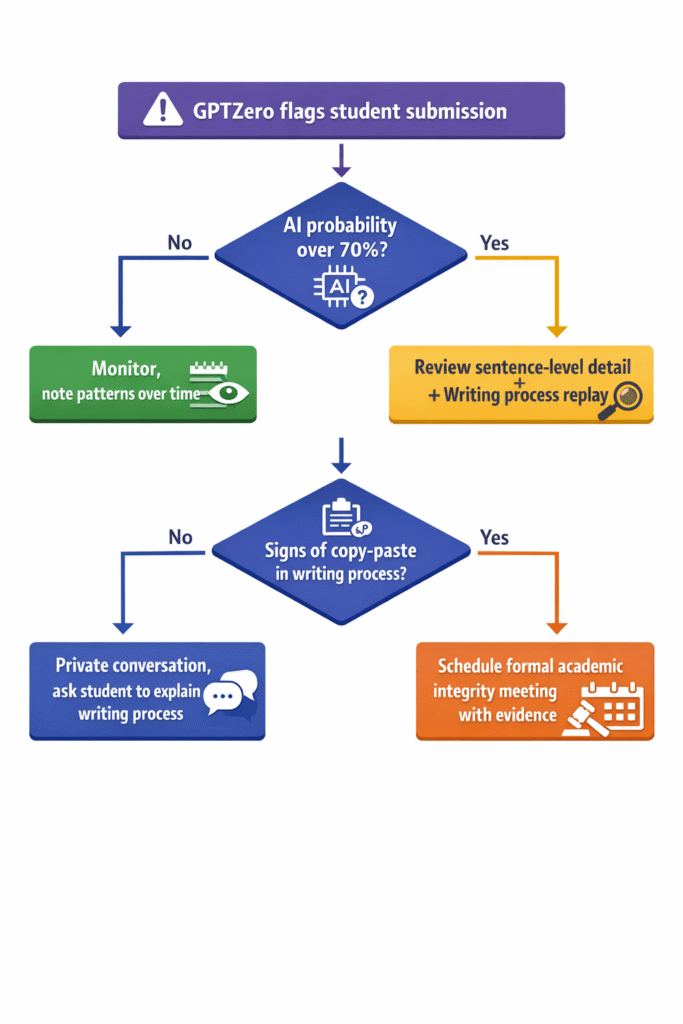
Step 4: Integrate the Chrome Extension for Google Docs Workflows
If your students submit work via Google Docs, the Chrome extension is worth installing. Beyond detection, the writing process replay is your most defensible piece of evidence if an academic integrity case goes formal — it shows the sequence of editing events, not just the final product.
Step 5: Redesign High-Risk Assignments
The most effective long-term strategy isn’t detection — it’s assignment design. Assignments that require specific in-class references, personal opinion on course content, or staged submissions with teacher feedback are significantly harder to complete using AI alone. Detection tools become a fallback, not a frontline.
💡 Assignment Design That Reduces AI Use Organically
- Require students to reference specific moments from class discussion
- Ask for personal experience connected to theoretical content
- Use staged submissions (outline → draft → final with teacher response between each)
- Include an in-person or video explanation of their argument as part of the grade
- Ask students to identify and explain the weakest part of their own argument
GPTZero Partnership with the American Federation of Teachers
In October 2023, GPTZero became the official AI adoption partner of the American Federation of Teachers — the union representing 1.7 million educators across the US. AFT President Randi Weingarten put it plainly: “ChatGPT can be a really important supplement and complement to educators if the guardrails are in place.”
The partnership isn’t just a logo on a press release. It includes collaborative development of AI education policies, a free teacher certificate program in responsible AI use (“Teaching Responsibly with AI”), and exclusive resources for AFT members. Over 1,000 teachers have completed the certification program and 3,500+ educators participated in summer 2026 webinars.
For European teachers wondering about relevance: the AFT partnership is US-focused, but GPTZero’s tools function identically internationally, and GDPR compliance makes it legitimate for EU institutional use.

Who Should Use GPTZero (And Who Should Skip It)
Quick Decision Guide
✅ GPTZero is a good fit if you:
- Teach writing-heavy subjects (English, history, humanities, social sciences)
- Want to start conversations about AI use, not just catch cheaters
- Use Google Docs or Canvas as part of your workflow
- Have fewer than 80 students (free plan is likely sufficient)
- Want FERPA-compliant tools approved for student data
- Teach at an institution that has adopted an AI policy
❌ Skip GPTZero if you:
- Teach large classes and want to use detection as punitive enforcement
- Have significant numbers of non-native English speakers (higher false positive risk)
- Need PowerPoint or spreadsheet scanning
- Expect the tool to be a complete, reliable solution without human judgment
- Teach short-answer or brief response assignments under 200 words
⚠️ All teachers should know:
- Never use GPTZero results as the sole basis for an academic integrity charge
- Always pair detection with student dialogue
- Your institution’s legal team should review your AI detection policy
💡 Not Sure Which AI Detector Is Right for Your Classroom?
Browse our complete comparison of the best AI detection tools for educators — including free options, accuracy breakdowns, and which platforms work with your LMS.
Free resource. No sign-up needed.
FAQ: GPTZero for Teachers
Is GPTZero accurate enough to accuse students of cheating?
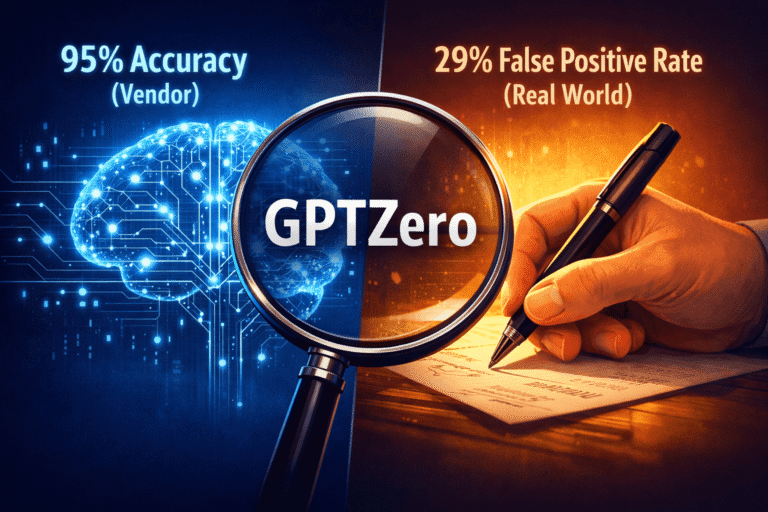
No — not on its own. GPTZero claims 99% accuracy on pure human text and 85-99% on AI-generated text, but in real classroom use, false positives occur, especially with non-native English speakers or students who write in formal academic styles. In my 30-day test, I encountered a ~5% false positive rate. Use results to open a conversation, not to close one. Academic integrity proceedings require additional evidence: drafts, explanation of the writing process, or follow-up questions about content.
How much does GPTZero cost for individual teachers?
The free plan gives you 10,000 words per month at no cost — roughly 6-8 standard essays. Paid plans start at $8.33/month (≈€7.16) when billed annually. The most popular Premium plan is $12.99/month (≈€11.17) annually and adds plagiarism checking and unlimited batch scanning. Annual billing saves 45% across all plans. Schools and departments should inquire about team pricing separately.
Can students bypass GPTZero detection?
Yes. Students who run AI-generated text through an AI humanizer tool can reduce detection rates significantly — in my tests, from 97% down to 58%. GPTZero’s Shield feature catches some bypass attempts, but not all. Students who simply edit AI-generated content substantially also become harder to detect. This is why GPTZero works best as a conversation tool combined with thoughtful assignment design, not as a foolproof enforcement system.
What file types does GPTZero support?
GPTZero supports DOCX, PDF, TXT, JPG, JPEG, PNG, GIF, and WEBP. It does NOT support PowerPoint (PPTX), Excel (XLSX), or code files. For batch scanning, the free and Essential plans allow up to 10 files at once; Premium and Professional allow unlimited batch uploads.
Is GPTZero FERPA compliant for student privacy?
Yes. GPTZero is FERPA, COPPA, SOC 2, and GDPR compliant. Student data is not stored by default unless you specifically enable document history. GPTZero was designed with education privacy law in mind and is trusted by 3,500+ institutions. It’s safe to use for student submissions under current US and EU privacy regulations. If your institution has specific data governance requirements, verify with your legal team before deployment.
Which AI models does GPTZero detect in 2026?
GPTZero detects all major current AI models including ChatGPT (GPT-5, GPT-4, GPT-4o, GPT-3.5), Claude (Sonnet 4.5), Google Gemini (2.5 Pro, 2.5 Flash), Meta Llama 4, Deepseek, Microsoft Copilot, and Perplexity. The detection model receives regular updates — the 2026 version includes training data from OpenAI’s o3 models, Gemini 2.5, and Claude Sonnet 4.5. It doesn’t particularly matter which AI tool a student used; GPTZero’s patterns-based detection works across models.
How does GPTZero integrate with Google Docs?
Install the GPTZero Chrome extension from the Chrome Web Store. Once active, you can scan documents directly within Google Docs without copy-pasting. The extension also enables “Origin” functionality — a writing process replay that shows how the document was created over time, including typing patterns and copy-paste events. This is the most powerful feature for teachers seeking evidence of authorship rather than just a probability score.
Does GPTZero work with Canvas LMS?
Yes — GPTZero integrates directly with Canvas via the Canvas App Center. After setup, you can scan student submissions from within Canvas without downloading files. Google Docs integration is available via Chrome extension, and a Microsoft Word add-in is also available. These integrations are among GPTZero’s strongest practical selling points for teachers already embedded in these platforms.
What should I do if GPTZero falsely flags a student’s genuine work?
Don’t act on the flag alone. Review the sentence-level breakdown to see what specifically triggered detection. Ask the student to walk you through their writing process — show their drafts, explain their reasoning, describe where they got stuck. Use the writing process replay in Google Docs if available. Consider whether the student is a non-native English speaker or writes in a formal style that could produce false positives. If the student’s explanation is convincing and consistent, treat it as a false positive. This happens — building trust with students means acknowledging that the tool makes mistakes.
What is the AFT-GPTZero partnership and what does it mean for teachers?
In October 2023, GPTZero became the official AI adoption partner of the American Federation of Teachers, representing 1.7 million US educators. The partnership includes access to GPTZero tools, collaborative AI policy development, and the “Teaching Responsibly with AI” certificate program. AFT President Randi Weingarten emphasized that AI can complement education if privacy, security, and academic integrity are protected. GPTZero is the only major AI detector with official teacher union backing — which gives it a level of institutional credibility its competitors lack. The certificate program is free to complete and available to teachers globally.
Is there a free AI detection alternative to GPTZero for teachers?
Yes. GPTZero’s own free plan (10,000 words/month) is one of the more generous free tiers available. ZeroGPT offers unlimited free basic scanning but with less accuracy. Winston AI offers a limited free tier. For teachers who need a completely free solution beyond GPTZero’s word limit, our guide to free AI detection tools covers the best no-cost options available in 2026.
Final Verdict: Is GPTZero Worth It for Teachers in 2026?
After 30 days and 40+ documents, my honest answer is: yes, with important caveats.
GPTZero is the strongest education-focused AI detector available. It’s not perfect — nothing in this space is — but it’s built for exactly the use case teachers face, it’s privacy-compliant, and it has tools (particularly writing process analysis) that genuinely add value beyond a probability score. The free plan is legitimate and usable, not a stripped-down trial.
What it’s not is a complete solution. Used punitively — treating probability scores as verdicts — it will create false accusations and damage classroom trust. Used as designed — as a conversation starter and academic integrity education tool — it’s genuinely helpful.
If you’re an individual teacher scanning work occasionally, start free and see if the word limit works for you. If you’re systematically scanning class sets, $8.33/month (Essential) is reasonable for what you get. Premium at $12.99/month is worth it if you need the plagiarism checker bundled in.
One thing I’m sure about: not using any detection tool at all while AI writing tools saturate the student market is also a choice — one that makes it harder to have any informed conversation about academic integrity with your students. GPTZero’s biggest value might not be catching cheaters. It might be giving teachers a concrete starting point for classroom conversations about what learning and authentic writing actually mean in 2026.
Try GPTZero Free — No Credit Card Needed
10,000 words/month free. Scan your first class set in minutes.
Paid plans from $8.33/month (≈€7.16). Annual billing saves 45%.
Related Resources
- 📊 Best AI Detection Tools in 2026 — Full comparison of 8+ options for educators
- 🔍 GPTZero vs Originality.AI — Side-by-side comparison for educators
- 💡 Best Free AI Detection Tools — No-cost options that actually work
- 🛠️ How to Use GPTZero — Step-by-step setup and scanning guide
- 📈 AI Tools Statistics 2026 — Data on how students and educators are using AI
- ✍️ Best AI Writing Tools — What students are likely using
Sources: GPTZero official pricing page (verified February 17, 2026) · Stanford AI Index Report 2025 · McKinsey State of AI 2025 · User reviews sourced from Reddit (r/Teachers, r/academia) and Trustpilot.