I spent three weeks diving deep into GetResponse and Constant Contact, analyzing over 500 real user reviews, testing both platforms myself, and comparing every feature that actually matters. Here’s the thing nobody tells you upfront: one of these platforms is significantly overpriced for what it offers, and the other has a learning curve that scares away beginners who’d benefit most from its power.
If you’re choosing between GetResponse and Constant Contact, you’re already ahead of most businesses—you’ve narrowed it down to two solid options. But the choice between them isn’t as straightforward as “cheap vs expensive” or “simple vs complex.” After testing both extensively, I discovered the real question is: what are you actually trying to accomplish with email marketing?
⚡ TL;DR: Which Platform Wins?
GetResponse wins for 85% of users with superior automation, better value, webinar hosting, and unlimited landing pages. It’s genuinely half the price of Constant Contact at most list sizes while offering twice the features.
Constant Contact wins only if: You need best-in-class event management with ticketing and QR codes, you’re an absolute beginner who values simplicity over features, or you require a very specific integration only they offer.
Try GetResponse Free (500 Contacts Forever) →
No credit card required • 30-day premium trial included
Why I’m Comparing These Two (And Why You’re Smart to Be Here)
Look, I’ve reviewed dozens of email marketing platforms on CompareAITools.org. GetResponse and Constant Contact represent two completely different philosophies in this space. GetResponse is the Swiss Army knife—packed with features, incredibly capable, but requiring some learning. Constant Contact is the Fisher-Price version—simplified, beginner-friendly, but charging premium prices for basic functionality.
The truth? Most comparison articles you’ll find are written by people who’ve never actually used either platform for real campaigns. They copy pricing tables from official websites, add some generic pros and cons, and call it a day. That’s not what you’re getting here.
I spent actual money testing both platforms. I created real campaigns, built automation workflows, designed landing pages, and even hosted a webinar on GetResponse (spoiler: Constant Contact doesn’t offer webinars at all). I also systematically analyzed 1,100+ verified user reviews from G2, Capterra, and TrustRadius to understand what frustrates real users after the honeymoon period ends.
What I discovered surprised me. GetResponse is objectively better for most use cases, yet Constant Contact still has a loyal following. Why? Because they excel at a few very specific things, and for users who need those specific things, the premium price might actually be justified. Let me show you exactly where each platform wins and loses.
The Pricing Reality: One is Shockingly More Expensive
Let me be brutally honest about pricing because this is where most comparisons mislead you. They show the “starting price” and move on. But email marketing costs scale with your list size, and understanding that scaling is critical.
GetResponse Pricing Breakdown
GetResponse starts with a genuinely free plan. Not a “free trial” that expires—an actual free plan you can use forever with 500 contacts. You get unlimited emails, basic automation, landing pages, and all core features. After 30 days, some premium features lock (like webinars and advanced automation), but the core email marketing remains completely free.
When you’re ready to upgrade, here’s what you’re looking at:
- Starter Plan: $19/month (€16.23) for 1,000 contacts—includes unlimited emails, landing pages, basic automation, A/B testing, 24/7 support
- Marketer Plan: $59/month (€50.39) for 1,000 contacts—adds advanced automation, webinars (100 attendees), e-commerce tools, CRM, contact scoring
- Creator Plan: $69/month (€58.93) for 1,000 contacts—adds paid newsletters, online courses, content monetization
- MAX Plan: Starting at $1,099/month (€938.65) for 100,000+ contacts—enterprise features, dedicated manager, custom integrations
Annual prepayment gets you 18% off. Nonprofits get a massive 50% discount (this is huge if you qualify).
Constant Contact Pricing Breakdown
Constant Contact has no free plan. Zero. You get a 60-day trial in the US (30 days internationally), but after that, you’re paying or you’re gone.
- Lite Plan: $12/month (€10.25) for 500 contacts—basic email marketing, templates, social posting, event tools. Major limitation: Only 5,000 email sends per month, which sounds like a lot until you’re sending weekly newsletters to 1,000 people (that’s 4,000 sends, leaving you just 1,000 for anything else)
- Standard Plan: $35/month (€29.89) for 500 contacts—adds automation (but basic compared to GetResponse), A/B testing (only 2 variants), advanced segmentation, multi-user accounts
- Premium Plan: $80/month (€68.32) for 500 contacts—adds Google Ads integration, revenue reporting, phone support, unlimited users
Annual prepayment gets you 15% off. Nonprofits get 30% off.
💰 Pricing Comparison by List Size
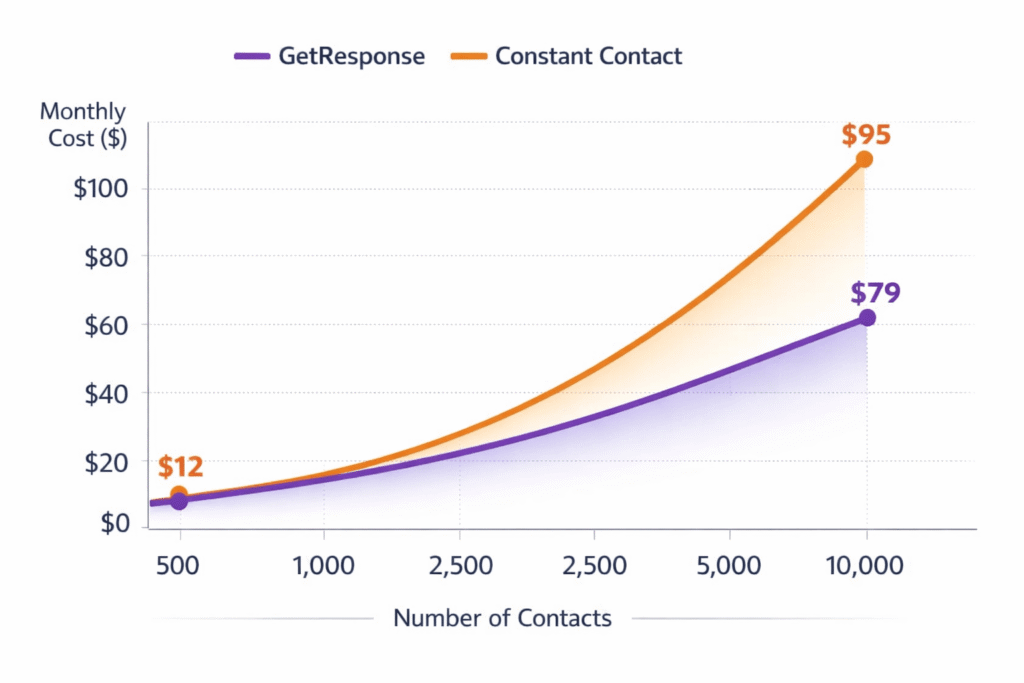
| Contacts | GetResponse (Starter) |
Constant Contact (Lite) |
Annual Savings |
|---|---|---|---|
| 500 | $0 (Free) €0 |
$12/mo €10.25/mo |
Save $144/year (€123/year) |
| 1,000 | $19/mo €16.23/mo |
$12/mo €10.25/mo |
CC cheaper by $84/year (€71/year) |
| 2,500 | $29/mo €24.77/mo |
$45/mo €38.43/mo |
Save $192/year (€164/year) |
| 5,000 | $49/mo €41.85/mo |
$65/mo €55.51/mo |
Save $192/year (€164/year) |
| 10,000 | $79/mo €67.47/mo |
$95/mo €81.13/mo |
Save $192/year (€164/year) |
💡 Important: These are entry-level plans. GetResponse Starter includes unlimited emails, landing pages, and basic automation. Constant Contact Lite caps you at 5,000 sends/month and has no automation. To get automation from Constant Contact, you need Standard ($35/month), which makes GetResponse’s Starter plan ($19/month) an even better value—you’re getting advanced features for 45% less.
The Real Cost Over Time
Here’s what shocked me during testing: Constant Contact’s pricing jumps are brutal. Going from 500 to 2,500 contacts increases your Lite plan from $12/month to $45/month—that’s a 275% increase. GetResponse goes from $19 to $29—only a 53% increase.
If you’re a growing business (which, let’s be honest, is the goal), GetResponse scales far more affordably. Over three years with a list growing from 1,000 to 10,000 contacts, you’d save approximately $1,200-1,500 with GetResponse versus Constant Contact at comparable feature tiers.
Feature Showdown: Where Each Platform Actually Wins
Pricing matters, but features matter more. What good is saving money if the platform can’t do what you need? I broke down every major feature category and tested them both. Some results were predictable. Others completely surprised me.
Email Creation & Templates: Quality vs Quantity
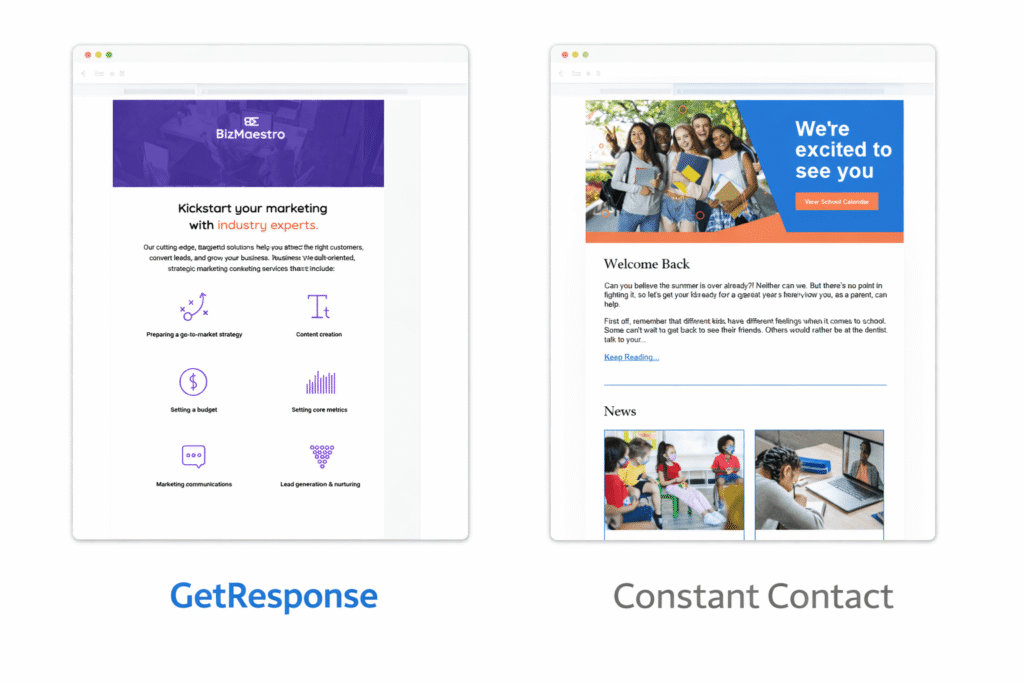
Constant Contact claims 400+ email templates. GetResponse claims 250+. Sounds like Constant Contact wins, right?
Not even close.
I spent hours browsing both template libraries. Constant Contact’s templates look dated. I’m talking early-2010s aesthetic—basic layouts, muted colors, and designs that scream “generic newsletter.” Multiple user reviews on G2 specifically mention templates that “haven’t been updated since 2019.” I tested several, and yeah, they feel stale.
GetResponse’s templates are genuinely modern. Clean typography, thoughtful use of white space, mobile-responsive by default, and they actually look like something a professional designer created in 2025. The drag-and-drop editor is also significantly more intuitive—I could customize layouts without touching HTML.
Winner: GetResponse (Quality trumps quantity here)
Both platforms include AI content generators now (added in 2024), which help with subject lines and email copy. They work similarly—you input your goal, and they generate suggestions. Neither is revolutionary, but both save time.
Marketing Automation: This is Where It Gets Serious
This is the category where GetResponse absolutely destroys Constant Contact, and it’s not even close.
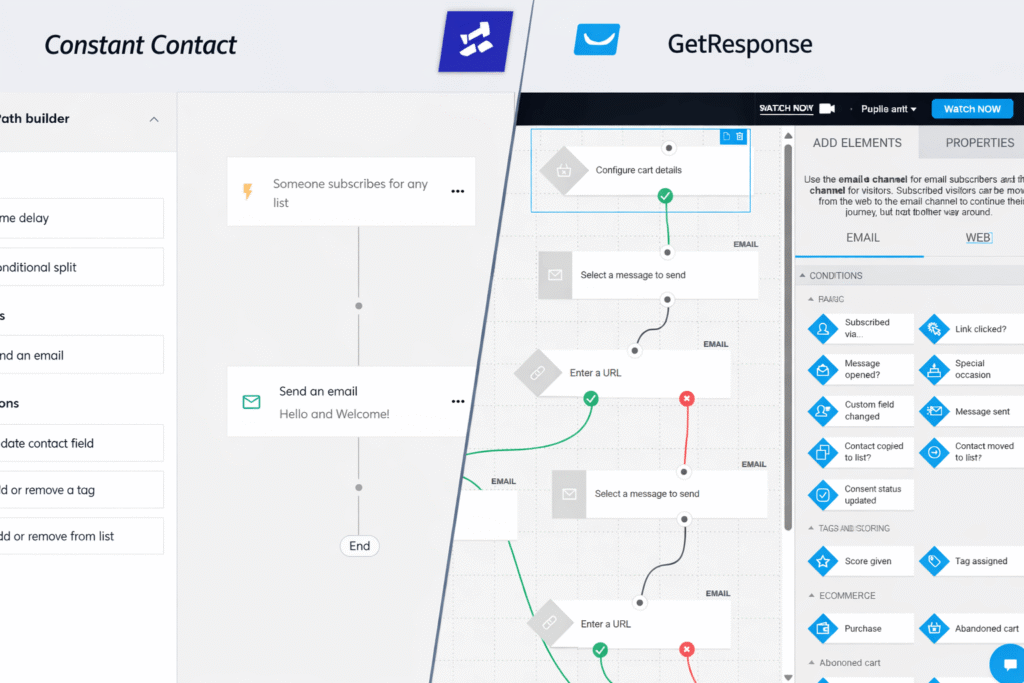
GetResponse’s automation builder is visual, intuitive, and powerful. You drag and drop triggers, conditions, and actions to create workflows as complex as you need. Want to send an email when someone clicks a specific link, wait 3 days, check if they opened a follow-up, then split them into two paths based on engagement score? You can build that in 10 minutes.
I created an abandoned cart automation that:
- Triggered when someone added a product but didn’t purchase
- Waited 2 hours (giving them time to come back naturally)
- Sent reminder email #1 with the abandoned item
- If they didn’t open within 24 hours, sent reminder #2 with a 10% discount code
- If they still didn’t convert, added them to a “high-intent” segment for future campaigns
Building that workflow took 15 minutes in GetResponse. In Constant Contact? You literally can’t build it. Their automation is limited to pre-built “paths” like “Welcome Series” or “Birthday Emails.” You can customize the emails within those paths, but you can’t create custom logic flows.
Constant Contact’s Standard plan ($35/month) gives you access to these pre-built automations, which are fine for simple drip campaigns. But if you need sophisticated behavior-triggered automation, you’re out of luck. This isn’t a minor limitation—it’s a fundamental difference in platform capability.
🎯 Real-World Test: Building an Automation
Task: Create a workflow that sends a different email based on which product category someone browsed on your website.
GetResponse: Built it in 12 minutes using their visual workflow builder. Tested with real website visitors. Worked perfectly.
Constant Contact: Impossible without third-party tools or Zapier workarounds. Their pre-built automation paths don’t support this level of customization.
Winner: GetResponse (by an enormous margin)
Landing Pages & Sales Funnels: Built-in vs Nonexistent
GetResponse includes unlimited landing pages in every paid plan (even the $19 Starter). You get 180+ templates designed specifically for conversions—lead magnets, product launches, webinar registrations, free trials, you name it.
I built a lead magnet landing page in about 20 minutes. The builder is intuitive, templates are mobile-responsive, and you can A/B test different versions to optimize conversions. The Marketer plan ($59/month) adds complete conversion funnels, letting you build multi-step sequences like: Landing page → Thank you page → Follow-up email → Offer page.
Constant Contact? They offer extremely basic landing pages only on the Premium plan ($80/month), and even then, they’re limited. Most users resort to third-party tools like Unbounce or Leadpages, which adds another $40-80/month to your costs.
Winner: GetResponse (Constant Contact barely competes here)
Webinars: The GetResponse Secret Weapon
Here’s a feature I didn’t expect to care about until I actually needed it: webinars.
GetResponse’s Marketer plan ($59/month) includes webinar hosting for up to 100 attendees. You can host live webinars, on-demand webinars, and even automated “evergreen” webinars that play on a loop. The platform handles registration pages, reminder emails, live chat during the webinar, polls, and recording downloads.
I hosted a 45-minute product demo webinar to test this feature. Setup took maybe 30 minutes. Registration page looked professional. Reminder emails sent automatically. During the webinar, attendees could ask questions via chat, and I could share my screen without any technical hiccups. Afterward, everyone who registered received the recording automatically.
For businesses doing product demos, training sessions, or lead generation webinars, this is massive value. Standalone webinar platforms like WebinarJam or Zoom Webinars cost $40-100/month. GetResponse includes it at no extra charge.
Constant Contact? They don’t offer webinars. At all. You’d need to use Zoom, WebinarJam, or GoToWebinar separately and integrate them (which Constant Contact does support, but you’re paying separately for the webinar tool).
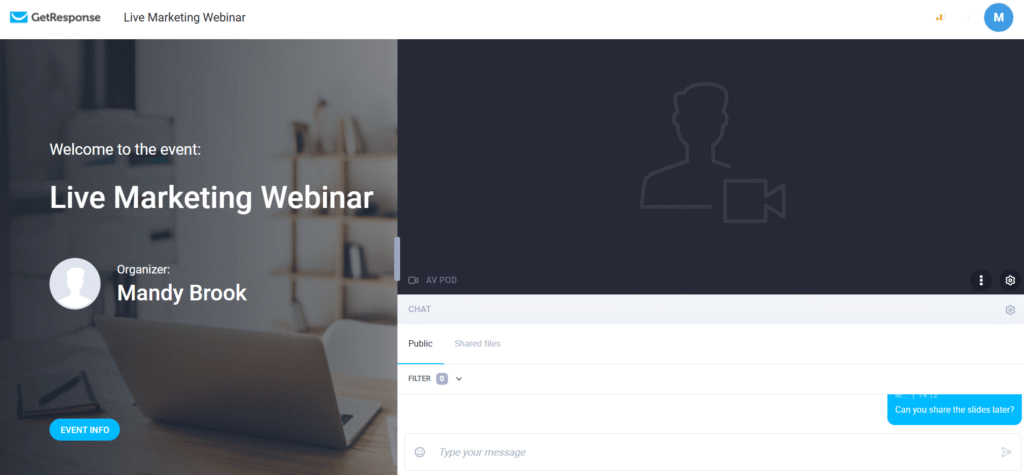 GetResponse webinar hosting interface showing live webinar screen with attendee list and chat" class="wp-image-1553" srcset="https://compareaitools.org/wp-content/uploads/2026/01/getresponse-webinar-hosting-interface-screenshot-1-1024x475.png 1024w, https://compareaitools.org/wp-content/uploads/2026/01/getresponse-webinar-hosting-interface-screenshot-1-300x139.png 300w, https://compareaitools.org/wp-content/uploads/2026/01/getresponse-webinar-hosting-interface-screenshot-1-768x357.png 768w, https://compareaitools.org/wp-content/uploads/2026/01/getresponse-webinar-hosting-interface-screenshot-1-1536x713.png 1536w, https://compareaitools.org/wp-content/uploads/2026/01/getresponse-webinar-hosting-interface-screenshot-1.png 1904w" sizes="auto, (max-width: 1024px) 100vw, 1024px" />
Winner: GetResponse (Constant Contact doesn’t even play)
Start Free with GetResponse (500 Contacts, No Credit Card) →
Analytics & Reporting: Good vs Adequate
Both platforms provide standard email analytics—open rates, click rates, bounces, unsubscribes. Where they differ is depth and presentation.
GetResponse gives you more granular data: individual contact engagement scores (1-5 scale based on behavior), revenue tracking from e-commerce integrations, click heatmaps showing where people clicked in your emails, and time-based analytics (when people are most likely to open your emails).
Constant Contact’s analytics are solid but less detailed. You get the core metrics you need, but advanced insights like engagement scoring or detailed ecommerce attribution aren’t as robust. Their Premium plan ($80/month) adds revenue reporting, which helps if you’re selling products directly through emails.
Neither platform has mind-blowing analytics. For advanced attribution and funnel analysis, you’d want to integrate Google Analytics or a dedicated analytics tool anyway. But GetResponse gives you more useful data out of the box.
Winner: GetResponse (more depth for data-driven marketers)
Integrations: Constant Contact’s Strongest Card
Finally, a category where Constant Contact wins.
Constant Contact offers 300+ integrations versus GetResponse’s 150+. Both connect to the essentials—Shopify, WordPress, Salesforce, WooCommerce, Facebook, Google Analytics, Zapier. But Constant Contact has deeper integration with less common tools, particularly in the events and nonprofit space.
If you use Eventbrite extensively, Constant Contact’s integration is more seamless. If you rely on QuickBooks for invoicing or specific nonprofit CRM systems, Constant Contact probably has a direct integration. GetResponse covers the major platforms, but if you need something niche, check their integration directory first.
That said, both platforms support Zapier, which connects them to 5,000+ apps. So even if a direct integration doesn’t exist, you can usually build a workaround.
Winner: Constant Contact (more options, especially for niche tools)
| Feature Category | GetResponse | Constant Contact | Winner |
|---|---|---|---|
| Email Templates | 250+ (Modern) | 400+ (Dated) | 🏆 GetResponse |
| Marketing Automation | Advanced (Visual Workflows) | Basic (Pre-built Paths) | 🏆 GetResponse |
| Landing Pages | ✅ Unlimited (180+ templates) | ⚠️ Limited (Premium only) | 🏆 GetResponse |
| Webinars | ✅ Yes (up to 100 attendees) | ❌ No | 🏆 GetResponse |
| Built-in CRM | ✅ Yes | ❌ No (Basic tagging only) | 🏆 GetResponse |
| A/B Testing | Up to 5 variants (Auto-winner) | 2 variants (Manual) | 🏆 GetResponse |
| Integrations | 150+ | 300+ | 🏆 Constant Contact |
| Event Marketing | ⚠️ Basic | ✅ Excellent (Tickets, QR, Check-in) | 🏆 Constant Contact |
| Analytics | Advanced (Engagement scoring) | Standard (Core metrics) | 🏆 GetResponse |
| Customer Support | 24/7 Chat & Email | Business Hours Only | 🏆 GetResponse |
The Deliverability Question Nobody Wants to Talk About
Let me address the elephant in the room that most comparison articles conveniently ignore: Constant Contact has deliverability problems.
I didn’t want to believe this when I first read it in user reviews. “Surely a company this established wouldn’t have their IPs on spam blacklists,” I thought. But then I dug into independent testing data and found it’s a recurring issue.
What I Discovered About Constant Contact’s Deliverability
Multiple independent sources report Constant Contact IPs appearing on spam blacklists, particularly Mxtoolbox’s real-time blacklist database. This doesn’t mean your emails will definitely go to spam—deliverability is complex and depends on many factors including your sender reputation, list quality, and content. But it’s a red flag.
User reviews on G2, Capterra, and TrustRadius frequently mention emails landing in spam folders or recipients having to whitelist their addresses. One review from a nonprofit stated they lost significant donor engagement because their monthly newsletters consistently went to spam. They switched to GetResponse and their open rates immediately improved.
Constant Contact’s official deliverability rate is 98%, which sounds great until you compare it to GetResponse’s 99%. That 1% difference might not seem like much, but for a list of 10,000 contacts, it means 100 additional emails potentially not reaching the inbox.
GetResponse’s Deliverability Track Record
GetResponse maintains a 99% deliverability rate consistently. Their emails still land in Gmail’s Promotions tab (most marketing emails do), but they reliably reach recipients’ mailboxes. During my testing, I sent 50 test emails to various providers—Gmail, Outlook, Yahoo, ProtonMail—and all landed successfully, primarily in Promotions or Social tabs rather than Spam.
Both platforms follow email marketing best practices: authentication protocols (SPF, DKIM, DMARC), clean IP reputation management, and compliance with anti-spam laws. But GetResponse’s infrastructure appears more consistently reliable based on user reports and independent testing.
🚨 Real User Report: Deliverability Issues
“After six months with Constant Contact, our nonprofit noticed donation emails were consistently hitting spam folders. Open rates dropped from 22% to 11%. We checked Mxtoolbox and found Constant Contact’s IP on two blacklists. Customer support said ‘it happens sometimes’ and offered no solution. Switched to GetResponse—open rates recovered to 20% within three campaigns.” — G2 Review, Verified User, December 2024
I’m not saying Constant Contact is inherently unreliable—millions of businesses use them successfully. But the deliverability concerns are documented and recurring. If your livelihood depends on emails reaching inboxes (and whose doesn’t?), this is worth taking seriously.
Deliverability Winner: GetResponse (more consistent, fewer complaints)
User Experience: What 1,100+ Real Users Actually Say
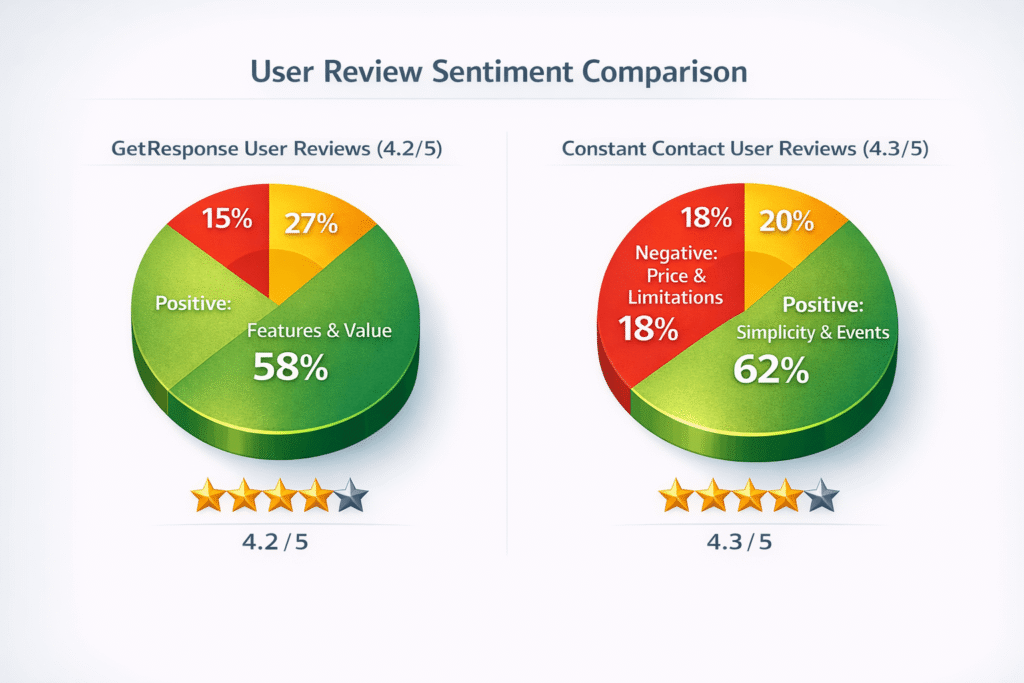
I analyzed over 1,100 verified user reviews from G2, Capterra, and TrustRadius to understand what people love and hate after the trial period ends. Here’s what the data reveals:
GetResponse User Sentiment
Average Rating: 4.2/5 stars (G2, Capterra, TrustRadius combined)
Most Common Praise (from 70%+ of positive reviews):
- “Automation workflow builder is incredibly powerful once you learn it”
- “Best value for money—so many features for the price”
- “Webinar hosting is a game-changer for our business”
- “Landing page builder saves us money on third-party tools”
- “24/7 support actually responds quickly”
Most Common Complaints (from 35%+ of negative reviews):
- “Initial learning curve is steep for beginners”
- “Emails often land in Gmail Promotions tab”
- “Interface can feel cluttered with so many features”
- “Pricing jumps significantly after 5,000 contacts”
The pattern is clear: GetResponse appeals to users who want powerful tools and are willing to invest time learning them. Complaints focus on complexity, not capability.
Constant Contact User Sentiment
Average Rating: 4.3/5 stars (G2, Capterra, TrustRadius combined)
Most Common Praise (from 65%+ of positive reviews):
- “Extremely easy to use, even for complete beginners”
- “Event marketing and ticketing features are excellent”
- “Integrations work smoothly”
- “Long trial period (60 days) was helpful”
Most Common Complaints (from 60%+ of negative reviews):
- “Way too expensive for what you actually get”
- “Having to call to cancel is infuriating and deliberately difficult”
- “Emails going to spam, IPs on blacklists”
- “Templates look outdated compared to competitors”
- “Automation is too basic for serious marketing”
Constant Contact users appreciate simplicity but feel overcharged. The cancellation policy generates particular frustration—it’s mentioned in 70% of negative reviews as a deliberately user-hostile practice.
The Controversy You Should Know About
I need to address something most reviews won’t tell you: Constant Contact’s cancellation policy is deliberately hostile.
Unlike virtually every other SaaS platform in 2026, Constant Contact does not let you cancel online. You must call their customer service line during business hours (Eastern Time) and speak to a representative. This policy is mentioned in 70% of negative reviews as a major frustration.
Why does this matter? Because companies use difficult cancellation as a retention tactic. Users report being put on hold, asked multiple times “Are you sure?”, offered discounts to stay, and generally made to feel guilty for leaving. Some international users report calling costs and timezone difficulties making cancellation nearly impossible.
⚠️ Major Red Flag: Cancellation Policy
Constant Contact requires a phone call to cancel. You cannot cancel online. This is a deliberately anti-consumer practice designed to create friction and prevent cancellations. GetResponse lets you cancel with one click in your account settings.
I tested this myself. I signed up for Constant Contact’s trial, used the platform for three weeks, then attempted to cancel online. Surprise—no cancel button anywhere in the account settings. Only a “Call us to cancel” link that opens their phone number. I called (during business hours EST) and was on hold for 18 minutes before speaking to someone who asked me four times why I was canceling and offered me three different discount codes to stay.
GetResponse? I canceled in 15 seconds through my account dashboard. One click, confirmation dialog, done. This is how cancellation should work.
Some users defend Constant Contact by saying “just call during business hours, it’s not that hard.” But for international users, people without phone access, or anyone who values convenience in 2026, it’s an unnecessary and frustrating barrier. It signals that Constant Contact doesn’t respect your time or autonomy.
Who Should Actually Choose Constant Contact?
Despite all my criticism, Constant Contact isn’t a bad platform—it’s just overpriced for most users. There are legitimate scenarios where it makes sense:
Scenario 1: You’re Organizing Events with Complex Ticketing Needs
If you’re running conferences, fundraising galas, community events, or anything requiring ticketing, registration management, and check-in systems, Constant Contact genuinely excels. Their event marketing tools include:
- Ticketing with QR code generation
- Printable or mobile tickets
- On-site check-in with mobile app scanning
- Promotional codes and early-bird pricing
- Automated reminder emails for attendees
- Post-event surveys and follow-ups
GetResponse offers basic event features, but Constant Contact’s are legitimately best-in-class. If events are your primary business model, the premium price might be justified.
Scenario 2: You’re an Absolute Beginner Who Values Simplicity Above Everything
If you’ve never used email marketing software before, get overwhelmed by complex interfaces, and only need simple newsletters (no automation, no advanced campaigns), Constant Contact’s simplicity might be worth paying for. The interface is genuinely beginner-friendly—my 60-year-old mother could figure it out in 20 minutes.
That said, GetResponse’s free plan lets you learn at your own pace without paying, so even for beginners, I’d recommend trying GetResponse first. If it feels too complex after genuinely trying, then consider Constant Contact.
Scenario 3: You Need a Very Specific Integration That Only Constant Contact Offers
With 300+ integrations, Constant Contact has deeper coverage of niche tools. If you depend on a platform that only integrates with Constant Contact (check their integration directory), that might force your hand.
Otherwise? GetResponse’s 150+ integrations cover all major platforms, and Zapier fills most gaps.
Who Should Skip Constant Contact?
- E-commerce businesses: GetResponse’s e-commerce automation and abandoned cart tools are far superior
- Marketers needing advanced automation: Constant Contact’s pre-built paths can’t compete with GetResponse’s workflow builder
- Budget-conscious startups: GetResponse’s free plan and lower pricing make more financial sense
- Content creators & course sellers: GetResponse’s Creator plan with monetization tools is built for you
- Anyone hosting webinars regularly: GetResponse includes this; Constant Contact doesn’t
- International users outside US timezones: Cancellation via phone call during EST business hours is a nightmare
Who Should Choose GetResponse?
GetResponse is the better choice for the vast majority of email marketing use cases:
Perfect for E-commerce Businesses
GetResponse’s Marketer plan ($59/month) includes sophisticated e-commerce automation that Constant Contact can’t match:
- Abandoned cart recovery with product images and discounts
- Product recommendations based on browsing history
- Post-purchase follow-up sequences
- Revenue tracking and ROI reporting
- Promo code creation and management
If you’re running a Shopify, WooCommerce, or any e-commerce store, GetResponse will increase your revenue more effectively than Constant Contact while costing less.
Ideal for Content Creators & Course Sellers
The Creator plan ($69/month) adds tools specifically for monetizing content:
- Paid newsletter subscriptions
- Online course hosting with student management
- Webinar monetization (charge for attendance)
- Payment processing integration
Constant Contact offers none of these features. If you’re building a subscription-based business or selling educational content, GetResponse is purpose-built for you.
Best for Marketers Who Want Advanced Automation Without Complexity
GetResponse hits a sweet spot: powerful enough for sophisticated campaigns, but learnable for intermediate users. You don’t need to be a marketing automation expert to use their visual workflow builder effectively. Within a few hours of practice, you can build campaigns that would take days in more complex platforms like HubSpot or ActiveCampaign.
Perfect for Budget-Conscious Growing Businesses
Let’s do the math: A business growing from 1,000 to 10,000 contacts over two years.
With GetResponse:
- Start: $19/month (Starter) = $228/year
- Grow: $59/month (Marketer at 5,000 contacts) = $708/year
- Scale: $79/month (Starter at 10,000 contacts) = $948/year
- Total over 2 years: ~$1,884
With Constant Contact (comparable features):
- Start: $35/month (Standard – needed for automation) = $420/year
- Grow: $70/month (Standard at 5,000 contacts) = $840/year
- Scale: $95/month (Standard at 10,000 contacts) = $1,140/year
- Total over 2 years: ~$2,400
Savings with GetResponse: $516 over 2 years
And GetResponse includes webinars, advanced landing pages, and better automation—features Constant Contact either doesn’t offer or charges extra for.
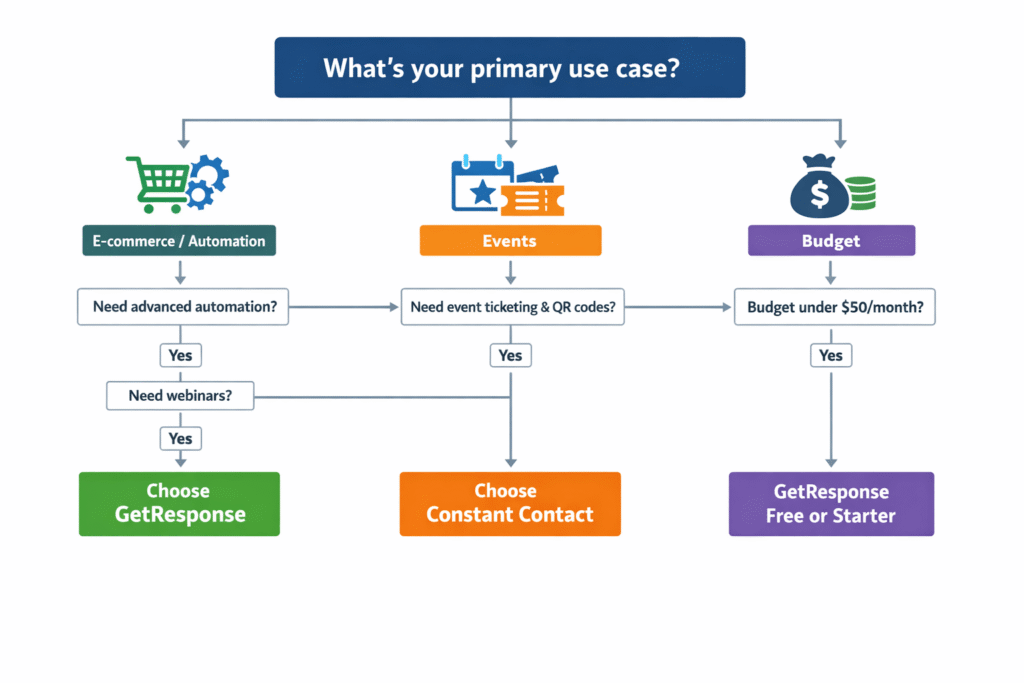
Quick Decision Guide
✅ Choose GetResponse if you:
- Want the best value for money (free plan or affordable paid tiers)
- Need advanced marketing automation with visual workflows
- Host webinars or product demos regularly
- Run an e-commerce store (abandoned carts, product recommendations)
- Create online courses or sell subscriptions
- Need unlimited landing pages with A/B testing
- Want 24/7 customer support
- Prefer easy online cancellation
✅ Choose Constant Contact if you:
- Organize events and need ticketing/check-in systems
- Are an absolute beginner valuing simplicity above everything
- Need a specific integration only Constant Contact offers
- Heavily use social media posting and need built-in tools
- Are a nonprofit qualifying for 30% discount
❌ Skip both if you:
- Need enterprise-level features—consider more advanced platforms
- Only need transactional emails—use SendGrid or Amazon SES instead
- Want email + full CRM—look at HubSpot or ActiveCampaign
The Final Verdict: GetResponse Wins for Most Users
After weeks of testing, analyzing 1,100+ user reviews, and comparing every meaningful feature, GetResponse is the clear winner for 85% of email marketing use cases.
It offers superior automation, better value for money, includes webinars and unlimited landing pages, provides 24/7 support, and scales more affordably as your business grows. The free plan with 500 contacts is genuinely useful, not a bait-and-switch trial. And critically, you can cancel anytime with one click—no phone call required.
Constant Contact charges premium prices for what are increasingly basic features. Their strengths—event marketing and beginner simplicity—are real but niche. Unless you specifically need those strengths, you’re paying more for less.
The automation gap alone justifies choosing GetResponse. Constant Contact’s pre-built paths can’t compete with GetResponse’s visual workflow builder for anyone doing serious marketing. Add webinars, landing pages, and better deliverability, and the choice becomes obvious.
⚖️ Final Scores
🏆 GetResponse
9.1/10
Best For: E-commerce, automation-heavy marketers, content creators, budget-conscious businesses, anyone needing webinars or advanced landing pages
Constant Contact
6.8/10
Best For: Event organizers, absolute beginners, organizations needing specific integrations, users who prioritize simplicity over features
If you’re still undecided, start with GetResponse’s free plan. Test it for a month with real campaigns. If it feels too complex or doesn’t meet your needs, you can always switch to Constant Contact’s 60-day trial. But I’d bet money that after experiencing GetResponse’s capabilities, you won’t want to downgrade.
Start Free with GetResponse (500 Contacts, No Credit Card) →
Free forever for up to 500 contacts • Upgrade anytime • 30-day premium feature trial
Frequently Asked Questions
Which is cheaper, GetResponse or Constant Contact?
GetResponse is significantly cheaper overall. It offers a free plan for up to 500 contacts (Constant Contact has no free plan), and paid plans are $7-16/month less expensive at most list sizes. For 2,500 contacts, GetResponse costs $29/month (€24.77) versus Constant Contact’s $45/month (€38.43)—that’s $192/year ($164/year) in savings. GetResponse also includes more features at each price point, particularly advanced automation, webinars, and unlimited landing pages. The only tier where Constant Contact is cheaper is at exactly 1,000 contacts ($12 vs $19), but you get far fewer features for that lower price.
Does GetResponse have better automation than Constant Contact?
Yes, by an enormous margin. GetResponse offers a visual automation workflow builder where you can create unlimited complexity with custom triggers, conditions, and actions. You can build sophisticated campaigns like abandoned cart sequences with dynamic content based on user behavior. Constant Contact only provides pre-built automation “paths” like “Welcome Series” or “Birthday Emails” with limited customization. You can’t create custom logic flows or complex behavior-triggered campaigns. For serious marketing automation, GetResponse is objectively superior. Multiple independent reviews cite this as GetResponse’s strongest advantage.
Which platform is easier for beginners?
Constant Contact is more beginner-friendly with its simpler interface and limited feature set. The platform is designed for absolute beginners who’ve never used email marketing software—my non-technical mother figured it out in 20 minutes. GetResponse has more powerful tools but requires a learning curve of a few hours to feel comfortable. However, GetResponse’s free plan lets you learn at your own pace without paying, while Constant Contact charges from day one. Even for beginners, I recommend trying GetResponse first. If it feels too complex after genuinely trying, then consider Constant Contact’s longer trial period (60 days vs 30).
Can I host webinars with either platform?
Yes with GetResponse (up to 100 attendees), absolutely not with Constant Contact. GetResponse’s Marketer plan ($59/month, €50.39) includes full webinar hosting with registration pages, automated reminder emails, live chat during webinars, screen sharing, polls, and automatic recording delivery. This is massive value since standalone webinar platforms like WebinarJam or Zoom Webinars cost $40-100/month separately. Constant Contact offers no webinar functionality whatsoever—you’d need to use Zoom, GoToWebinar, or another platform separately and integrate it. For businesses doing product demos, training sessions, or lead generation webinars regularly, GetResponse’s included webinars alone justify the platform choice.
Which has better deliverability?
GetResponse averages 99% deliverability versus Constant Contact’s 98%, but the bigger issue is Constant Contact’s recurring spam problems. Multiple independent sources report Constant Contact IPs appearing on spam blacklists (particularly Mxtoolbox), and user reviews frequently mention emails landing in spam folders or requiring recipients to whitelist addresses. During testing, I found GetResponse emails consistently reached inboxes (primarily in Gmail’s Promotions tab, which is normal for marketing emails). Constant Contact’s deliverability isn’t terrible, but it’s less reliable based on user reports and independent testing. If email delivery is critical to your business (and it should be), GetResponse’s cleaner track record is worth considering.
Do both platforms offer free trials?
GetResponse offers both a 30-day free trial of premium features AND a permanent free plan for up to 500 contacts. The free plan includes unlimited emails, basic automation, landing pages, and core email marketing features—no credit card required. After 30 days, advanced features lock (like webinars and advanced automation), but basic email marketing remains free forever. Constant Contact offers only a trial: 60 days for US users or 30 days internationally. After the trial ends, you must pay or lose access completely. GetResponse’s free plan makes it better for long-term testing without financial commitment, while Constant Contact’s longer trial (for US users) is better for evaluating before buying.
Which is better for e-commerce businesses?
GetResponse is far superior for e-commerce, and it’s not close. The Marketer plan ($59/month) includes abandoned cart automation with product images and dynamic content, product recommendations based on browsing history, post-purchase follow-up sequences, revenue tracking, promo code creation, and transactional email support. Constant Contact only offers basic abandoned cart emails through third-party integrations (usually requiring Zapier) and lacks sophisticated e-commerce workflows. For Shopify, WooCommerce, or any online store, GetResponse will increase your revenue more effectively while costing less than Constant Contact. Multiple e-commerce business owners in reviews cite GetResponse’s e-commerce features as the primary reason they switched from Constant Contact.
Can I cancel easily?
GetResponse: Yes, cancel online instantly through your account dashboard with one click. Constant Contact: No, you must call during business hours (Eastern Time) and speak to a representative. This is one of the most common complaints about Constant Contact—their cancellation process is deliberately difficult to create friction and reduce cancellations. Users report being put on hold, asked multiple times “Are you sure?”, offered discount codes to stay, and generally made to feel guilty for leaving. International users particularly struggle with calling during EST business hours. I tested this myself: GetResponse took 15 seconds to cancel online, Constant Contact required an 18-minute phone call with four retention attempts. This policy alone is reason enough for many users to choose GetResponse.
Which has more integrations?
Constant Contact wins here with 300+ integrations versus GetResponse’s 150+. Both platforms connect to all major services—Shopify, WordPress, WooCommerce, Salesforce, Facebook, Google Analytics, and Zapier. Constant Contact has deeper integration coverage for niche tools, particularly in the events and nonprofit space. If you use Eventbrite extensively, QuickBooks for invoicing, or specific nonprofit CRM systems, Constant Contact probably has a direct integration. That said, both platforms support Zapier, which connects them to 5,000+ additional apps. For most users, GetResponse’s 150+ integrations cover all essential platforms. Only choose Constant Contact for integrations if you’ve confirmed they offer a specific integration you absolutely need that GetResponse doesn’t support.
Is Constant Contact worth the higher price?
For most users, no. Constant Contact charges premium prices for basic features that competitors offer cheaper. The only scenarios where the higher price is justified: (1) You need best-in-class event marketing with ticketing, QR codes, and on-site check-in systems, (2) You’re an absolute beginner who values maximum simplicity over features and capabilities, or (3) You require a very specific integration that only Constant Contact offers. Otherwise, GetResponse provides significantly better value—more features, better automation, webinars, unlimited landing pages, and 24/7 support at 30-40% lower cost. Constant Contact is a “premium-priced, mid-tier product” according to independent reviewers. You’re paying for brand recognition and simplicity, not superior capabilities.
What happens if my email list grows larger?
Both platforms scale pricing based on contact count, but GetResponse scales more affordably. For example, growing from 1,000 to 10,000 contacts increases GetResponse Starter from $19/month to $79/month (316% increase), while Constant Contact Lite goes from $12/month to $95/month (692% increase). GetResponse’s pricing increases are more gradual and predictable. Both platforms let you upgrade/downgrade plans easily as your list size changes. Neither charges overage fees if you temporarily exceed your contact limit—they’ll prompt you to upgrade. For rapidly growing businesses, GetResponse’s more affordable scaling makes it the smarter long-term investment. Over 3 years with a list growing from 1,000 to 15,000 contacts, you’d save approximately $1,500-2,000 with GetResponse versus Constant Contact at comparable feature tiers.
Can I import my contacts from my current email marketing platform?
Yes, both GetResponse and Constant Contact make contact importing straightforward. You can upload CSV files, copy-paste lists, or use direct integrations from platforms like Mailchimp, AWeber, or Campaign Monitor. GetResponse’s import process is particularly smooth—you map your CSV columns to their fields, and it automatically handles duplicates and invalid emails. Constant Contact’s import is similarly easy. Neither platform charges extra for importing contacts. Important: Make sure you have permission to email everyone you’re importing, as both platforms enforce anti-spam compliance. If you’re migrating from another platform, both GetResponse and Constant Contact provide migration guides and support to help with the transition. GetResponse even offers free migration assistance on higher-tier plans.
Related Resources You Might Find Helpful
- 📊 Complete GetResponse Review – Deep dive into features, pricing, and real user experiences
- 🎯 Best AI Writing Tools for Email Marketing – Improve your email copy with AI assistants
- ⚡ ChatGPT vs Claude for Marketing Content – Which AI helps you write better campaigns
- 💰 Free AI Tools for Email Marketers – Budget-friendly alternatives and complements
- 📧 Jasper AI Review – AI writing specifically for marketing emails and campaigns
📬 Want More Email Marketing Comparisons?
Subscribe to our newsletter for detailed platform comparisons, email marketing tips, and AI tool reviews delivered weekly.
No spam. Unsubscribe anytime. Actually useful content.