

Quick Answer
60-second read
Make.com is a visual no-code automation platform that connects 3,000+ apps — and you can build your first working workflow in under 20 minutes. The free plan gives you 1,000 credits/month, while the Core plan starts at just $9/month (€7/month). It’s an excellent Zapier alternative for anyone who needs complex, branching automations at a fraction of the cost. This guide was last updated May 2026 with verified pricing and the latest platform changes.
Free plan available
This article was last updated May 2026 with verified current pricing and feature changes.
I’ve spent a lot of time inside Make.com — building automations for content workflows, lead management, and client reporting. What hooked me initially was the visual canvas: you can literally see your data flowing from one app to the next. Coming from Zapier, the difference was striking. More power, far lower cost.
That said, Make has a real learning curve. The terminology trips people up, credits can drain faster than you expect, and there’s no auto-save (a frustration I’ve experienced personally). This guide covers everything you need to get up and running — including the pitfalls most tutorials skip entirely.
If you’re also looking at email marketing automation tools alongside Make.com, or comparing the best AI writing tools to pair with your workflows, those guides are worth checking out too.
🔬 How We Researched This Guide
This guide is based on hands-on testing of Make.com’s Free and Core plans across multiple automation workflows. We reviewed 200+ user reviews from Capterra, GetApp, and Trustpilot, and verified all pricing directly from the official Make.com pricing page in May 2026.
200+
User reviews analysed
11
Web sources checked
May 2026
Pricing verified
Ready to Try Make.com?
Start free — 1,000 credits/month, no credit card required.
What Is Make.com, and How Does It Actually Work?
Make.com is a no-code visual automation platform that connects 3,000+ apps and automates multi-step workflows — called scenarios — without writing any code. Formerly known as Integromat (rebranded in 2022), Make is headquartered in Prague, Czech Republic, and currently serves 350,000+ users worldwide. Plans range from a permanently free tier to custom enterprise pricing, with paid plans starting at $9/month (€7/month, verified May 2026).
The core concept: you build a scenario on a visual canvas. Each connected app is a module — represented as a coloured circle. The first module is the trigger (the event that starts everything). Subsequent modules are actions (tasks that execute in response). Data passes between modules as a bundle, and you can branch that data down multiple paths using routers and filters.
Think of it like a factory assembly line. Each station (module) receives materials (data), processes them, and passes them to the next. A router is the conveyor fork — sending items down different lines based on conditions you define.
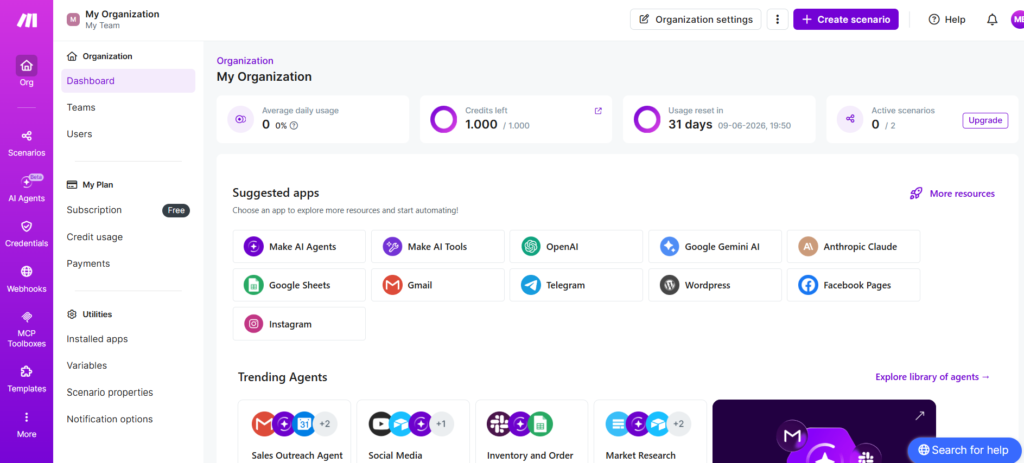
The short answer: Make.com is best suited for freelancers, marketing teams, and operations professionals who need conditional, multi-step automation at a fraction of Zapier’s cost. It’s a European company (Prague) — GDPR-native by design — which gives it a meaningful edge for EU-based businesses. Not recommended for users who just want simple one-to-one app syncing; Zapier is easier for that.
How Much Does Make.com Cost — and Is It Worth It in 2026?
Make.com offers five pricing tiers in 2026. The Core plan starts at $9/month (€7/month, billed annually) and includes 10,000 credits/month — enough for most freelancers and small businesses running regular automations. Always verify current pricing at make.com/en/pricing as rates may change.
One important change most reviews miss: Since August 27, 2025, Make.com bills by credits, not “operations.” The switch was 1:1 (1 operation = 1 credit), but older articles using “operations” are referring to the same billing unit. If you’re regularly buying extra credits, upgrading your plan is almost always cheaper.
Free
$0/month
€0/month
- ✅ 1,000 credits/month
- ✅ Visual workflow builder
- ✅ 3,000+ app integrations
- ✅ Routers & filters
- ✅ AI Agents (beta)
- ⚠️ 15-min minimum run interval
- ❌ No API access
Best for: Testing Make.com before committing
Core
$9/month
€7/month · ~£7/month · Annual billing
- ✅ 10,000 credits/month
- ✅ Unlimited active scenarios
- ✅ 1-minute minimum run interval
- ✅ Make API access
- ✅ Make Code App (JS/Python)
- ✅ Custom AI provider (BYO key)
- ✅ Everything in Free
Best for: Freelancers and small businesses
Pro
$16/month
€13/month · Annual billing
- ✅ 10,000 credits/month
- ✅ Priority scenario execution
- ✅ Custom variables
- ✅ Full-text execution log search
- ✅ Scenario inputs & outputs
- ✅ Everything in Core
Best for: Power users needing advanced debugging
Teams
$29/month
€24/month · Annual billing
- ✅ Team roles & permissions
- ✅ Create & share templates
- ✅ Everything in Pro
Best for: SMB teams on shared automations
All EUR prices approximate — always verify at make.com/en/pricing. Annual billing shown; monthly billing is approximately 15–20% higher.
⚠️ The Credit Drain Trap Nobody Warns You About
If you set a scheduled trigger to check every 1 minute, Make executes that check 1,440 times per day — consuming up to 43,200 credits/month just for checking, even if nothing new ever arrives. On the Core plan’s 10,000-credit budget, that blows your entire allowance before a single action runs. Fix: Use webhook triggers wherever possible. The external app pushes data to Make instantly — zero polling credits wasted.
What Do the Key Make.com Terms Actually Mean?
Make.com’s terminology is one of its biggest friction points for beginners. Before you build anything, get these straight:
| Make Term | Plain English |
|---|---|
| Scenario | An automated workflow — the entire process from trigger to final action |
| Module | A single step/app within a scenario (e.g., “Gmail — Watch for new email”) |
| Trigger | The first module — the event that starts the scenario |
| Action | Any module after the trigger that performs a task |
| Credit | The billing unit — each module execution uses 1 credit (formerly called “operation” before Aug 2025) |
| Router | A module that splits the workflow into multiple conditional paths |
| Filter | A condition that controls whether data continues down a route |
| Webhook | An instant trigger — the external app pushes data to Make in real time (no polling credits) |
| Bundle | A single “packet” of data passing through a scenario (one email, one form submission, etc.) |
| Blueprint | A JSON export/import of a scenario — useful for sharing or backing up workflows |
🎯 Understanding Make.com Credits
Every module action in a scenario consumes 1 credit. A simple 3-step automation (trigger + 2 actions) uses 3 credits per run. Run that scenario 100 times a day and you’re using 300 credits/day — 9,000 credits/month. That fits comfortably within the Core plan’s 10,000 credit allowance. The Free plan’s 1,000 credits is enough for testing or very low-volume automations. Native AI modules may consume more than 1 credit per action — if you’re running AI at volume, connect your own API key (available on all paid plans) to bypass Make’s credit markup.
How Do You Build Your First Make.com Scenario — Step by Step?
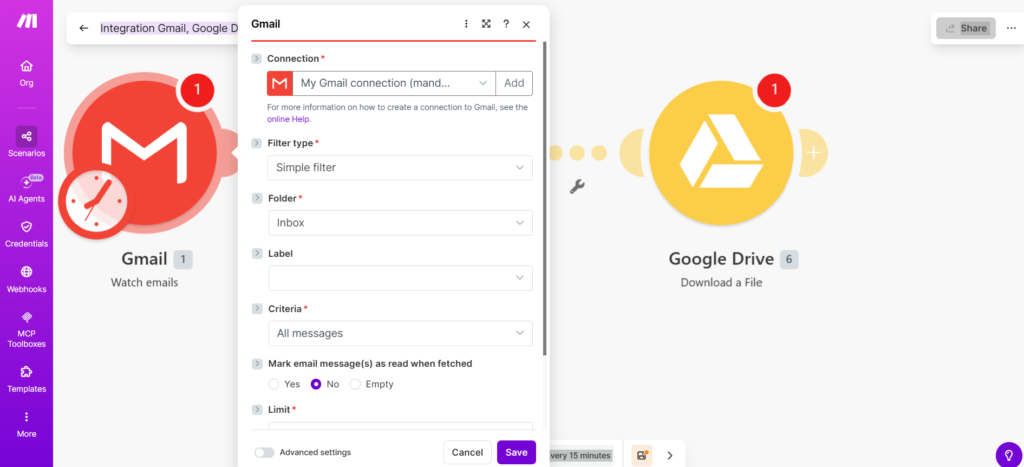
I’m going to walk through the exact process using a real beginner-friendly example: automatically saving new Gmail attachments to Google Drive. It takes around 15–20 minutes and uses only 2 modules — perfect for a first attempt.
⚡ Build Your First Scenario in 10 Steps
💡 Shortcut: Start With a Template
Don’t build from scratch on your first scenario. Go to your Make dashboard, click Templates in the left sidebar, and search for your apps (e.g., “Gmail + Google Sheets”). Make’s 7,500+ public templates are pre-wired — just authenticate your accounts, customize the details, and activate. You’ll be live in under 10 minutes and learn the Make structure as you go. Every template is free on all plans.
What Can You Actually Automate With Make.com? 5 Real Examples
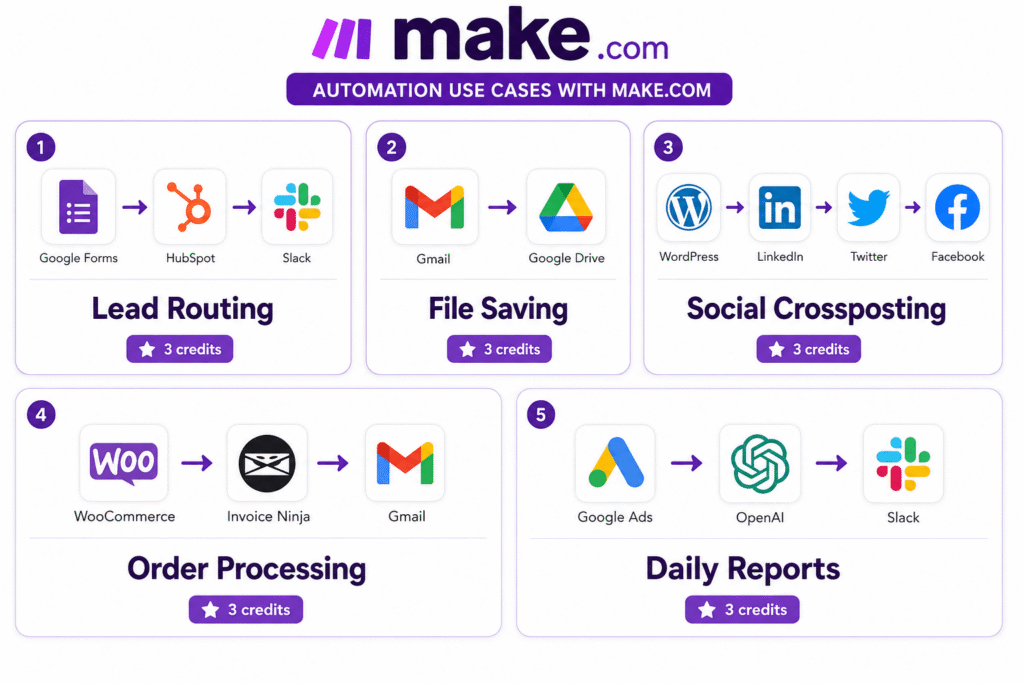
1. New Lead → CRM + Slack Alert (Marketing)
Apps: Google Forms → HubSpot → Slack. Someone fills in your contact form. Make adds them to HubSpot as a new contact, then fires a Slack message to your sales channel with their name, email, and enquiry. Credits used per run: 3 (one per module)
2. Save Email Attachments to Google Drive (Operations)
Apps: Gmail → Google Drive. Every email with an attachment automatically uploads the file to a specified Drive folder — labelled with the sender’s name and date. Credits used per run: 2–5 depending on attachment count
3. New Blog Post → Crosspost to Three Social Channels (Content)
Apps: WordPress (trigger) → LinkedIn + Twitter/X + Facebook. When you publish a new post, Make pulls the title, excerpt, and URL and posts a tailored update to each platform automatically. Uses a Router (splits to three separate paths). Credits used per run: ~5
4. WooCommerce Order → Invoice + Notification (eCommerce)
Apps: WooCommerce → Invoice Ninja → Gmail. Every new order triggers Make to create an invoice in Invoice Ninja and send a confirmation email with the invoice PDF attached. Uses a webhook trigger — instant, no polling credit cost. Credits used per run: 3
5. Daily Google Ads Report → AI Summary → Slack (Reporting)
Apps: Google Ads (scheduled) → OpenAI → Slack. Every morning, Make pulls yesterday’s campaign data, sends it to ChatGPT for a plain-language summary, and posts the digest to your Slack channel. Use BYO API key to avoid AI credit markup. Credits used per run: 3–5
What Are Make.com’s Most Powerful Advanced Features?
Routers and Filters — Conditional Logic Without Code
This is where Make genuinely pulls ahead of Zapier. A Router splits your workflow into multiple paths, and each path can have a Filter condition controlling whether data flows through. For example: new Typeform submission → Router → Path A (if “Budget > €5,000”) → create Deal in Pipedrive; Path B (if “Budget < €5,000”) → add to nurture email list. That conditional branching is either impossible or extremely clunky in Zapier’s linear interface.
Error Handling — What Happens When Things Break
Real automation fails sometimes. Make lets you define error routes for each module — what should happen if a step fails. Options: Ignore (skip and continue), Rollback (reverse completed steps), Break (stop and alert), or Retry. On Pro+ plans, you can search full execution logs to debug exactly where something went wrong.
Make AI Agents — Automation That Actually Thinks
🤖 Make AI Agents — What’s New in 2026
The next generation of Make AI Agents (launched February 2026) brings LLM decision-making directly into the visual canvas. Unlike rule-based automation, AI Agents reason in real time — choosing which tools to call and adapting to unexpected inputs. New in 2026: in-canvas chat for testing and refining agent behaviour, real-time decision animation, and multi-modal support (agents can accept and produce PDFs, images, and CSVs). Available on all plans including Free. On all paid plans, connect your own OpenAI, Anthropic, or other AI provider API key — paying your AI provider directly rather than through Make’s credit system.
Make Grid — See Your Entire Automation Landscape
Make Grid is a visual map of your entire automation setup — showing how all scenarios, apps, and AI components connect to each other. For anyone managing 10+ scenarios across multiple teams, this becomes genuinely useful for spotting dependencies and planning changes without breaking existing workflows.
Is Make.com Better Than Zapier or n8n?
| Feature | Make.com | Zapier | n8n |
|---|---|---|---|
| Free Plan | ✅ 1,000 credits/mo | ✅ 100 tasks/mo | ✅ Unlimited (self-host) |
| Entry Paid Plan | $9 / €7/mo | $29.99 / ~€26/mo | $20 / ~€17/mo (cloud) |
| App Integrations | 3,000+ | 8,000+ | ~1,500 |
| Visual Builder | 🏆 Canvas (best) | Linear list | Node editor |
| Conditional Logic | 🏆 Routers + Filters | Basic paths only | Full code support |
| Ease of Use | Moderate | 🏆 Easiest | Advanced |
| GDPR Native | ✅ EU company | ⚠️ US company | ✅ Self-host |
| 🏆 Best For | Complex branching workflows at low cost | Quick, simple automations & max integrations | Developers needing self-hosting |
Quick verdict: Choose Make.com if you need conditional logic and can’t justify Zapier’s price. Choose Zapier if you need maximum integrations and the simplest possible setup. Choose n8n if you’re a developer who wants full data sovereignty or self-hosting.
What Are the Real Problems With Make.com? (Honest Review)
- No auto-save: One careless moment and your work is gone. Always click Save before navigating away — make it a habit.
- Polling trigger credit drain: Setting a 1-minute check on a low-traffic data source wastes thousands of credits monthly.
- Steep learning curve: Routers, iterators, aggregators, field mapping syntax — expect 1–2 weeks before you feel genuinely comfortable.
- Complex scenarios get messy: Twenty+ modules on a single canvas becomes “spaghetti” fast.
- Inconsistent customer support: Some users report prompt responses; others cite weeks of silence. Core/Pro users are in the queue; Enterprise gets dedicated support.
- Fewer integrations than Zapier: 3,000 versus 8,000+. If your niche tools aren’t covered, you’ll be building custom HTTP requests.
- Scenarios require manual activation: Newly built scenarios don’t automatically run until you physically toggle Activate. Easy to miss after testing with “Run Once.”
⚠️ The Auto-Save Warning
Make.com does not auto-save your work. If your browser crashes, your session times out, or you accidentally close the tab while editing a scenario, all unsaved changes are lost permanently. Develop the habit of clicking Save every few steps — especially on complex multi-module scenarios where rebuilding from scratch would take hours.
Is Make.com Worth It in 2026? Our Verdict
Make.com scores 8.2/10 for most business users — excellent automation capabilities at a price that’s hard to argue with, held back by the no-auto-save problem and a learning curve steeper than it should be in 2026. For European users specifically, the GDPR-native architecture and EUR pricing (Core at €7/month) make it the obvious first choice over US-based alternatives.
✅ Choose Make.com if you:
- Need conditional branching logic (routers/filters)
- Want to save $20+/month vs Zapier for the same power
- Are based in Europe and prioritise GDPR compliance
- Want to build AI-powered automation workflows
- Need multi-step automations with 3+ connected apps
- Are comfortable with a 1–2 week learning curve
❌ Skip Make.com if you:
- Only need simple 1-to-1 app syncing (use Zapier)
- Need niche integrations not in Make’s 3,000+ library
- Are a developer wanting self-hosting (use n8n)
- Don’t have time to learn a new tool’s terminology
- Can’t tolerate the risk of losing work without auto-save
✅ What Make Does Well
- Visual canvas builder — see your entire workflow at a glance
- Advanced conditional logic — routers, filters, iterators, no code needed
- Significantly cheaper than Zapier — Core at $9/mo vs Zapier’s $29.99/mo
- 3,000+ integrations — covers virtually all major business tools
- AI Agents on all plans including Free
- 7,500+ templates — go from zero to live in under 10 minutes
- GDPR-native — European company, better default data protection
Start Automating With Make.com Today
Free plan available — 1,000 credits/month, no credit card required. Core plan starts at just $9/month (€7/month).
Frequently Asked Questions About Make.com
What is Make.com and what can it do?
Make.com is a no-code visual automation platform that connects 3,000+ apps and automates multi-step workflows called scenarios without any coding. It is available from a free plan (1,000 credits/month) up to enterprise pricing. Make.com is best for marketing teams, operations professionals, and freelancers who need complex conditional automation. Using Make, you can automate tasks like saving email attachments to Google Drive, posting new blog content to social media, routing CRM leads to your sales team, or building AI agents that make decisions in real-time within your workflows.
Is Make.com free to use?
Yes. Make.com has a permanently free plan that includes 1,000 credits/month, access to 3,000+ app integrations, and AI Agents. The main limitation is a 15-minute minimum interval between scenario runs, meaning your automation cannot check for new data more often than every 15 minutes. For real-time or high-frequency automation, the Core plan starts at $9/month (€7/month, billed annually). Always verify current pricing at make.com/en/pricing.
How much does Make.com cost per month?
Make.com pricing in 2026 (annual billing): Free ($0, 1,000 credits/month), Core ($9/month, 10,000 credits), Pro ($16/month, 10,000 credits), Teams ($29/month, 10,000 credits), Enterprise (custom). Approximate EUR prices: Core €7/month, Pro €13/month, Teams €24/month. Monthly billing is approximately 15–20% higher than annual. Always verify current pricing at make.com/en/pricing as rates may change.
What is the difference between Make.com and Zapier?
Make.com is more powerful and affordable than Zapier for complex multi-step workflows with conditional logic. Make uses a visual canvas with routers and filters — ideal for multi-path logic. Zapier uses a linear list interface that’s easier for beginners but limited for advanced workflows. Make’s Core plan starts at $9/month (€7/month) vs Zapier’s comparable plan at approximately $29.99/month (~€26/month). Zapier has more integrations (8,000+ vs Make’s 3,000+). For most business users who need more than basic automation, Make provides significantly better value.
What are Make.com credits?
A credit is consumed each time a module in your Make.com scenario performs an action. Most standard module actions cost 1 credit. This billing unit was called “operations” before August 27, 2025, when Make switched to credits at a 1:1 conversion rate. The Free plan includes 1,000 credits/month; the Core plan includes 10,000 credits/month. Critical warning: polling triggers consume credits every interval whether or not new data exists — use webhook triggers wherever possible to avoid unnecessary credit drain.
How do I create my first scenario in Make.com?
Sign up free at make.com, click “Create a new scenario” from the dashboard, click “+” on the canvas to add a trigger app, authenticate the app via OAuth, choose the trigger event, then add action modules by clicking “+” again. Map data fields between modules using the variable panel, click “Run Once” to test with real data, save your work (Make doesn’t auto-save), then click “Activate” to go live. Total time for a simple first scenario: 15–20 minutes. Alternatively, browse the 7,500+ templates and activate one directly — faster and easier for beginners.
What is a webhook trigger in Make.com?
A webhook trigger is an instant trigger where an external app sends data to Make the moment an event occurs, without Make needing to check periodically. Unlike polling triggers that consume credits every interval even when no new data exists, webhooks only consume credits when data actually arrives. For most modern apps (Typeform, Stripe, WooCommerce, etc.), webhook support is built-in. In Make, set up a “Webhooks — Custom Webhook” module as your trigger and paste the generated URL into the third-party app’s webhook settings. Using webhooks instead of polling is the single biggest credit-saving habit you can develop.
Can Make.com be used with AI tools like ChatGPT?
Yes. Make.com has native AI integration on all plans including Free. You can add OpenAI, Anthropic, Google Gemini, and other AI provider modules directly to any scenario. The next-generation Make AI Agents (launched February 2026) bring LLM decision-making into the visual canvas with multi-modal support for PDFs, images, and CSVs. On all paid plans, you can connect your own API key — paying your AI provider directly rather than going through Make’s credit system, which avoids any credit markup on AI actions.
Is Make.com good for European users?
Yes. Make.com is one of the best automation tools for European businesses because it is a European company (Prague, Czech Republic). It is GDPR-compliant by design, holds SOC 2 Type II and SOC 3 certifications, and supports SSO on Enterprise plans. For EU businesses, this means significantly simpler compliance than US-based competitors like Zapier, which require additional data processing agreements. Pricing for European users: Core costs approximately €7/month, Pro €13/month, Teams €24/month (billed annually — always verify at make.com/en/pricing).
How difficult is Make.com to learn?
Make.com has a moderate learning curve — steeper than Zapier but easier than n8n or coding from scratch. Most beginners can build simple 2–3 step automations within their first session using the template library. The core concepts to master are: trigger vs. action modules, field mapping with the variable panel, conditional logic (routers and filters), credit management, and the polling vs. webhook distinction. Make Academy offers free eLearning courses, and the 50,000+ member community forum is highly active. Realistically: 1–2 hours to get comfortable with the interface; 1–2 weeks of hands-on building to become genuinely confident.
Related Resources Worth Reading
- 📊 Email Marketing Automation Guide — How to automate your full email marketing funnel
- 🎯 Best Email Marketing Software 2026 — Compare platforms that integrate with Make.com
- 🤖 Best AI Writing Tools 2026 — Pair with Make.com for AI content workflows
- 📈 GetResponse Review 2026 — Email platform with native automation
- 🔗 Best Free AI Tools 2026 — Zero-cost tools to power your Make.com AI scenarios
- 📊 Make.com Review 2026 — Full breakdown of features, pricing, and credit system
- ⚡ Make vs Zapier — How Make.com compares to the market leader
- 🔧 Make vs n8n — Visual canvas vs developer-first automation
- 🔗 Pabbly Connect Review
- 🔗 Pabbly Connect vs Zapier
- 🔗 Pabbly Connect vs Make.com
- 🔗 How to Use Pabbly Connect
- 🧩 n8n Review
- 🧩 n8n vs Zapier
- 🧩 How to Use n8n
Ready to Build Your First Automation?
Start free — no credit card required. 1,000 credits/month on the free plan is enough to build and test real automations. Core plan at $9/month (€7/month) when you’re ready to scale.
