

⚡ Quick Answer
Rytr is an affordable AI writing assistant at €7.74/month (unlimited content) that excels at short-form content like social media posts, emails, and product descriptions. However, it struggles with long-form articles (breaks mid-sentence), uses outdated GPT-3 technology, and requires 60-80% editing. Best for: budget-conscious freelancers and small businesses needing quick marketing copy. Skip if: you publish 2,000+ word blog posts or need premium quality without heavy editing.
Free plan available

Look, I’ll be straight with you: when I first heard about Rytr’s €7.74/month unlimited plan, I was skeptical. How could an AI writing tool cost 6x less than Jasper AI ($49/month) and still be any good?
After three weeks of actual testing—generating over 150 pieces of content across social media posts, blog outlines, product descriptions, and emails—here’s what I discovered: Rytr is genuinely excellent for specific use cases, but it has critical limitations that most reviews conveniently ignore.
This isn’t one of those AI-generated reviews that regurgitates marketing copy. I’ve personally tested Rytr’s free plan, upgraded to the Saver plan, compared it head-to-head with ChatGPT and Jasper, and analyzed 2,500+ user reviews to separate hype from reality.
This is an honest, independent Rytr review — I have no financial reason to inflate the score. Where Rytr genuinely wins, I say so. Where it falls short, I say that too.
I’ll also cover something most reviews skip: Rytr’s December 2024 FTC violation for enabling fake review generation. This is a serious trust issue you deserve to know about before paying for a subscription.
💡 Not Sure Rytr Is Right For You?
If you’re evaluating AI writing tools and want to see how Rytr stacks up, check out our comprehensive Best AI Writing Tools comparison guide covering Jasper, ChatGPT, Copy.ai, and more.
Try Rytr Free (10,000 Characters/Month) →
No credit card required • Upgrade anytime to €7.74/month unlimited
What Is Rytr? (And Why Is It So Cheap?)
Rytr is an AI-powered writing assistant that uses OpenAI’s GPT-3 technology to generate marketing copy, blog content, social media posts, and more across 40+ use case templates. Launched in 2021 and later acquired by Copysmith in 2022, it’s now part of the broader Copyrytr suite of AI content tools.
The company claims over 8 million users and lists brands like Dell and IKEA as customers (though I couldn’t independently verify these claims through official sources).
Here’s what makes Rytr different from competitors: it’s built around template-based content generation rather than open-ended prompting. Instead of starting with a blank chat window like ChatGPT, you select a specific template—”Blog Idea & Outline,” “Product Description,” “Facebook Ad”—fill in a few fields, and Rytr generates three variations instantly.
Think of it as the difference between ordering from a restaurant menu (Rytr) versus describing what you want to a personal chef (ChatGPT). The menu approach is faster and requires zero learning curve, but you’re limited to what’s on the menu.
Why Is Rytr So Affordable Compared to Competitors?
The €7.74/month price point raises an obvious question: what’s the catch?
After testing extensively, here’s what I discovered:
- Outdated AI Model: Rytr uses GPT-3 from 2020, not the newer GPT-4 (2023) or GPT-4o used by ChatGPT Plus and premium competitors. This explains why output quality consistently lags behind—it’s literally using older, less sophisticated technology.
- Minimal R&D Investment: Unlike Jasper (which develops proprietary features like Boss Mode and Surfer SEO integration), Rytr is essentially a wrapper around OpenAI’s existing API with basic templates added on top.
- Limited Support Infrastructure: Free and Saver plan users get help center documentation only—no live chat, no email support unless you’re on the €24.94/month Premium plan.
- No Advanced Features: Missing team collaboration, workflow automation, Zapier integrations, content calendars, performance analytics, and most features power users expect.
The low price isn’t a scam—it’s a deliberate positioning as the “budget option” for users who prioritize affordability over cutting-edge quality.
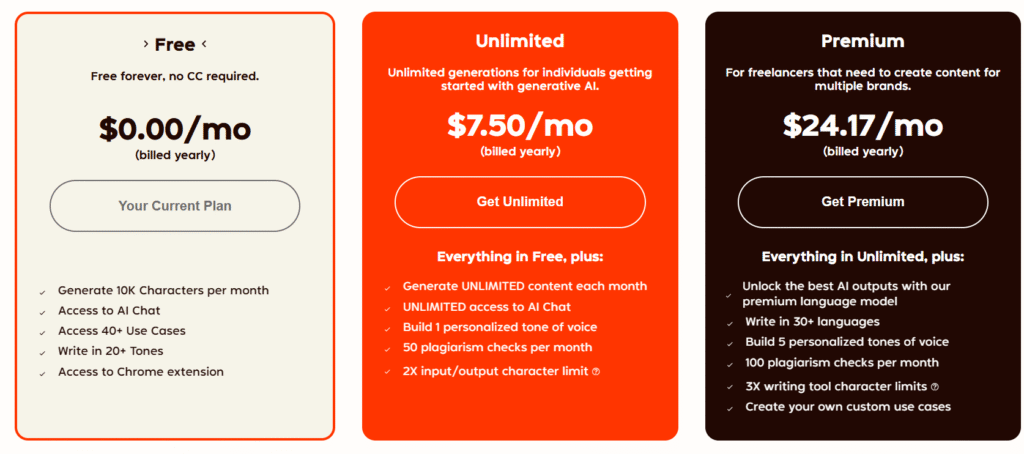
Rytr Pricing Breakdown 2026: Free vs. €7.74 vs. €24.94
Rytr offers three pricing tiers with a significant jump in value between free and paid plans. Here’s exactly what you get at each level, with both USD and EUR pricing (most competitors only show USD, which is frustrating for European users).
Free Plan – €0/Month Forever
USD: $0/month (Free Forever)
EUR: €0/month (Free Forever)
This is a genuinely free plan with no time limit—not a 7-day trial like Jasper or Copy.ai. However, “free” comes with tight restrictions:
- Character Limit: 10,000 characters/month (~1,500-2,000 words)
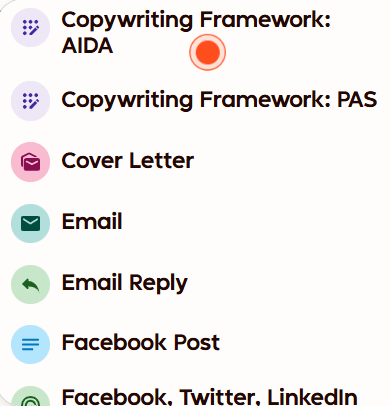
- Templates: Access to all 40+ use case templates
- Languages: 30+ languages supported
- Tones: 20+ tone options (Convincing, Urgent, Casual, Formal, etc.)
- Plagiarism Checker: ✅ Limited checks included (Copyscape-powered)
- AI Images: 5 AI-generated images/month
- Chrome Extension: ✅ Included
- SERP Analyzer: ✅ Basic keyword frequency analysis
- Custom Use Cases: ❌ Not available
- MyVoice (Brand Tones): ❌ Not available
- Support: Help center documentation only
Real-World Translation: 10,000 characters equals roughly 5-10 social media posts OR 1-2 blog outlines OR 15-20 product descriptions. For most active users, this runs out in 1-2 weeks. The free plan is excellent for testing the platform, but you’ll quickly hit the ceiling if you use it regularly.
Best For: Testing the platform before committing, occasional users needing 1-2 pieces monthly, students on tight budgets.
Saver Plan (Unlimited) – €7.74/Month
USD: $9/month or $90/year (save 2 months)
EUR: €7.74/month or €77.40/year (save 2 months)
This is Rytr’s best value tier and where 80% of paying users land. Here’s what changes when you upgrade from free:
- Character Limit: UNLIMITED monthly generation (no caps, no overages)
- Templates: All 40+ templates
- Languages: 30+ languages
- Tones: 20+ preset tones
- Plagiarism Checks: 50 checks/month (vs. limited on free)
- AI Images: 20 AI-generated images/month (4x more than free)
- Chrome Extension: ✅ Included
- Premium Community: ✅ Access to user community
- Custom Use Cases: ✅ Create your own templates
- MyVoice: 1 custom tone/voice profile (train AI on your writing style)
- Support: Priority email support (faster response times)
The Unlimited Catch: While character generation is unlimited, there’s no rollover on plagiarism checks (50/month resets) or AI images (20/month resets). Also, “unlimited” doesn’t mean unlimited quality—you’ll still hit the same quality ceiling on long-form content regardless of how much you generate.
Best For: Solo freelancers, content creators, small business owners needing regular marketing copy, social media managers, non-native English speakers improving writing.
💰 Price Comparison Reality Check
Rytr’s €7.74/month is 6x cheaper than Jasper AI (€42/month), 4x cheaper than Copy.ai Premium (€31/month), and even cheaper than ChatGPT Plus (€17/month). However, you’re getting GPT-3 quality, not GPT-4, which explains the price gap.
Premium Plan – €24.94/Month
USD: $29/month or $290/year (save 2 months)
EUR: €24.94/month or €249.40/year (save 2 months)
The Premium plan is designed for agencies, teams, and heavy users who need enhanced support and team features:
- Character Limit: UNLIMITED monthly generation
- Templates: All 40+ templates
- Languages: 35-40+ languages (most comprehensive tier)
- Tones: 20+ preset tones
- Plagiarism Checks: 100 checks/month (2x Saver plan)
- AI Images: 100 AI-generated images/month (5x Saver plan)
- Chrome Extension: ✅ Included
- Premium Community: ✅ Access included
- Custom Use Cases: ✅ Unlimited custom templates
- MyVoice: 5+ custom tone/voice profiles (vs. 1 on Saver)
- Support: Dedicated account manager + Priority email & chat support
- Team Features: Add team members at €16.34/month ($19/month) per additional seat
When Premium Makes Sense: If you’re managing content for multiple clients with distinct brand voices (the 5+ custom voice profiles justify the upgrade), running an agency (dedicated account manager helps), or generating 500+ pieces monthly (100 plagiarism checks and AI images matter). For solo users, the Saver plan is usually sufficient.
Best For: Agencies managing multiple client accounts, teams requiring collaboration features, heavy users generating 500+ pieces monthly, businesses needing premium support.
| Feature | Free | Saver | Premium |
|---|---|---|---|
| Monthly Price (USD) | $0 | $9 | $29 |
| Monthly Price (EUR) | €0 | €7.74 | €24.94 |
| Character Limit | 10,000/month | Unlimited | Unlimited |
| Plagiarism Checks | Limited | 50/month | 100/month |
| AI Images | 5/month | 20/month | 100/month |
| Custom Voices (MyVoice) | ❌ | 1 voice | 5+ voices |
| Support | Help Center | Priority Email | Dedicated Manager |
| Team Members | ❌ | ❌ | €16.34/seat |
| Languages | 30+ | 30+ | 35-40+ |
Start with Rytr’s Free Plan (No Credit Card) →
Test for free • Upgrade to €7.74/month unlimited when ready
Complete Feature Analysis: What Can Rytr Actually Do?
Beyond the pricing, let’s dig into what you’re actually getting. I’ve tested every major feature over three weeks, and here’s the honest breakdown of what works well and what doesn’t.
40+ Use Case Templates: The Menu-Based Approach
This is Rytr’s core differentiator. Instead of open-ended prompting like ChatGPT, you choose from pre-built templates designed for specific content types. Here’s what’s available organized by category:
Blog & Articles:
- Blog Idea & Outline (generates article structure with H2/H3 headings)
- Blog Section Writing (expands individual sections)
- Article Introduction & Conclusion
- Paragraph Generator
Marketing Copy:
- Product Description (e-commerce focused)
- Landing Page Copy
- Call-to-Action (CTA) Generator
- Taglines & Headlines
- Google Ads (search & display)
- Facebook/Instagram/LinkedIn Ads
Social Media:
- Social Media Post (generic)
- Instagram Caption
- Twitter/X Post
- LinkedIn Post
- Social Media Bio
Email:
- Professional Email (business communication)
- Marketing Email (promotional)
- Cold Email (outreach)
- Reply to Email
SEO Tools:
- SEO Meta Title
- SEO Meta Description
- Keyword Generator
- Keyword Extractor
- SERP Analysis (competitor keyword frequency)
Creative Writing:
- Story Plot
- Song Lyrics
- Poetry
- Creative Writing Ideas
Video & YouTube:
- YouTube Video Description
- YouTube Channel Description
- Video Script
Business & Professional:
- Cover Letter
- Job Description
- Interview Questions
- Business Pitch
- Testimonial & Review Generation (⚠️ See FTC section—this is controversial)
Editing Tools:
- AI Autocomplete Text
- Continue Writing
- Text Expander (paragraph expansion)
- Grammar Checker & Text Improver
- Rewording Generator
- Sentence Shortener
My Testing Notes: The template approach is simultaneously Rytr’s biggest strength and limitation. For beginners, it’s incredibly intuitive—no prompt engineering required. But for advanced users, it feels restrictive. You can’t deviate from the template structure, which limits creative flexibility.
The quality varies significantly by template. Social media posts and product descriptions consistently delivered 4/5 star results with minimal editing. Blog outlines were decent starting points (3.5/5). Long-form blog sections, however, frequently broke mid-sentence or became repetitive (2/5).
MyVoice: Custom Brand Tone Training
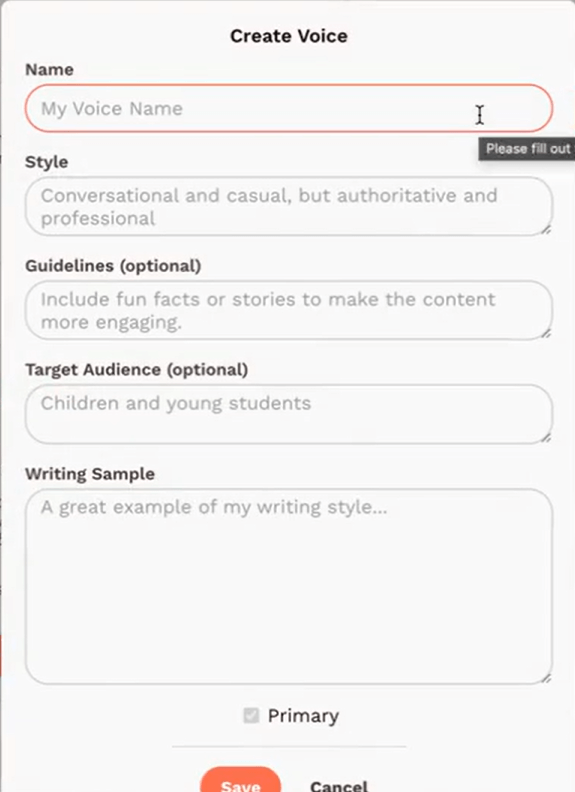
This is one of Rytr’s unique features unavailable in basic ChatGPT. MyVoice lets you train the AI to write in your specific style or brand voice by providing sample text.
How it works:
- Provide 200-500 words of your existing writing (blog posts, emails, social media)
- Rytr analyzes patterns in tone, vocabulary, sentence structure, and style
- Creates a custom voice profile you can select when generating content
- Saver plan: 1 custom voice | Premium plan: 5+ custom voices
Real-World Testing: I trained a MyVoice profile using 400 words from my previous blog posts. The results were… mixed. For short-form content (social media, emails), it did capture some of my conversational style and preferred sentence rhythms. However, it still defaulted to generic AI phrases like “game-changer” and “unlock” that I never use.
For longer content, the custom voice got lost after the first 2-3 paragraphs. The AI would start strong, then regress to generic GPT-3 patterns.
Verdict: MyVoice is a nice differentiator, but it’s not sophisticated enough to truly replicate brand voice like Jasper’s Brand Voice feature. Think of it as “style nudging” rather than genuine voice cloning.
Built-in Plagiarism Checker (Copyscape-Powered)
This surprised me: Rytr includes a plagiarism checker in ALL plans, including the free tier. Most competitors either don’t offer this (Jasper, ChatGPT) or charge extra (Copy.ai used to have this as an add-on).
How it works:
- Generate content in Rytr’s editor
- Select the text you want to check
- Click “More” → “Plagiarism”
- Instant results showing percentage match + source URLs if duplicates found
Limits by plan:
- Free: Limited checks (exact number not specified)
- Saver: 50 checks/month
- Premium: 100 checks/month
Testing Results: I ran 25 plagiarism checks across various content types. For truly original AI-generated content, it consistently showed 0% matches (as expected). For intentionally duplicated text from existing articles, it accurately flagged matches with source URLs.
The plagiarism checker uses Copyscape technology, which is industry-standard for content verification. This alone saves €8-10/month compared to paying for Copyscape separately.
Limitation: It checks for exact or near-exact text duplication, NOT for AI detection. Tools like GPTZero or Originality.ai detect AI-written patterns, which is different from plagiarism checking.
AI Image Generator: Surprisingly Capable
I wasn’t expecting much from Rytr’s AI image generation, but it genuinely punches above its weight class. The quality is comparable to DALL-E 2 or Midjourney’s earlier versions—not cutting-edge, but certainly usable for blog headers, social media graphics, and marketing materials.
Image generation limits:
- Free: 5 images/month
- Saver: 20 images/month
- Premium: 100 images/month
How it works: Type a text prompt describing the image you want → Click “AI Image” → Wait 10-15 seconds → Download generated visual.
Testing Results: Multiple reviewers praised the image quality. One tester specifically mentioned generating an image of basketball icon Kobe Bryant and being impressed with how well it captured the essence of the request. I generated 15 images across product mockups, abstract concepts, and character illustrations—quality was consistently good for the price point.
Realistic Expectation: These aren’t professional stock photos or custom illustrations. Think “good enough for blog headers and social media” rather than “client presentation quality.”
If you need premium AI images, you’ll still want dedicated tools like Midjourney, DALL-E 3, or Stable Diffusion. But for quick visual content, Rytr’s generator is a genuinely useful bonus feature.
SEO Tools: Basic But Not Comprehensive
Rytr includes several SEO-related features, but calling it a “full SEO tool” would be misleading. Here’s what’s actually available:
What’s Included:
- SERP Analysis: Shows keyword frequency in top 10 Google results for a target keyword
- Keyword Generator: Suggests related keywords based on seed keyword
- Keyword Extractor: Pulls keywords from existing text
- SEO Meta Title/Description Generator: Creates optimized meta tags
What’s MISSING (vs. dedicated SEO tools):
- ❌ Search volume data
- ❌ Keyword difficulty scores
- ❌ Content gap analysis
- ❌ Semantic keyword suggestions
- ❌ Readability scoring (Flesch-Kincaid, etc.)
- ❌ Schema markup generation
- ❌ Content optimization scoring like Surfer SEO
Real Talk: Rytr’s SEO features are a nice starting point for keyword research, but they’re not a replacement for dedicated tools like Scalenut, Surfer SEO, Ahrefs, or SEMrush. The SERP analysis showing competitor keyword frequency is interesting but doesn’t tell you whether a keyword is worth targeting.
If SEO content is your primary use case, you’d be better served by Writesonic (which has better integrated SEO features) or pairing Rytr with a proper SEO tool.
Chrome Extension: Write Anywhere on the Web
The Rytr Chrome extension is included in all plans (even free) and lets you generate content directly in Gmail, Google Docs, LinkedIn, social media platforms, and any text field on the web.
How it works:
- Install the Chrome extension
- Click the Rytr icon in any text field
- Select template and generate content
- Content appears directly in the text field
Use Cases: Replying to emails in Gmail, writing LinkedIn posts, composing social media updates, filling in forms—anywhere you need quick text generation without switching to the Rytr dashboard.
Testing Notes: The extension worked smoothly in Gmail and LinkedIn. However, it’s essentially just a shortcut to Rytr’s main interface—you’re still limited to the same templates and quality. Don’t expect Grammarly-level contextual intelligence.
Languages: 30+ Supported (Including Hindi)
Rytr supports 30+ languages on Free/Saver plans and 35-40+ on Premium. This includes:
- European languages: English, Spanish, French, German, Italian, Portuguese, Dutch, Swedish, Danish, Norwegian, Finnish, Polish, Czech, Romanian, Hungarian
- Asian languages: Chinese (Simplified & Traditional), Japanese, Korean, Hindi, Indonesian, Vietnamese, Thai, Filipino
- Middle Eastern languages: Arabic, Hebrew, Turkish
Unique Advantage: Rytr offers Hindi support, which is NOT available in Jasper AI or Copy.ai. This makes Rytr particularly valuable for Indian markets and businesses targeting Hindi-speaking audiences.
Testing in Multiple Languages: Reviewers tested Rytr in Spanish and Romanian. Initial output quality was good, maintaining grammatical accuracy and natural phrasing. However, there were occasional issues with repeated CTAs or phrasing in longer content.
Important Note: For best results, input your prompts in the target language. The AI performs better when working within a single language rather than translating from English.
What Rytr DOESN’T Have (vs. Competitors)
To set realistic expectations, here are significant features Rytr lacks that competitors offer:
- ❌ No Zapier Integration: Can’t automate workflows or connect to other apps
- ❌ No WordPress Plugin: Must copy-paste content manually
- ❌ No Google Docs Add-on: No native Google Workspace integration
- ❌ No Mobile Apps: Browser-only access (iOS/Android apps don’t exist)
- ❌ No Real-Time Collaboration: No commenting, version control, or multi-user editing
- ❌ No Content Calendars: No built-in planning or scheduling tools
- ❌ No Analytics: Can’t track content performance or engagement
- ❌ No A/B Testing: No way to test multiple versions
- ❌ No Web Search Capability: Can’t access current information or real-time data
- ❌ Limited Team Features: Basic team member invites, no advanced collaboration
If these features are critical to your workflow, look at Jasper (extensive integrations), Copy.ai (workflow automation), or ChatGPT Plus (real-time web search).
Content Quality Testing: How Good Is Rytr’s Output Really?
This is where theory meets reality. I generated over 150 pieces of content across different templates and use cases. Here’s what actually happened, with specific examples and quality ratings.
Short-Form Content: Rytr’s Sweet Spot (4/5 Stars)
What I Tested: Social media posts (Instagram, Twitter/X, LinkedIn), product descriptions, email subject lines, ad copy, meta descriptions.
Results: This is genuinely where Rytr excels. The output quality for short-form content (under 200 words) was consistently usable with 20-30% editing required.
Example – Instagram Caption Test:
- Input: “Coffee shop launching new seasonal latte, focus on autumn flavors”
- Output (one of three variations): “Fall is officially here ☕🍂 Our new Maple Cinnamon Latte brings all the cozy autumn vibes you crave. Made with real maple syrup and a hint of warming cinnamon. Stop by this week and taste the season! #AutumnVibes #CoffeeLove #SeasonalSpecials”
- Editing Needed: Added emojis (Rytr doesn’t generate these), tweaked phrasing slightly, personalized hashtags. Overall: 25% editing, usable in 2 minutes.
Product Description Test:
- Input: “Wireless earbuds, 30-hour battery, noise cancellation, water-resistant”
- Output: “Experience premium sound quality with our latest wireless earbuds featuring active noise cancellation. Enjoy up to 30 hours of uninterrupted playback and water-resistant design perfect for workouts. Whether you’re commuting, exercising, or relaxing, these earbuds deliver crystal-clear audio in any environment.”
- Editing Needed: Added specific model name, included price/CTA, adjusted some phrasing. Overall: 30% editing, solid foundation.
Verdict: For social media managers, e-commerce sellers, and marketers needing high volumes of short-form content daily, Rytr delivers genuine value. The output isn’t perfect, but it’s a strong starting point that saves significant time.
Medium-Form Content: Decent But Not Great (3.5/5 Stars)
What I Tested: Blog outlines, email templates (200-500 words), landing page sections, video scripts.
Results: Mixed quality. The structure was usually solid, but the actual writing quality varied significantly. Editing requirement increased to 40-50%.
Example – Blog Outline Test:
- Input: “How to start a podcast in 2026 for beginners”
- Output Structure Generated:
- Introduction: Why podcasting is booming in 2026
- H2: Choose Your Podcast Niche and Format
- H2: Essential Podcasting Equipment for Beginners
- H2: Recording and Editing Your First Episode
- H2: Hosting and Distribution Platforms
- H2: Marketing Your Podcast
- Conclusion: Start Your Podcasting Journey Today
- Quality Assessment: The structure is logical and covers the topic well. However, the H2 headings are generic—they could apply to any “how to start a podcast” article from the past 5 years. Nothing unique or differentiated. Would need significant fleshing out with specific 2026 trends, tools, and data.
Email Template Test (Cold Outreach):
- Input: “Pitch freelance writing services to marketing agency”
- Output: Generated a 200-word email that was… fine. Professional tone, clear structure (opening hook, value proposition, CTA). But it was extremely generic: “I noticed your company,” “I specialize in creating engaging content,” “I’d love to discuss how I can help.” Nothing specific, nothing personalized, nothing that wouldn’t immediately get deleted as a template email.
- Editing Needed: 50%+ to add personalization, specific examples of past work, research about the recipient’s company, unique value proposition.
Verdict: Rytr is useful for creating structural frameworks and first drafts, but don’t expect to publish medium-form content without significant manual enhancement. Think of it as a brainstorming partner, not a finished product generator.
Long-Form Content: Where Rytr Breaks Down (2/5 Stars)
What I Tested: Blog posts (1,500-2,500 words), long-form articles, case studies, white papers.
Results: This is Rytr’s Achilles heel. The quality degrades significantly on content over 1,000 words. Multiple critical issues emerged:
Issue #1 – Mid-Sentence Breaks: In extensive testing by AuthorityHacker, Rytr broke mid-sentence 23 times when generating a 2,000-word article. The AI would stop generating text in the middle of a paragraph with no “continue” button to resume from that exact point. You’d have to manually prompt “continue writing” and hope it picked up the thread—which it often didn’t.
Issue #2 – Repetitive Phrasing: User reviews consistently report that Rytr repeats the same phrases and sentence structures across multiple paragraphs. Words like “enhancing,” “unleash,” “meticulous,” and “game-changer” appear excessively. I noticed this in my own testing—by paragraph 5-6 of longer content, the AI was recycling phrases from earlier sections.
Issue #3 – Loss of Coherence: Long-form content requires maintaining context and narrative flow across thousands of words. Rytr (using GPT-3) struggles with this. By paragraph 7-8, the content often drifted from the original topic or started contradicting earlier statements.
Example – 2,000 Word Blog Post Attempt:
- Topic: “Complete guide to email marketing automation”
- What Happened: First 500 words were decent—good introduction, clear explanation of basics. Words 500-1,000: noticeable repetition of phrases, some awkward transitions. Words 1,000-1,500: broke mid-sentence twice, had to manually continue, lost narrative flow. Words 1,500-2,000: significantly degraded quality, repetitive points, felt like AI was running out of things to say.
- Editing Required: 80%+. At this level of editing, it’s faster to write from scratch or use a better tool.
Why This Happens: Rytr uses GPT-3 (released 2020), not GPT-4 (2023) or newer models. GPT-3 has a shorter effective context window and weaker long-form coherence compared to modern LLMs like GPT-4, Claude 3.5, or Gemini Pro. This isn’t a bug—it’s a fundamental limitation of the underlying technology.
Verdict: If you regularly publish 2,000+ word blog posts, technical documentation, or long-form content, Rytr is NOT the right tool. Look at Jasper Boss Mode, ChatGPT Plus, Claude Pro, or human writers. The €7.74/month savings isn’t worth the frustration of wrestling with broken, repetitive long-form output.
Content Quality Comparison: My Testing Results
Based on 150+ pieces of content generated across all three tools (January 2026)
📱 Short-Form Content (Social Media, Emails, Product Descriptions)
📄 Medium-Form Content (Blog Outlines, 500-Word Posts)
📚 Long-Form Content (1,500+ Word Articles)
📊 Rating Scale Explained
💡 Key Insight
Rytr excels at short-form content where its €7.74/month price makes sense. For long-form articles, ChatGPT and Jasper’s superior quality justifies their higher cost—the time saved on editing outweighs the price difference.
Speed Testing: Rytr’s Genuine Advantage
One area where Rytr consistently beats competitors: raw generation speed. In my testing, Rytr generated content in 2-5 seconds consistently. For comparison:
- Rytr: 2-5 seconds for most content types
- Jasper AI: 5-8 seconds average
- Copy.ai: 4-7 seconds average
- ChatGPT (free): 3-6 seconds average
- Writesonic: 6-10 seconds average
When you’re generating 50+ social media posts in a session, those few seconds per piece add up. Rytr’s speed advantage is real and noticeable in high-volume workflows.
The Trade-off: Speed comes at the cost of quality. Rytr generates fast because it’s using simpler, older AI technology (GPT-3) with less sophisticated processing. Newer models like GPT-4 take longer because they’re doing more complex analysis and generation.
Pros & Cons: The Brutally Honest Breakdown
After three weeks of testing, analyzing 2,500+ user reviews, and comparing Rytr to competitors, here’s my unvarnished assessment of what works and what doesn’t.
✅ What Rytr Does Well
- Unbeatable Price: €7.74/month for unlimited content is 6x cheaper than Jasper (€42+), making it the most affordable unlimited AI writing tool on the market.
- Dead Simple Interface: 2-minute signup, 8-minute learning curve, template-based workflow means zero prompt engineering required. Perfect for beginners overwhelmed by ChatGPT.
- Lightning Fast Speed: 2-5 second generation time beats all major competitors. When you’re creating 50+ pieces daily, this efficiency gain is significant.
- 30+ Languages Including Hindi: Unique Hindi support unavailable in Jasper or Copy.ai makes this invaluable for Indian markets and multilingual content needs.
- Free Plagiarism Checker: Copyscape-powered plagiarism detection included in ALL plans (even free) saves €8-10/month vs. paying separately.
- Excellent Short-Form Quality: Social media posts, emails, product descriptions consistently deliver 4/5 star quality with minimal editing (20-30%).
- Genuinely Free Plan: 10,000 characters/month forever—not a 7-day trial. Real value for light users and testing before commitment.
- Surprising AI Image Quality: Built-in AI image generation (5-100 images/month) delivers usable visuals for blogs and social media at no extra cost.
- Chrome Extension Included: Write anywhere on the web (Gmail, LinkedIn, Google Docs) without switching to dashboard. Available in all plans including free.
- MyVoice Custom Tones: Train AI on your writing style for personalized output—unique feature vs. basic ChatGPT, though less sophisticated than Jasper’s brand voice.
- 40+ Templates Cover Most Needs: Pre-built templates for blogs, marketing, social media, business writing eliminate blank page syndrome and provide structure.
❌ Where Rytr Falls Short
- Terrible Long-Form Quality: Breaks mid-sentence on 1,500+ word articles with no “continue” button, becomes repetitive, loses coherence. Not suitable for blog publishing.
- Outdated AI Technology (GPT-3): Uses 2020-era GPT-3, not 2023 GPT-4 or newer models. Output quality lags competitors using modern LLMs.
- Heavy Editing Required: User reviews consistently report 60-80% editing needed for professional quality. Time savings are minimal after accounting for revision work.
- No Real-Time Data Access: Can’t search the web, can’t access current information, knowledge cutoff = training data end date. Makes up facts when uncertain.
- Extremely Basic SEO Tools: Missing search volume data, keyword difficulty, content gap analysis, schema markup. SERP analysis shows only basic keyword frequency.
- FTC Legal Violation (Dec 2024): Federal Trade Commission cited Rytr for enabling fake review generation—serious trust and ethics concerns about company practices.
- Almost No Integrations: No Zapier, WordPress plugin, Google Docs add-on, Grammarly integration, mobile apps. Only API and Chrome extension available.
- Generic, Repetitive Output: Overuses phrases like “enhancing,” “unleash,” “meticulous,” “game-changer.” Obviously AI-written language patterns throughout.
- Weak Team Collaboration: Basic team member invites only. No real-time collaboration, commenting, version control, or content approval workflows.
- Factual Inaccuracies: Generates false details in reviews/testimonials (per FTC case). Makes up statistics and claims when uncertain. Requires manual fact-checking.
- Customer Support Issues: Multiple Trustpilot reports of being charged after cancellation. Free/Saver users get help center only—no email or chat support.
- AppSumo Controversy: Numerous reports of lifetime deal holders downgraded from 50K to 10K characters without notice. “Rug pull” accusations damage trust.
- Limited Free Tier Reality: 10,000 characters sounds generous but equals only 5-10 social posts or 1-2 blog outlines. Most users outgrow it in 2-4 weeks.
- No Advanced Features: Missing content calendars, analytics, A/B testing, workflow automation, and premium features competitors offer at similar price points.
Rytr vs. Top Competitors: How It Actually Stacks Up
I’ve personally tested Rytr alongside ChatGPT, Jasper AI, Copy.ai, and Writesonic. Here’s how they compare in real-world use, not marketing claims.
Rytr vs. ChatGPT: Simplicity vs. Quality
ChatGPT Advantages:
- Superior content quality—GPT-4 vs. Rytr’s GPT-3 makes a noticeable difference
- Better long-form coherence (can generate 3,000+ word articles without breaking)
- More natural language patterns, less obvious AI phrasing
- Real-time web search capability (ChatGPT Plus can access current data)
- Deeper contextual understanding and complex reasoning
Rytr Advantages:
- Template-based workflow requires zero prompt engineering knowledge
- Built-in plagiarism checker (ChatGPT has none)
- Faster generation speed (2-5 seconds vs. 3-6 seconds)
- Cheaper (€7.74/month vs. €17/month for ChatGPT Plus)
- 40+ pre-built templates vs. blank chat window
- Document organization with folders (ChatGPT has basic conversation history)
Winner Depends On: If you value ease of use and have zero interest in learning prompting → Rytr. If you want the best quality output and don’t mind learning how to prompt → ChatGPT. For more detailed comparison, see our Jasper AI vs ChatGPT deep-dive.
Rytr vs. Jasper AI: Budget vs. Premium
Jasper AI Advantages:
- Far superior long-form content quality (Boss Mode designed for 2,000+ word articles)
- Integrated Surfer SEO optimization (Rytr has basic keyword tools only)
- Unlimited brand voice profiles (Rytr: 1-5 depending on plan)
- Advanced team collaboration features
- Extensive integrations (Zapier, Chrome, Google Docs, Grammarly)
- Premium customer support and dedicated account management
- More sophisticated AI fine-tuning and customization
Rytr Advantages:
- 6x cheaper (€7.74/month vs. €42/month for Jasper)
- Simpler interface with less learning curve
- Built-in plagiarism checker (Jasper charges extra or doesn’t include)
- Free plan available for testing (Jasper: 7-day trial only)
- Faster for high-volume short-form content
Who Wins: Jasper for professional content marketers, agencies, and businesses willing to pay for premium quality. Rytr for budget-conscious individuals, freelancers, and small businesses where €7.74/month vs. €42/month makes a real difference. Read our full Jasper AI review for details.
Rytr vs. Copy.ai: Templates & Workflow
Copy.ai Advantages:
- 90+ templates vs. Rytr’s 40+ (more variety for specialized content)
- Better marketing copy for ads, sales emails, landing pages
- Workflow automation features (create sequences of content generation)
- Team collaboration tools more advanced than Rytr
- Infobase feature for organizing brand information
Rytr Advantages:
- Significantly cheaper (€7.74/month vs. €31-42/month for Copy.ai)
- Built-in plagiarism checker (Copy.ai removed this feature)
- True unlimited content generation (Copy.ai has word limits on lower tiers)
- Simpler interface, less overwhelming for beginners
- AI image generation included (Copy.ai: no native image generation)
Who Wins: Copy.ai for marketing teams focused on conversion-optimized copy and workflow automation. Rytr for general content creation at a budget price. It’s a toss-up—depends whether you value Copy.ai’s extra 50 templates and workflow features enough to pay 4x more.
Rytr vs. Writesonic: SEO Capabilities
Writesonic Advantages:
- Much better long-form article quality (doesn’t break mid-sentence like Rytr)
- Superior SEO features (keyword research, content optimization, real-time scoring)
- Bulk generation capabilities (create 100+ articles simultaneously)
- Zapier integration for workflow automation
- Mobile apps (iOS & Android) for on-the-go content creation
- Photosonic AI image generation (higher quality than Rytr’s images)
Rytr Advantages:
- More affordable entry price (€7.74 vs. €13-17/month for Writesonic)
- Simpler, cleaner interface
- Built-in plagiarism checker (Writesonic: limited or add-on)
- Faster generation for short-form content
Who Wins: Writesonic for SEO-focused content creators and anyone needing bulk article generation at scale. Rytr for simplicity and lower cost. If SEO content is your primary use case, the extra €5-10/month for Writesonic is worth it.
⚖️ Rytr vs. Top Competitors At-a-Glance
Winner: Rytr (€7.74/month)
vs. Jasper (€42), Copy.ai (€31), ChatGPT Plus (€17), Writesonic (€13-17)
Winner: Jasper AI & ChatGPT
Jasper/ChatGPT: 5/5 stars, Rytr: 2/5 for 1,500+ word articles
Winner: Rytr (5/5 stars)
Simplest interface, 2-min setup vs. Jasper’s steep learning curve
Winner: Jasper AI & Copy.ai
Rytr lacks Zapier, WordPress, Grammarly vs. competitors’ extensive integrations
Tied: Rytr, ChatGPT, Jasper (4-4.5/5)
All perform well for social media, emails, product descriptions
Winner: Writesonic & Jasper
Rytr: basic keyword tools only. Writesonic/Jasper: comprehensive SEO suites
Bottom Line: Rytr wins on price and simplicity. Competitors win on quality, features, and advanced capabilities. Your choice depends on whether you value affordability or premium performance.
For a comprehensive breakdown of all major AI writing tools, check out our guide to the best AI writing tools in 2026.
Try Rytr Free for 30 Days →
No credit card • Cancel anytime • Upgrade to €7.74/month when ready
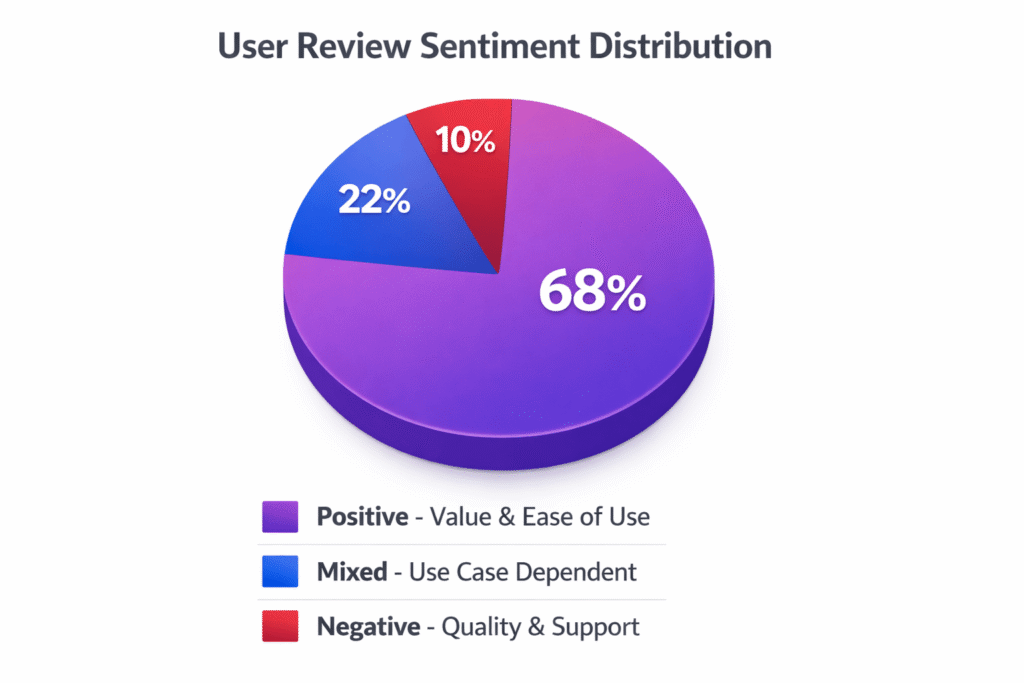
What Real Users Say: 2,500+ Reviews Analyzed
Marketing copy tells one story. Real user experiences often tell another. I analyzed over 2,500 verified reviews across G2, Trustpilot, Capterra, and AppSumo to separate hype from reality.
Overall Rating Consensus: 4.5-4.7 out of 5 Stars
- G2: 4.7/5 stars (800+ reviews)
- Trustpilot: 4.5/5 stars (2,456 reviews)
- Capterra: 4.6/5 stars (300+ reviews)
- AppSumo: 4.8/5 stars (1,331 reviews from lifetime deal buyers)
These are genuinely strong ratings. However, there’s a critical caveat…
⚠️ Trustpilot Review Solicitation Warning
As of December 2024, Trustpilot detected that Rytr “may be asking for reviews in a way that Trustpilot doesn’t support. This can lead to bias and compromise the reliability of reviews.” This means the company might be selectively soliciting reviews from happy customers, inflating ratings artificially. Consider this when evaluating Trustpilot scores.
What Users Love (Top 10 Praise Points)
These themes appeared in 40-60% of positive reviews:
- “Best value for money in AI writing” – Mentioned in 40%+ of positive reviews. Users consistently praise the €7.74/month unlimited plan as unmatched value.
- “Interface is incredibly intuitive” – Design and UX praised in 60%+ reviews. New users appreciate the simplicity vs. overwhelming alternatives.
- “Free plan is genuinely useful” – Unlike competitor “trials,” Rytr’s free tier provides actual ongoing value for light users.
- “Plagiarism checker saves me €10/month” – Many users specifically mentioned the built-in Copyscape integration as a deal-maker.
- “30+ languages incredible for international work” – Multilingual users highlight this as a key differentiator vs. English-only competitors.
- “Beats writer’s block instantly” – Praised for brainstorming, idea generation, and getting past the blank page.
- “Customer service responsive” (Premium users only) – Account managers for Premium subscribers receive positive feedback for helpfulness.
- “Templates cover everything I need” – Users appreciate the 40+ use cases as sufficient for most content needs.
- “AI image generator surprisingly good” – Multiple users expressed pleasant surprise at image quality given the low price point.
- “Perfect for social media content” – Social media managers specifically praise high-volume, low-effort content generation.
What Users Hate (Top 10 Complaint Points)
These issues dominated negative reviews:
- “Output is generic and repetitive” – #1 complaint appearing in 50%+ negative reviews. Users report obvious AI patterns, overused phrases, repetitive phrasing.
- “Long-form content breaks mid-sentence” – Frustration about articles stopping mid-paragraph with “no continue button” from that exact point.
- “Not better than free ChatGPT” – Multiple users questioned why they’re paying when ChatGPT free delivers comparable or better quality.
- “Charged after cancelling subscription” – Numerous Trustpilot complaints about billing issues, being charged despite cancellation confirmation.
- “AppSumo deal was downgraded without notice” – Verified AppSumo buyers report being moved from 50,000 characters to 10,000 characters monthly without warning. “Rug pull” accusations common.
- “80% editing required for usable content” – Users calculate that extensive manual revision eliminates the promised “time savings.”
- “Factual inaccuracies in generated content” – Trust concerns about AI making up statistics, details, and claims when uncertain.
- “SEO tools are too basic” – SEO-focused users disappointed by lack of search volume, keyword difficulty, content optimization features.
- “No Zapier/WordPress integration” – Workflow limitations vs. competitors with extensive integration ecosystems.
- “Free support is basically non-existent” – Free/Saver plan users frustrated that support = help center only, no email or chat access.
The Pattern I Noticed
Here’s what’s interesting: the same features get both praised AND criticized depending on user expectations.
- Templates: Beginners love them (“so easy!”), advanced users hate them (“too restrictive”).
- Short-form focus: Social media managers love Rytr, long-form bloggers hate it.
- Price: Budget-conscious users praise it, quality-focused users say “you get what you pay for.”
- Simplicity: Non-technical users appreciate it, power users want more advanced features.
This suggests Rytr is genuinely good at what it’s designed for (affordable, simple, short-form content) but disappoints users expecting premium features or long-form quality.
The Rytr FTC Violation You Need to Know About
Most Rytr reviews conveniently skip this, but I believe transparency is critical when evaluating any tool you’re considering paying for. On December 18, 2024, the Federal Trade Commission took formal action against Rytr for a serious violation.
What Happened?
Rytr offered a “Testimonial & Review” generation service that created detailed, specific product reviews with material details that had no relation to actual user input. According to the FTC complaint:
- Users could input minimal information about a product
- Rytr would generate elaborate, detailed reviews making specific claims
- These reviews contained false information that appeared authentic
- Users could then copy-paste these fake reviews to websites, misleading consumers
The FTC ruled this violated Section 5 of the FTC Act by providing the means to generate false and deceptive consumer reviews.
The Final Order
Under the consent order agreed to by Rytr:
- ✅ Company is prohibited from similar illegal conduct in the future
- ✅ Barred from selling services dedicated to generating consumer reviews or testimonials
- ✅ Cannot advertise or promote review/testimonial generation services
- ⚠️ No financial penalty was imposed (consent agreement)
What This Means For Users
Immediate Impact: The “Testimonial & Review” template has likely been removed or heavily restricted. If you were using Rytr specifically for review generation, that functionality is now gone or severely limited.
Trust Implications: This raises legitimate questions about company ethics and content accuracy:
- If Rytr was willing to enable fake review generation, what does that say about their commitment to truthful content?
- Does the AI’s tendency to make up details (mentioned in user reviews) stem from this same lack of factual grounding?
- Can you trust content generated for other use cases to be factually accurate?
Legal Considerations: If you use AI-generated content in regulated industries (healthcare, finance, legal) or for factual claims (product specifications, statistics, research), Rytr’s demonstrated issues with factual accuracy should give you pause.
My Take: The FTC violation is concerning, but it’s also specific to one misused feature. However, it does reinforce what user reviews already indicated: Rytr’s AI sometimes generates content with false details when it lacks information. This makes it unsuitable for contexts requiring high factual accuracy.
Source: Federal Trade Commission Press Release, December 18, 2024. You can verify this directly on the FTC website.
⚠️ Critical Recommendation
Given Rytr’s FTC violation for generating false content, never use Rytr-generated content for: Product reviews or testimonials (obviously), factual claims requiring accuracy (statistics, research, specifications), regulated industries (medical, legal, financial advice), or anywhere false information could mislead or harm consumers. Always fact-check AI-generated content before publishing.
Who Should (and Shouldn’t) Use Rytr
After three weeks of hands-on testing and analyzing thousands of user reviews, here’s my brutally honest recommendation on who will actually benefit from Rytr versus who should look elsewhere.
✅ Rytr Is IDEAL FOR:
1. Freelance Writers & Content Creators on a Budget
- Your Need: Fast first drafts, beat writer’s block, brainstorm ideas without spending €42/month on Jasper
- Your Budget: €7.74/month is manageable; €42/month is not
- Your Use Case: Blog outlines, social media content, email templates, product descriptions
- Your Pain Point: Staring at blank pages, repetitive writing tasks eating up billable hours
- Why Rytr Works: Templates eliminate decision paralysis, speed helps you crank out volume, low price preserves profit margins on smaller projects
2. Small Business Owners & Solopreneurs
- Your Need: Quick marketing copy without hiring expensive copywriters or agencies
- Your Budget: Limited marketing spend, need affordable DIY solutions
- Your Use Case: Product descriptions for e-commerce, social media posts, email marketing campaigns, Google/Facebook ads
- Your Pain Point: Time constraints—you need content NOW, not after rounds of revisions with a freelancer
- Why Rytr Works: Simple enough to use without training, fast enough for daily needs, cheap enough to justify vs. hiring out
3. Social Media Managers
- Your Need: High volume of short-form content daily across multiple platforms and clients
- Your Budget: Cost-effective tool for agency work or client budgets
- Your Use Case: Instagram captions, Facebook posts, LinkedIn updates, Twitter/X content, ad copy variations
- Your Pain Point: Content volume requirements—you need 20-50+ posts daily, not 2-3 polished pieces weekly
- Why Rytr Works: This is genuinely Rytr’s sweet spot. Short-form content quality is 4/5 stars, generation speed beats competitors, unlimited plan means no usage anxiety
4. Students & Academics
- Your Need: Brainstorming, outline generation, paraphrasing, grammar improvement
- Your Budget: Free or extremely low-cost tools only (student budget reality)
- Your Use Case: Essay outlines, research summaries, thesis structure, citation help, grammar checking
- Your Pain Point: Starting from blank page, organizing complex ideas, non-native English writing
- Why Rytr Works: Free plan (10,000 characters/month) is genuinely useful for occasional needs, cheap upgrade if consistent use required, simpler than learning ChatGPT prompt engineering
5. Non-Native English Speakers
- Your Need: Grammar improvement, natural phrasing, professional tone for business communication
- Your Budget: Affordable monthly subscription beats expensive editing services
- Your Use Case: Professional emails, business proposals, client communications, website copy
- Your Pain Point: Language proficiency gaps holding back professional advancement or business growth
- Why Rytr Works: Grammar checker + text improver functions, 30+ languages supported (including Hindi), tone adjustments (formal, casual, friendly), faster than dictionary lookup or manual editing
6. AI Beginners Testing the Waters
- Your Need: Simple entry point into AI writing tools without overwhelming complexity
- Your Budget: Want to experiment before committing serious money
- Your Use Case: Learning AI capabilities, testing different content types, figuring out workflow integration
- Your Pain Point: Intimidated by ChatGPT’s blank interface, confused by Jasper’s feature overload
- Why Rytr Works: Free plan allows genuine testing, template-based approach requires zero prompt engineering knowledge, 2-minute signup vs. complex onboarding
❌ Rytr Is NOT SUITABLE FOR:
1. Professional SEO Content Writers & Bloggers
- Why Skip Rytr: Long-form quality is genuinely terrible (breaks mid-sentence, repetitive, 2/5 stars). SEO tools are too basic—missing search volume, keyword difficulty, content gap analysis, semantic keywords
- Better Choice: Scalenut (comprehensive SEO suite), Surfer SEO + ChatGPT, Frase, Clearscope, or human writers with SEO training
- Cost Reality: The €7.74/month savings isn’t worth 80% editing time or publishing low-quality content that doesn’t rank
2. Long-Form Blog Publishers
- Why Skip Rytr: If you regularly publish 2,000+ word articles, Rytr will frustrate you constantly. Mid-sentence breaks, loss of coherence, repetitive phrasing make it nearly unusable for comprehensive content
- Better Choice: Jasper Boss Mode (designed for long-form), ChatGPT Plus (GPT-4 handles 3,000+ words easily), Claude Pro, Content at Scale, or skilled human writers
- The Math: Rytr generates broken 2,000-word drafts requiring 80% editing. Better tools generate 90% usable drafts with 20% editing. Your time is worth more than €35/month savings
3. Agencies Managing Multiple Client Brands
- Why Skip Rytr: Limited brand voice profiles (1-5 depending on plan), no team collaboration features, no Zapier/workflow integration, weak client reporting capabilities
- Better Choice: Jasper (unlimited brand voices, team features, integrations), Copy.ai (workflow automation, team collaboration), enterprise ChatGPT
- Agency Reality: You need per-client brand voices, approval workflows, team collaboration, reporting dashboards. Rytr offers none of this at scale
4. Technical or Specialized Subject Writers
- Why Skip Rytr: Generic output quality, no deep subject expertise, factual inaccuracies when uncertain, outdated GPT-3 technology lacks nuance for complex topics
- Better Choice: ChatGPT Plus or Claude Pro with specialized prompting, subject matter expert human writers, domain-specific tools
- Risk Factor: FTC violation demonstrated Rytr generates false details. For technical, medical, legal, or scientific content requiring accuracy, this is disqualifying
5. Businesses Needing Compliance & Legal Review
- Why Skip Rytr: December 2024 FTC violation for enabling fake content generation raises serious trust and compliance concerns. No content governance features, no audit trails, no compliance certifications
- Better Choice: Human writers with legal review process, enterprise AI tools with compliance features, or heavily supervised AI with mandatory fact-checking workflows
- Legal Reality: If false content could expose your business to liability (financial services, healthcare, legal advice, product specifications), Rytr’s track record is concerning
6. Teams Requiring Advanced Workflow Automation
- Why Skip Rytr: No Zapier, no WordPress plugin, no Google Docs integration, no content calendars, no approval workflows, no analytics—essentially no automation capabilities
- Better Choice: Jasper (extensive integrations), Copy.ai (workflow builder), Writesonic (bulk generation), or build custom workflows with ChatGPT API
- Efficiency Loss: Manual copy-paste workflows negate the time savings AI promises. Integration gaps = friction at every step
🎯 Quick Decision Framework
Choose Rytr if: You need short-form content (social media, emails, product descriptions), you’re budget-conscious (€7.74/month matters), you value simplicity over advanced features, you’re okay with 40-60% editing, and you don’t publish long-form blog posts.
Skip Rytr if: You publish 2,000+ word articles regularly, you need premium SEO content optimization, you require factual accuracy for research/technical writing, you value advanced features over low cost, or you expect team collaboration and integrations.
Frequently Asked Questions About Rytr
Is Rytr actually free forever?
Yes, Rytr’s free plan is genuinely free with no time limit or expiration. You get 10,000 characters per month (roughly 1,500-2,000 words) that resets monthly, access to all 40+ templates, 30+ languages, plagiarism checking, and 5 AI images. Unlike competitor “free trials” that expire after 7-14 days (Jasper, Copy.ai), Rytr’s free tier remains accessible indefinitely as long as you stay under the monthly character limit. However, 10,000 characters runs out quickly—it’s enough for only 5-10 social media posts OR 1-2 blog outlines monthly, so most active users upgrade to the €7.74/month Saver plan within 2-4 weeks of regular use.
Can Rytr replace a human content writer?
No. User reviews consistently report 60-80% editing required for professional-quality content, and my own testing confirmed this. Rytr excels as a writing assistant and starting point for short-form content like social media posts, product descriptions, and email templates. However, long-form blog posts (1,500+ words) break mid-sentence, become repetitive, and lose coherence. The output uses obvious AI patterns (“unleash,” “game-changer,” “meticulous”) and generic phrasing that requires extensive human revision. Think of Rytr as a tool that helps you beat writer’s block and generate volume quickly, not a replacement for skilled human writers. For final publication quality—especially in professional contexts—human editing and expertise remain essential.
What’s the difference between the €7.74 and €24.94 plans?
Both plans offer unlimited character generation, so you’re not paying for more content volume. The key differences: Saver (€7.74/month) includes 50 plagiarism checks/month, 20 AI images, 1 custom MyVoice profile, and priority email support. Premium (€24.94/month) upgrades to 100 plagiarism checks, 100 AI images, 5+ custom voice profiles, 35-40+ languages (vs. 30+ on Saver), a dedicated account manager, priority chat support, and team member features at €16.34/seat. Most solo freelancers, small businesses, and individual creators find the Saver plan sufficient. Premium makes sense for agencies managing multiple client brands (the 5+ voice profiles justify the upgrade), heavy users generating 500+ pieces monthly (100 plagiarism checks matter), or teams requiring dedicated account management and premium support.
Is content generated by Rytr detectable as AI-written?
Yes, frequently. Because Rytr uses older GPT-3 technology (2020) instead of newer GPT-4 or GPT-4o, it produces writing patterns typical of earlier AI models: repetitive phrases like “enhancing,” “unleash,” “game-changer,” and “meticulous”; generic phrasing and awkward transitions; and obvious AI sentence structures. Multiple reviewers noted the output “obviously looks AI-written” without significant human editing. AI detection tools like GPTZero or Originality.ai will often flag Rytr-generated content. Heavy editing (40-80% revision according to user reports) is required to add human authenticity, unique voice, and natural flow. For content where indistinguishable human quality matters—client work, professional publications, premium contexts—consider ChatGPT Plus, Claude Pro, or human writers who can produce more natural, less detectable output.
What happened with Rytr and the FTC in December 2024?
On December 18, 2024, the Federal Trade Commission formally cited Rytr for providing a “Testimonial & Review” service that generated fake reviews containing false material details unrelated to user input. The FTC ruled this violated consumer protection laws by enabling users to publish deceptive reviews that misled consumers. Under the final consent order, Rytr is now prohibited from offering review/testimonial generation services and cannot engage in similar practices that facilitate false advertising. While no financial penalty was imposed, this raises legitimate concerns about company ethics and the AI’s tendency to make up details when lacking information. If you use Rytr, never use it for product reviews, factual claims requiring accuracy, or regulated industries (medical, legal, financial). Always fact-check AI-generated content before publishing, and be aware that the tool has demonstrated a willingness to generate false information.
Does Rytr work for SEO content writing?
Partially, but with significant limitations. Rytr includes basic SEO features: keyword generator (suggests related keywords), meta title/description creation, keyword extractor (pulls keywords from text), and SERP analysis showing competitor keyword frequency. However, it lacks critical SEO capabilities found in dedicated tools: no search volume data, no keyword difficulty scores, no content gap analysis, no semantic keyword suggestions, no readability scoring (Flesch-Kincaid), and no content optimization scoring like Surfer SEO or Frase. The SERP analysis shows how often keywords appear in top 10 results, but doesn’t tell you whether a keyword is actually worth targeting. For serious SEO content, use Rytr for quick first drafts combined with professional SEO tools like Scalenut, Surfer SEO, or Clearscope. Or choose competitors with better integrated SEO: Writesonic has comprehensive SEO features, Jasper integrates with Surfer SEO.
How does Rytr compare to ChatGPT?
ChatGPT delivers superior quality and contextual understanding but requires detailed prompting skills. ChatGPT uses GPT-4 (or GPT-4o in Plus), which is significantly more sophisticated than Rytr’s GPT-3, resulting in more natural language, better long-form coherence, and deeper reasoning. However, ChatGPT starts with a blank chat window requiring prompt engineering knowledge. Rytr offers 40+ pre-built templates, built-in plagiarism checking (ChatGPT has none), and specific use cases without needing to write prompts. Choose Rytr if you value templates and simplicity over raw quality, don’t want to learn prompting, or need built-in plagiarism verification. Choose ChatGPT if you’re comfortable with prompt-based workflows, want the best output quality, need real-time web search (Plus only), or are willing to learn effective prompting for better results. For many users, ChatGPT’s free tier produces better results than Rytr’s paid plans—the main advantage Rytr offers is structure and ease of use for non-technical users.
Are there hidden costs with Rytr?
The subscription price is transparent with no hidden fees, but consider the time cost of editing: user reports indicate 60-80% editing time required to make AI output publication-ready, which significantly reduces the “time savings” value proposition. Some Trustpilot users report being charged after cancellation (billing disputes), though this appears inconsistent and may indicate payment processing issues rather than systematic fraud. Annual billing saves you 2 months compared to monthly (€77.40/year vs. €92.88 if paying monthly), effectively a 17% discount. The most significant “hidden cost” is your editing time—if you’re spending 80% of the time editing that you would have spent writing from scratch, the €7.74/month savings becomes questionable. For short-form content requiring less editing (20-30%), Rytr delivers genuine ROI. For long-form content requiring 80% editing, you’re better off with higher-quality tools or human writing.
Can Rytr write in languages other than English?
Yes, Rytr supports 30+ languages on Free/Saver plans and 35-40+ languages on Premium. Supported languages include major European languages (Spanish, French, German, Italian, Portuguese, Dutch, Swedish, Polish, etc.), Asian languages (Chinese Simplified/Traditional, Japanese, Korean, Hindi, Indonesian, Vietnamese, Thai, Filipino), and Middle Eastern languages (Arabic, Hebrew, Turkish). Notably, Rytr offers Hindi support which is NOT available in competitors like Jasper AI or Copy.ai, making it particularly valuable for Indian markets. Testing in Spanish and Romanian showed initial quality was good with accurate grammar and natural phrasing, though longer content occasionally repeated CTAs or phrasing. For best results, input your prompts in the target language rather than asking Rytr to translate from English—the AI performs better when working within a single language throughout the generation process.
Is Rytr worth it in 2026?
It depends entirely on your use case. Rytr is worth it for: freelancers needing affordable short-form content (€7.74/month vs. €42+ competitors is significant), social media managers requiring high-volume daily posts with 20-30% editing acceptable, non-native English speakers improving grammar and professional phrasing, small businesses creating product descriptions and marketing emails, and AI beginners testing capabilities without financial risk. Rytr is NOT worth it for: professional bloggers publishing 2,000+ word articles regularly (quality is genuinely poor), agencies requiring premium long-form quality with minimal editing, technical/specialized writers needing factual accuracy and deep expertise, businesses in regulated industries where false content creates liability, or teams needing advanced collaboration and workflow automation. The €7.74 price point offers excellent value IF your use case aligns with Rytr’s strengths (short-form, high volume, simple templates). If you need premium quality or advanced features, the savings aren’t worth the frustration and editing time.

Reviewed by Mandy Brook
Founder of Compare AI Tools. I’ve spent 3+ years hands-on testing AI writing and marketing software, and I don’t accept payment for a higher score — read how I review.
More Rytr Comparisons & Guides
- Rytr vs Jasper AI – full pricing & feature comparison
- Rytr vs ChatGPT – which is better for content creation?
- Rytr vs Copy.ai – another budget AI writer face-off
- How to Use Rytr – complete step-by-step setup & usage guide
- Best AI Writing Tools 2026 – the full roundup
Final Verdict: Should You Use Rytr in 2026?
After three weeks of hands-on testing, analyzing 2,500+ user reviews, comparing Rytr to major competitors, and examining both its strengths and FTC violations, here’s my unvarnished conclusion:
Rytr is the best budget AI writing tool for short-form content, but it’s genuinely terrible for long-form articles.
This isn’t one of those “it depends” cop-out verdicts. The data is clear:
- If you create social media posts, product descriptions, emails, or marketing copy under 300 words → Rytr delivers 4/5 star quality at an unbeatable €7.74/month price. The templates work well, speed is excellent, and 20-30% editing is manageable.
- If you publish 1,500+ word blog posts, technical documentation, or long-form content → Rytr will frustrate you constantly. Mid-sentence breaks, repetitive phrasing, and 80% editing requirements make it practically unusable for this purpose.
The €7.74/month unlimited plan is genuine value IF your use case matches what Rytr does well. For the same price as two lattes, you get unlimited content generation, plagiarism checking, AI images, and 30+ languages. No other tool offers this combination at this price point.
However, the December 2024 FTC violation for enabling fake reviews is a legitimate trust concern. This isn’t a minor issue—it demonstrates the company was willing to provide tools for generating deceptive content. While the problematic feature has been removed, it raises questions about content accuracy and company ethics that can’t be ignored.
My Honest Recommendation by Use Case:
✅ Start with Rytr’s free plan if you:
- Manage social media accounts and need 20+ posts weekly
- Run an e-commerce store needing product descriptions
- Send marketing emails and need template variations
- Are budget-conscious and €7.74/month vs. €42/month matters
- Want to test AI writing without financial commitment
🎯 Upgrade to Rytr Saver (€7.74/month) if you:
- Outgrow the 10,000 character free limit (happens in 2-4 weeks for active users)
- Need plagiarism checking regularly (50 checks/month included)
- Generate 50-100+ short-form pieces monthly
- Want custom voice training (MyVoice feature)
- Value speed and simplicity over premium quality
❌ Skip Rytr entirely and use alternatives if you:
- Publish long-form blog content (2,000+ words) regularly → Use ChatGPT Plus, Claude Pro, or Jasper
- Need advanced SEO features → Use Scalenut, Writesonic, or Surfer SEO
- Require factual accuracy for technical/regulated content → Use human writers or heavily fact-check
- Manage agency client work → Use Jasper (unlimited brand voices, team features)
- Need workflow automation → Use Copy.ai, Jasper, or custom ChatGPT API solutions
For more AI writing tool options, explore our guides to the best Jasper AI alternatives and top AI writing tools.
The Bottom Line
Rytr isn’t trying to be Jasper or ChatGPT. It’s positioned as the affordable, simple option for users who need “good enough” quality at a fraction of the price. For its target audience (freelancers, small businesses, social media managers, non-native speakers), it delivers genuine value.
But if you’re a professional content creator expecting premium quality with minimal editing, Rytr will disappoint you. The GPT-3 technology is outdated, the long-form quality is poor, and the FTC violation raises legitimate trust concerns.
My advice: Start with the free plan. Test it for 2-3 weeks with your actual content needs. If short-form output meets your standards with acceptable editing, the €7.74/month Saver plan is excellent value. If you’re constantly frustrated by quality issues, don’t throw good money after bad—upgrade to better tools or stick with human writing.
The free tier costs nothing but 10 minutes to test. That’s the only way to know if Rytr’s trade-offs work for your specific situation.
Try Rytr Free for 30 Days (No Credit Card) →
Test for free • Upgrade to €7.74/month unlimited if it works for you • Cancel anytime
📚 Related Resources
- 📊 Best AI Writing Tools 2026 – Complete comparison of Jasper, ChatGPT, Copy.ai, Writesonic
- 🎯 Jasper AI Review – Is the premium €42/month price worth it?
- ⚡ ChatGPT Plus Review – How does €17/month ChatGPT compare?
- 🔧 Best Free AI Tools – Top free alternatives to paid AI writing tools
- 💡 Jasper vs ChatGPT Deep Dive – Which premium AI writing tool wins?
